

Image Converter: Any Format
Danish Khan Photo & Video iPhoneiPadiPod touch
Image Converter: Any Format is a free Photo & Video app for iPhone and iPad by Danish Khan. Requires iOS 18. Updated September 17, 2026.
- Price
- Free
- on the App Store
- Size
- 20 MB
- Age 12+
- Updated
- Sep 17
- 2026 · v2.1
Screenshots

About Image Converter: Any Format
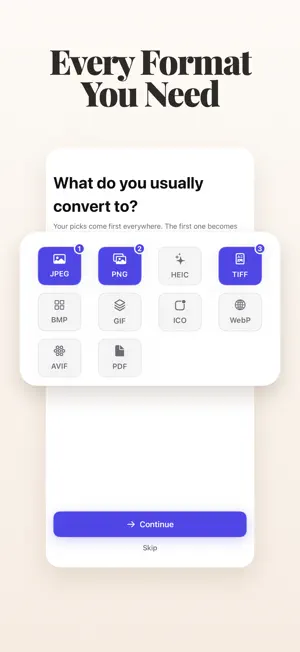
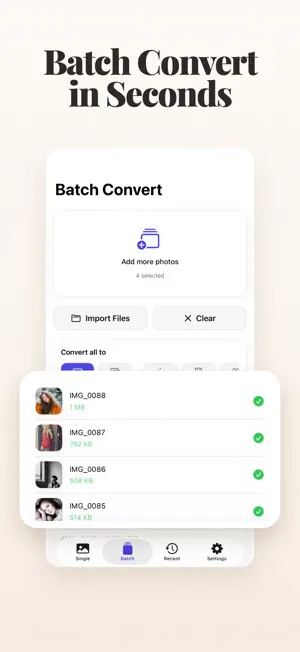
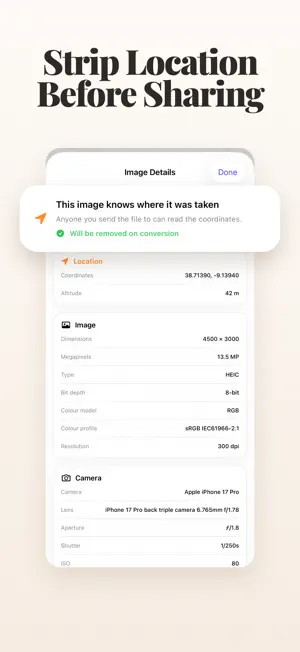
Convert your photos to any format, instantly. Ever taken a photo and needed it as a different file type — a HEIC that won't upload, a screenshot you need as PNG, a set of photos you need as one PDF? This app converts between every common image format in a couple of taps, right on your device. SUPPORTED FORMATS JPEG, PNG, HEIC, AVIF, WebP, TIFF, BMP, GIF, ICO and PDF — plus camera RAW files as input. CONVERT FROM ANYWHERE - Share button: in Photos, Files or Safari, tap Share, then Image Converter - Control Center or the Action button: turn your latest screenshot into a JPEG in one press - Safari: save any web image, including WebP and AVIF, as JPEG, PNG or HEIC - Messages: make stickers from your photos, with the background removed SINGLE OR BATCH Convert one photo, or a whole album at once. Save them all to Photos, Files or a single ZIP — or combine them into one PDF, one image per page or several per A4 page. SMALLER, CLEANER FILES Aim for an exact file size like 500 KB, resize to 1920 px, adjust quality, and see what a photo reveals — then remove its location before you share. RECENT CONVERSIONS Your last 20 converted files stay ready to save or share again. PRIVATE BY DESIGN Every conversion happens entirely on your device. Nothing is ever uploaded, and no account is needed. FREE & FAIR Convert 5 images a day for free, or watch a short ad for more. A one-time purchase unlocks unlimited images and removes ads — no subscription. Available in English, Japanese, German, French, Korean, Chinese and Arabic. Privacy Policy: https://danish-khan01.github.io/danishiosapps/imageconverter-support.html
What’s new
Version 2.1 · Updated September 17, 2026
• Convert right from the Share button in Photos, Files and Safari • Control Center control: turn your latest screenshot into a JPEG in one press • New formats: AVIF and PDF (combine photos into one PDF) • Aim for a file size, and remove location before sharing • Make stickers in Messages • Now in Japanese, German, French, Korean, Chinese and Arabic • 5 free images a day, or unlock unlimited images with a one-time purchase
Alternatives to Image Converter: Any Format
Looking for apps like Image Converter: Any Format? Here are 6 similar apps on the App Store. The highest rated is Image Converter: Offline Batch (5.0/5), and all 6 are free to download.
-
 Image Lite:画像リサイズ・軽量化
-
 Image Converter: Offline Batch
5.0
-
 Image Converter - Batch Photos
-
 HEIC Converter: to JPG PNG
-
 Photo Converter JPEG HEIC PNG
-
 WePics - AI Couple Portraits
4.2
| App | Rating | Price | Last updated | Compare |
|---|---|---|---|---|
| Image Converter: Any Format | – | Free | September 17, 2026 | |
| Image Lite:画像リサイズ・軽量化 | – | Free | Aug 22, 2026 | Compare |
| Image Converter: Offline Batch | 5.0 / 5 (1) | Free | Aug 19, 2026 | Compare |
| Image Converter - Batch Photos | – | Free | Sep 9, 2026 | Compare |
| HEIC Converter: to JPG PNG | – | Free | Oct 8, 2026 | Compare |
| Photo Converter JPEG HEIC PNG | – | Free | Mar 28, 2026 | Compare |
| WePics - AI Couple Portraits | 4.2 / 5 (5) | Free | Sep 18, 2026 | Compare |