

SuperQR Staff
Timur Aisautov Business iPhoneiPadiPod touch
SuperQR Staff is a free Business app for iPhone and iPad by Timur Aisautov. Requires iOS 15.0. Updated October 29, 2026.
- Price
- Free
- on the App Store
- Size
- 32 MB
- Age 12+
- Updated
- Oct 29
- 2026 · v1.22.0
Screenshots


About SuperQR Staff
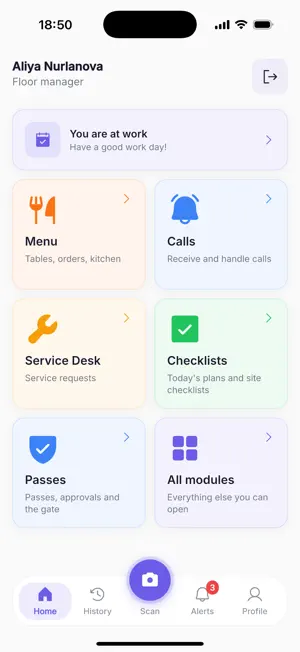
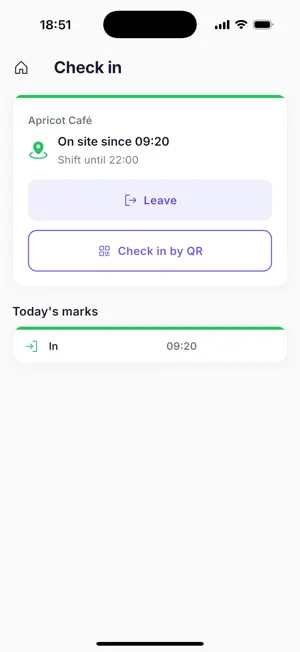
SuperQR Staff is the app for employees of businesses on the SuperQR platform. Waiters, cooks, administrators, maintenance staff and security each get their own work screen, and guests are served faster, because orders, calls and requests reach the phone at once. The app brings together eight modules. A business switches on only the ones it needs, and each employee sees the modules and actions of their role. MENU — TABLES, ORDERS, KITCHEN • Tables with their status, open orders and calls • A guest's order from the QR menu comes to the waiter for confirmation • Orders taken at the table go to the kitchen; ready ones are marked as served • Kitchen mode: orders by stage, New and Cooking, each station working its own items • Stop list: take a dish off sale or put it back, right from the phone • Hand a table or an order to a colleague; merge tables into one bill • Bills: create a bill, choose the payment method, mark it paid • Analytics by dishes, tables and staff for managers and administrators STAFF CALLS • A guest taps the call button on the business's page, and the waiter is notified • Your calls and the shared queue of calls • Take a call, hand it to a colleague, mark it done TIME TRACKING • Arrival and departure by location or by a check-in point's QR code • Today's shift and marks, and standard hours with overtime • A reminder to mark departure when the shift has ended • A question when two shifts run back to back, and a manager's changes shown with your marks • Marks made offline go out by themselves once the app is open and back online CHECKLISTS • Today: the checklists of the site you are at, and the distance to other sites • A map of sites • Photo proof from the camera or the gallery • Checklists done only on site are filled in within the site's radius • Inspectors add a site from the phone QUEUE • Your service point: pick a window, call the next guest, finish serving • Tickets for walk-in guests, by phone number and service • For supervisors: hand a ticket to a colleague, move it up or down, cancel it SERVICE REQUESTS • New requests and your requests, by the types your business defines, such as cleaning or repairs • Take a request, hand it to a colleague, finish it with a resolution • Add photos to a request right from the phone • Statuses, due dates and a conversation on every request BOOKINGS • The day's bookings, booking details and a one-tap call to the client • Take a booking and complete it with a report • Scan a booking's pass at the entrance • A conversation on each booking, and chats with the business's clients VISITOR PASSES • Check a pass by scanning it or by its code • The visitor's card and the verdict: valid or refused • Record entry and exit • Approve visits and keep a conversation on each visit NOTIFICATIONS AND HISTORY • Push notifications for orders, calls, requests, bookings, queue tickets and visits • History and Alerts: your marks and notifications by day, with search and filters • One scanner for every code: check-in points, sites, bookings and passes LOCATION Location is used only while the app is open: when you mark arrival or departure, while a checklist done only on site or the Today list is open, on the map of sites, and when an inspector or checklist administrator sets a site's point. Before its first use the app explains what it needs location for. It is never tracked in the background. WHO IT IS FOR Restaurants, cafés, bars, hotels, beauty salons, fitness clubs, car service centres and other service businesses that already use SuperQR. HOW TO START The business's administrator creates the employee's account in the SuperQR web account. You sign in with your phone number and PIN; there is no sign-up in the app. If your business is not on SuperQR yet, leave a request at superqr.com. LANGUAGES Russian, Kazakh, English, Chinese. Developer: MVoter Technologies LLP. Privacy policy: https://superqr.com/privacy-policy/
What’s new
Version 1.22.0 · Updated October 29, 2026
HOME • A new home with Home, History, Scan, Alerts and Profile tabs • One scanner for every code: check-in points, sites, bookings and passes • History and Alerts: your marks and notifications by day TIME TRACKING • Arrival and departure by location or by a check-in point's QR code • The site's local time • Today's standard hours, with overtime • A question when two shifts run back to back • A reminder to mark departure when the shift has ended • A manager's changes shown with your marks • Marks made offline go out by themselves once the app is open and back online CHECKLISTS • Today: the checklists of the site you are at • A map of sites • Checklists done only on site • Inspectors add a site from the phone KITCHEN • Cooks and baristas work the items of their own station LOCATION • Before its first use, the app explains what it needs location for • Location is used only while the app is open, never in the background ALSO • Sign-in fills in +7 for you • Screens work better on narrow phones and with large text • Hundreds of fixes across every module
App privacy
The developer, Timur Aisautov, reported these privacy practices to Apple.
Data Linked to You
The following data, which may be collected and linked to your identity, may be used for the following purposes:
- Diagnostics: Other Diagnostic Data
- Location: Precise Location, Coarse Location
- Contact Info: Email Address, Name, Phone Number
- User Content: Emails or Text Messages, Photos or Videos, Other User Content
- Search History: Search History
- Identifiers: User ID, Device ID
- Usage Data: Product Interaction
Used for: Analytics, App Functionality
Data Not Linked to You
The following data, which may be collected but is not linked to your identity, may be used for the following purposes:
- Other Data: Other Data Types
Used for: Analytics
Alternatives to SuperQR Staff
Looking for apps like SuperQR Staff? Here are 6 similar apps on the App Store.


| App | Rating | Price | Last updated | Compare |
|---|---|---|---|---|
| SuperQR Staff | – | Free | October 29, 2026 | |
| Table Reservations : Stolik | – | Free | Jul 17, 2026 | Compare |
| PosudaKz B2B | – | Free | Oct 9, 2026 | Compare |
| EatWork | – | Free | Jul 4, 2026 | Compare |
| Gravix | – | Free | Oct 21, 2026 | Compare |
| Business Woman | – | Free | Mar 20, 2025 | Compare |
| ElectroPoint | – | Free | Aug 22, 2026 | Compare |
Compare SuperQR Staff with the top alternatives: ratings, updates, ASO score and keyword gaps →