

Data Budget Tracker: DataSplit
Nicolaas CorneIis Antonius Vertelman Utilities iPhoneiPadiPod touch
Data Budget Tracker: DataSplit is a free Utilities app for iPhone and iPad by Nicolaas CorneIis Antonius Vertelman. Requires iOS 18.0.
- Price
- Free
- on the App Store
- Size
- 10 MB
- Age 4+
- Updated
- Sep 14
- 2026 · v1.2.1
Screenshots

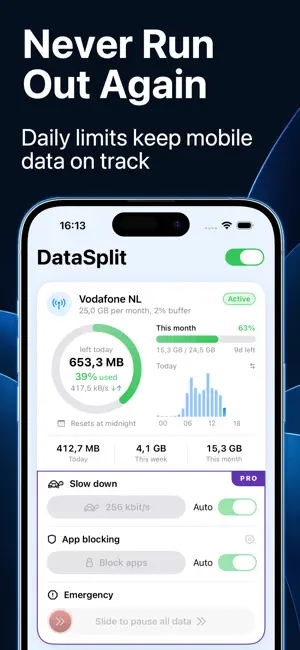

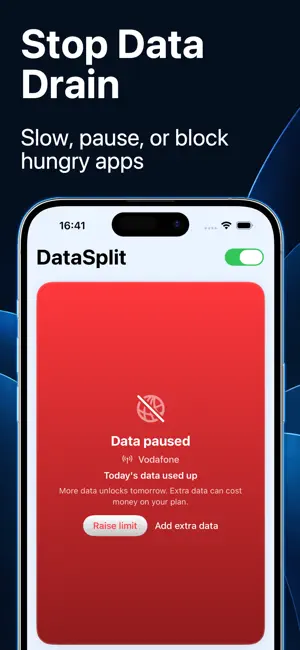
About Data Budget Tracker: DataSplit
Track mobile data and Wi-Fi usage with clear budgets for every network. DataSplit is a private data usage tracker and budget planner for mobile plans, Wi-Fi networks, prepaid SIMs, eSIMs, roaming, travel data and Personal Hotspot. It counts traffic from every app, entirely on your device. Enter your allowance, plan period and data already used. DataSplit calculates a practical daily target and shows whether you are on pace. HOW IT WORKS 1. Turn on data counting. 2. Set a daily, weekly, monthly or custom budget for your mobile plan or Wi-Fi network. 3. DataSplit tracks usage, divides what remains across the days ahead and warns you before your data runs out. ALWAYS FREE • On-device mobile data and Wi-Fi usage counting across all apps • Separate budgets for every saved network • Daily allowances and custom billing cycles • Usage warnings and local notifications • History, charts, Home Screen widgets and a Live Activity • Personal Hotspot usage estimates DATASPLIT PRO • Automatic pause when a budget runs out • Safety buffer when overages cost money • Automatic or manual speed reduction • Emergency stop that pauses data immediately • Add extra data mid-cycle; DataSplit rebalances your daily allowance • App blocking with Apple Screen Time Pro features require an in-app purchase. PRIVATE BY DESIGN There is no DataSplit account, remote server, advertising or analytics. Usage totals, budgets, Wi-Fi network names and settings stay on your device. DataSplit does not decrypt or analyze traffic content. iOS requests permission for a local VPN configuration so DataSplit can count mobile data and Wi-Fi traffic across apps. DataSplit is not a remote VPN service and does not relay traffic through a DataSplit server. While counting is active, DNS uses Cloudflare and Google public resolvers. These providers receive DNS queries and the device's public IP under their own privacy terms. DataSplit and its developer do not receive or retain those queries. DataSplit provides an independent estimate. Mobile and Wi-Fi providers may count usage differently, and Personal Hotspot usage is estimated. Always check your provider's official usage figures. DataSplit cannot guarantee that overage charges will never occur. PURCHASES AND SUBSCRIPTIONS DataSplit Pro is available as a monthly or yearly auto-renewable subscription, or as a one-time Lifetime purchase. Localized prices and eligible introductory offers are shown before purchase. Payment is charged to your Apple Account when confirmed. Subscriptions renew automatically unless cancelled at least 24 hours before the current period ends. Your account is charged for renewal within 24 hours before the period ends. Manage or cancel subscriptions in your Apple Account settings. Purchases can be restored in the app. A Lifetime purchase does not expire. Buying Lifetime does not automatically cancel an active subscription. Privacy Policy: https://data-split.com/privacy DataSplit Terms of Use: https://data-split.com/terms Apple Standard EULA: https://www.apple.com/legal/internet-services/itunes/dev/stdeula/
What’s new
Version 1.2.1 · Updated September 14, 2026
• You can now set the start day of your weekly and monthly budgets. • New widgets to keep track of the networks of your choice. • UI improvements for a smoother, more polished experience.
App privacy
The developer, Nicolaas CorneIis Antonius Vertelman, reported these privacy practices to Apple.
Data Not Collected
The developer does not collect any data from this app.
Alternatives to Data Budget Tracker: DataSplit
Looking for apps like Data Budget Tracker: DataSplit? Here are 6 similar apps on the App Store. The highest rated is BitMeter: Data Usage Widget (5.0/5), and all 6 are free to download.
-
 Data Monitor: Track & Save
1.0
-
 NetUsageLog
-
 BitMeter: Data Usage Widget
5.0
-
 GigaGuard: Data Usage Widget
-
 Wavelet Network Monitor
-
 DataLeft
| App | Rating | Price | Last updated | Compare |
|---|---|---|---|---|
| Data Budget Tracker: DataSplit | – | Free | September 14, 2026 | |
| Data Monitor: Track & Save | 1.0 / 5 (1) | Free | Sep 28, 2026 | Compare |
| NetUsageLog | – | Free | Oct 5, 2026 | Compare |
| BitMeter: Data Usage Widget | 5.0 / 5 (2) | Free | Sep 10, 2026 | Compare |
| GigaGuard: Data Usage Widget | – | Free | Oct 20, 2026 | Compare |
| Wavelet Network Monitor | – | Free | May 20, 2026 | Compare |
| DataLeft | – | Free | Aug 14, 2026 | Compare |