

PiggySpy
Krzysztof Drapinski Finance iPhoneiPadiPod touch
PiggySpy is a free Finance app for iPhone and iPad by Krzysztof Drapinski. Requires iOS 17.6. Updated October 1, 2026.
- Price
- Free
- on the App Store
- Size
- 7 MB
- Age 4+
- Updated
- Oct 1
- 2026 · v1.0.2
Screenshots



About PiggySpy
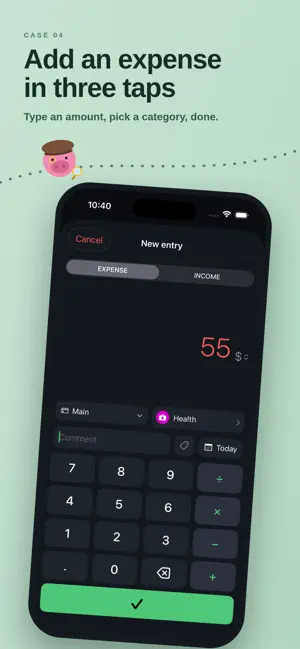
PiggySpy turns tracking your money into detective work — and it stays out of your way while doing it. ADD AN EXPENSE IN THREE TAPS A numeric keypad with a built-in calculator. Type 12+8, pick a category, done. SEE WHERE IT GOES A donut chart by category for any period: day, week, month, year or a custom range. Charts for spending over time, income against expenses and money flow. A REPORT THAT WATCHES THE MONTH A month-end forecast, a comparison with your typical month and your spending pace. Categories that stray from the usual stand out at once — and any category can carry a monthly limit. SAVINGS, KEPT SEPARATE Mark a category as savings — bonds or a deposit stop counting as spending and get their own place on the home screen, in the report and on the charts. SHARE AN ACCOUNT Run a household budget with someone else. Both of you see and add entries on the same account, using the same categories, so the totals always agree. Your other accounts stay private. BRING YOUR HISTORY WITH YOU Import a CSV from another app — PiggySpy proposes the column mapping and creates missing categories. Export back to CSV or paste straight into a spreadsheet. MADE FOR EVERY DAY Multiple accounts. Recurring payments added automatically. Face ID lock. Themes and colours you can adjust. Available in English, Polish, German, Spanish, French, Italian, Portuguese, Japanese and Chinese. YOUR DATA IS YOURS Everything lives on your device and in your private iCloud. There is no PiggySpy server, no account to create, no ads and no tracking. We cannot see your finances — nobody can. FREE, WITH AN OPTIONAL TIP Every feature above is free forever. If PiggySpy earns its keep, you can support it — supporters get an alternate app icon, True Black mode, extra themes and shared accounts. Terms of Use: https://www.apple.com/legal/internet-services/itunes/dev/stdeula/ Privacy Policy: https://github.com/sucre06/PiggySpy-assets/blob/main/privacy-policy.md
What’s new
Version 1.0.2 · Updated October 1, 2026
The piggy has been tidying up. • Your salary and rent can add themselves. When adding an entry, tap the date and choose how often it repeats. • Coming up now shows money coming in, not just money going out. • Close a label once it is done. It leaves the report but stays on your entries. • Narrow the list of all entries to expenses only or income only. • A new category picks the color that clashes least with the rest. • Plus small design fixes, and when a new month starts the app switches to it on its own, even if it was left open.
App privacy
The developer, Krzysztof Drapinski, reported these privacy practices to Apple.
Data Not Collected
The developer does not collect any data from this app.
Alternatives to PiggySpy
Looking for apps like PiggySpy? Here are 6 similar apps on the App Store. The highest rated is TallyDay: Spending & Diary (5.0/5), and all 6 are free to download.
-
 Fern: Cycle Budget Planner
-
 FinWizard Financial Calculator
-
 CentRail: Expense Tracker
-
 TallyDay: Spending & Diary
5.0
TallyDay: Spending & Diary
5.0
-
 Cires: Expense & Money Manager
-
 Budget Tracker: SpendLog
| App | Rating | Price | Last updated | Compare |
|---|---|---|---|---|
| PiggySpy | – | Free | October 1, 2026 | |
| Fern: Cycle Budget Planner | – | Free | Aug 25, 2026 | Compare |
| FinWizard Financial Calculator | – | Free | Aug 20, 2026 | Compare |
| CentRail: Expense Tracker | – | Free | Aug 1, 2026 | Compare |
| TallyDay: Spending & Diary | 5.0 / 5 (1) | Free | Oct 14, 2026 | Compare |
| Cires: Expense & Money Manager | – | Free | Sep 27, 2026 | Compare |
| Budget Tracker: SpendLog | – | Free | Aug 24, 2026 | Compare |
Compare PiggySpy with the top alternatives: ratings, updates, ASO score and keyword gaps →