

Cadac: CM Meters
CADAC Holdings Ltd. Music iPadMac
Cadac: CM Meters is a free Music app for iPad and Mac by CADAC Holdings Ltd. Requires iOS 16.6. Updated August 13, 2026.
- Price
- Free
- on the App Store
- Size
- 2 MB
- Age 4+
- Updated
- Aug 13
- 2026 · v1.0
Screenshots
Save to Pinterest

About Cadac: CM Meters
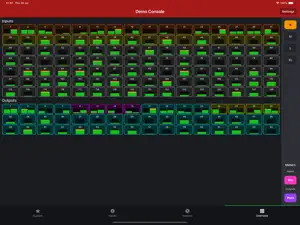
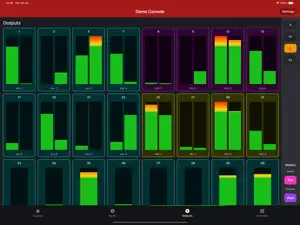
CM-Meters gives you a clear, real-time view of the metering on your Cadac CM-J Series digital audio mixing console, on either iPad or Mac. Once your device is connected to the console, CM-Meters displays the console’s live input and output levels. View all inputs and outputs at once or focus on just the inputs or just the outputs or build a custom combination of the channels and busses you want to monitor. Metering can be shown pre or post fader, so you can check signal as it arrives at the desk or after your mix. Views: Overview: every input and output on a single screen. Inputs: all input channels. Outputs: all output busses, including auxes, groups and matrices. Custom: your own selection of inputs and outputs, chosen in Settings. Meter size: Switch between small, medium, large and extra-large meters to suit your device and your viewing distance. Demo mode: A built-in Demo mode lets you explore the app without connecting to a console. Note: CM-Meters works with the Cadac CM-J Series only. It is not compatible with Cadac’s earlier CDC series consoles (four, four-m, five, six, seven, seven-s or eight).
App privacy
The developer, CADAC Holdings Ltd., reported these privacy practices to Apple.
Data Not Collected
The developer does not collect any data from this app.
Alternatives to Cadac: CM Meters
Looking for apps like Cadac: CM Meters? Here are 6 similar apps on the App Store. The highest rated is SSL Live TaCo (3.0/5), and all 6 are free to download.


| App | Rating | Price | Last updated | Compare |
|---|---|---|---|---|
| Cadac: CM Meters | – | Free | August 13, 2026 | |
| LV1 Monitor | – | Free | Nov 5, 2026 | Compare |
| mobileinearStage | – | Free | Jun 18, 2026 | Compare |
| mobileinearMix | – | Free | Jun 26, 2026 | Compare |
| LV1 Shortcuts | – | Free | Oct 3, 2026 | Compare |
| JMixRemote | 2.7 / 5 (3) | Free | Feb 26, 2026 | Compare |
| SSL Live TaCo | 3.0 / 5 (6) | Free | Apr 24, 2026 | Compare |
Compare Cadac: CM Meters with the top alternatives: ratings, updates, ASO score and keyword gaps →