

CaptionStudio: Local Captions
夏骏 倪 Productivity iPhoneiPadiPod touch
CaptionStudio: Local Captions is a free Productivity app for iPhone and iPad by 夏骏 倪. Rated 5.0/5 from 2 ratings. Requires iOS 26.0. Updated August 31, 2026.
- Rating
- 5.0
- 2 ratings
- Price
- Free
- on the App Store
- Size
- 10 MB
- Age 4+
- Updated
- Aug 31
- 2026 · v1.0
Screenshots
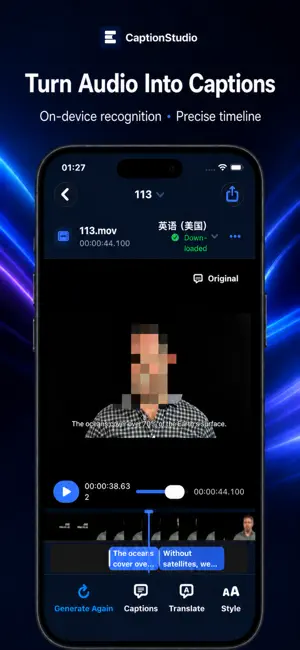


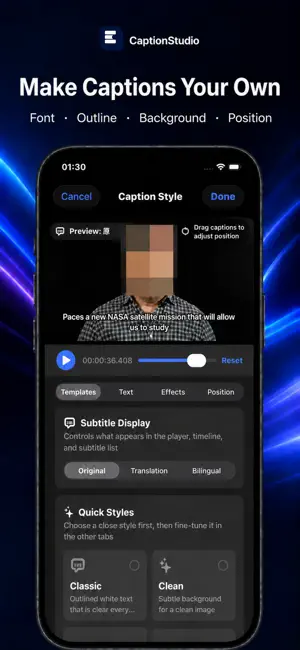
About CaptionStudio: Local Captions
Turn audio and video into editable, translatable, export-ready timed captions—and keep meetings and conversations on your device. CaptionStudio brings media captions, meeting notes, floating captions, and conversation translation into one app. No account is required. Media, recordings, captions, and saved translation history are processed and stored on device by default. AUDIO & VIDEO CAPTIONS • Import MOV, MP4, M4V, M4A, MP3, WAV, or AAC files, or choose a video from Photos • Generate timed captions with native speech recognition • Play, seek, correct, split, merge, and add captions on a visual timeline • Translate captions and edit original, translated, or bilingual text • Customize fonts, size, colors, outline, background, and position • Export SRT, WebVTT, or TXT, or burn captions into an MP4 video MEETING NOTES • Record audio while creating a transcript • Organize the transcript into an overview, key points, decisions, and action items • Replay the recording and edit every section • Export meeting notes with the transcript as Markdown FLOATING CAPTIONS • Use iOS system broadcasting to transcribe audio from supported apps • Follow live captions in Picture in Picture • Show original, translated, or bilingual captions • Customize window ratio, text size, lines, alignment, colors, and background • DRM, broadcast, and audio-source restrictions may prevent some content from being transcribed CONVERSATION TRANSLATION • Speak a phrase, translate it, and hear it aloud • Swap source and target languages • Keep conversation history on device and delete it at any time PRIVACY FIRST • No account, ads, or developer-operated cloud upload • No third-party analytics or advertising SDKs • iOS manages required language resources; some models may need to be downloaded before first use • Recognition, translation, and language availability depend on the device, system version, and available models New users receive a 7-day full-feature trial on first launch. After the trial, choose a one-year access purchase that does not auto-renew or a lifetime unlock. Purchases and refunds are handled by Apple. Speech recognition, translation, and generated notes can be affected by accents, noise, overlapping speakers, and system models. Review important content against the original recording or video.
App privacy
The developer, 夏骏 倪, reported these privacy practices to Apple.
Data Not Collected
The developer does not collect any data from this app.
Alternatives to CaptionStudio: Local Captions
Looking for apps like CaptionStudio: Local Captions? Here are 6 similar apps on the App Store. The highest rated is TimeColorCue: Focus Timer (5.0/5), and 5 of the 6 are free to download.
-
 TimeColorCue: Focus Timer
5.0
TimeColorCue: Focus Timer
5.0
-
 Portbase
4.0
Portbase
4.0
-
 知数记账
知数记账
-
 SRT Subtitle Toolbox Mobile
-
 Realtime Interpreter AI
5.0
Realtime Interpreter AI
5.0
-
 AI Plagiarism Check PRO
| App | Rating | Price | Last updated | Compare |
|---|---|---|---|---|
| CaptionStudio: Local Captions | 5.0 / 5 (2 ratings) | Free | August 31, 2026 | |
| TimeColorCue: Focus Timer | 5.0 / 5 (1) | Free | Oct 21, 2026 | Compare |
| Portbase | 4.0 / 5 (1) | Free | Oct 18, 2026 | Compare |
| 知数记账 | – | Free | Sep 9, 2026 | Compare |
| SRT Subtitle Toolbox Mobile | – | Free | Oct 16, 2026 | Compare |
| Realtime Interpreter AI | 5.0 / 5 (1) | Free | Jun 7, 2026 | Compare |
| AI Plagiarism Check PRO | – | 1.99 USD | Jul 24, 2026 | Compare |