

HabitShift: Screen Time
Ryota Inoue Health & Fitness iPhoneiPadiPod touch
HabitShift: Screen Time is a free Health & Fitness app for iPhone and iPad by Ryota Inoue. Requires iOS 26.5. Updated September 8, 2026.
- Price
- Free
- on the App Store
- Size
- 3 MB
- Age 4+
- Updated
- Sep 8
- 2026 · v1.0.1
Screenshots



About HabitShift: Screen Time
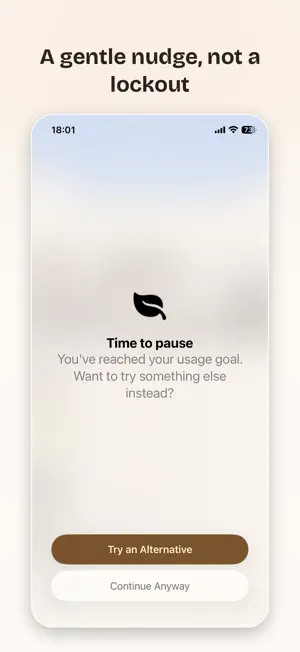
Stop doomscrolling. Start doing something you'll actually feel good about. HabitShift doesn't lecture you or lock your phone. Instead, it notices when you've been on social media, short videos, or news apps for a while — and gently offers you something better to do instead: read a page, stretch, breathe, go for a short walk, or whatever activity you choose. HabitShift requires a subscription (Monthly or Yearly, with a 7-day free trial) to use. HOW IT WORKS - Pick the apps or categories you want to keep an eye on - HabitShift quietly tracks your usage in the background using Apple's Screen Time framework - When you cross a time threshold, you'll get a friendly nudge with a real alternative to try - Not ready yet? Keep using the app — no lockouts, no guilt. HabitShift will simply check back in with another gentle nudge after a bit more time passes - Log the activity whenever you're ready, build a streak, and watch your habits shift — one small choice at a time BUILT AROUND REPLACEMENT, NOT RESTRICTION Most screen-time apps give you one warning, then stop. HabitShift keeps offering — as many times as you need, for as long as you need it. You choose your own alternative activities — reading, exercise, breathing exercises, journaling, language practice, or anything personal to you — organized into categories you fully control. Change is rarely a single decision, so HabitShift is designed to meet you again and again, without judgment. TRACK YOUR PROGRESS - Weekly bar charts show your app usage and your alternative activities side by side - Monthly calendar view highlights your best days and trends over time - Category breakdowns show exactly where your time and effort are going - Streaks keep you motivated without guilt-tripping you PRIVACY BY DESIGN HabitShift never sends your data anywhere. Everything — your usage patterns, your logged activities, your custom categories — stays on your device. No accounts, no servers, no ads, no tracking SDKs. WHO IT'S FOR Anyone who's tried "just deleting the app" and reinstalled it three days later. HabitShift meets you where you actually are — again and again if needed — and helps you build a habit you can stick with, gently and on your own terms. Fully available in English and Japanese. Terms of Use: https://www.apple.com/legal/internet-services/itunes/dev/stdeula/
What’s new
Version 1.0.1 · Updated September 8, 2026
Updated app metadata for improved discoverability.
App privacy
The developer, Ryota Inoue, reported these privacy practices to Apple.
Data Not Collected
The developer does not collect any data from this app.
Alternatives to HabitShift: Screen Time
Looking for apps like HabitShift: Screen Time? Here are 6 similar apps on the App Store. The highest rated is Surf Paddle Trainer (5.0/5), and all 6 are free to download.
-
 Surf Paddle Trainer
5.0
-
 リルック:マインドフルネス瞑想と睡眠導入アプリ
4.3
-
 Meditation Timer: Bell & Music
4.8
-
 PFCボディメイク
3.8
-
 MEISOON:LAVA監修・瞑想・安眠・マインドフルネス
5.0
-
 OWN. オウンドット
| App | Rating | Price | Last updated | Compare |
|---|---|---|---|---|
| HabitShift: Screen Time | – | Free | September 8, 2026 | |
| Surf Paddle Trainer | 5.0 / 5 (1) | Free | Sep 26, 2026 | Compare |
| リルック:マインドフルネス瞑想と睡眠導入アプリ | 4.3 / 5 (10) | Free | Nov 20, 2023 | Compare |
| Meditation Timer: Bell & Music | 4.8 / 5 (5) | Free | Jan 13, 2026 | Compare |
| PFCボディメイク | 3.8 / 5 (5) | Free | May 19, 2024 | Compare |
| MEISOON:LAVA監修・瞑想・安眠・マインドフルネス | 5.0 / 5 (2) | Free | Oct 1, 2026 | Compare |
| OWN. オウンドット | – | Free | Oct 21, 2026 | Compare |