

Report Card Comments : REMARK
Aneesh Pradeep Education iPhoneiPadiPod touch
Report Card Comments : REMARK is a paid Education app for iPhone and iPad by Aneesh Pradeep. Requires iOS 18.6. Updated October 9, 2026.
- Price
- 1.99 USD
- on the App Store
- Size
- 6 MB
- Age 4+
- Updated
- Oct 9
- 2026 · v6
Screenshots

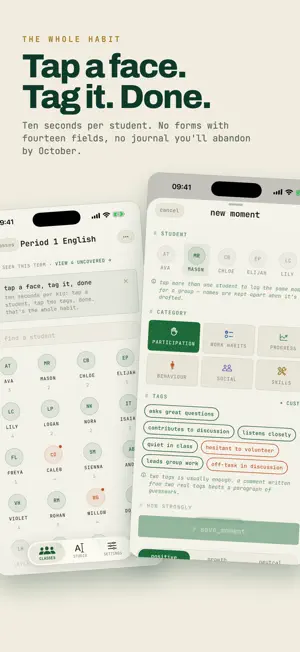


About Report Card Comments : REMARK
REMARK turns a ten second note about a student into a finished report card comment. Capture what you see during the week. At report time the comment is already written, from your own observations. WHAT YOU CAN DO - Capture a moment in ten seconds, in your own shorthand - Turn those notes into a full report card comment in seconds - Write warm messages home to families from the same notes - Cover several students with a single note - See at a glance which students still have nothing on file - Set your report deadline and watch the countdown - Keep a personal bank of comments you reuse every term - Export as plain text or CSV, or copy one comment at a time - Full two pane layout on iPad, with keyboard shortcuts WHY TEACHERS USE IT - Report week stops being hours of blank boxes - Every comment is grounded in something you actually observed - Nothing generic and nothing recycled from last year - Your voice stays yours, because every draft is fully editable - Read your own notes back as evidence beside each comment PRIVACY YOU CAN CHECK YOURSELF - No ads. Not one, anywhere in the app. - No account, no sign up, no email address required - Your classes, students and notes stay on your device - Student names are replaced with placeholder tokens before any AI request leaves the device, so the AI never receives a child name - You can read the exact outgoing request at any time in Settings - No analytics services, no trackers, no data brokers - Nothing you write is ever used to train AI models BUILT FOR QUALITY - One clear monospaced interface, designed to be read fast - Full Dynamic Type and VoiceOver support - Capture, editing, export and backup all work offline - No clutter and no distractions between you and your class WHO IT IS FOR - Primary and elementary teachers - Middle school and high school teachers - Homeroom teachers and subject teachers - Anyone who writes report card comments for a whole class HOW IT WORKS 1. Add a class and paste your roster from an email or a spreadsheet 2. Capture short notes as you teach 3. At report time, open the studio and generate a comment 4. Edit it, approve it, and export it to your school system Everything you enter belongs to you. Export a backup file whenever you like and keep it wherever you keep your school documents. Terms of Use: https://www.apple.com/legal/internet-services/itunes/dev/stdeula/
App privacy
The developer, Aneesh Pradeep, reported these privacy practices to Apple.
Data Not Collected
The developer does not collect any data from this app.
Alternatives to Report Card Comments : REMARK
Looking for apps like Report Card Comments : REMARK? Here are 6 similar apps on the App Store.


| App | Rating | Price | Last updated | Compare |
|---|---|---|---|---|
| Report Card Comments : REMARK | – | 1.99 USD | October 9, 2026 | |
| Novel Teacher | – | Free | Sep 18, 2026 | Compare |
| Schedule Lesson | – | Free | Oct 8, 2026 | Compare |
| Evaluation Grids | – | Free | Oct 12, 2026 | Compare |
| MyDesk Teachers | – | Free | Sep 9, 2026 | Compare |
| IDL Attendance - Roll Call | – | Free | Oct 24, 2026 | Compare |
| Nerka | – | Free | Aug 17, 2026 | Compare |