

All Languages Learner
Taras Maslov Education iPhoneiPadiPod touchMac
All Languages Learner is a free Education app for iPhone and iPad by Taras Maslov. Requires iOS 17.0. Updated October 16, 2026.
- Price
- Free
- on the App Store
- Size
- 3 MB
- Age 4+
- Updated
- Oct 16
- 2026 · v1.6
Screenshots



About All Languages Learner
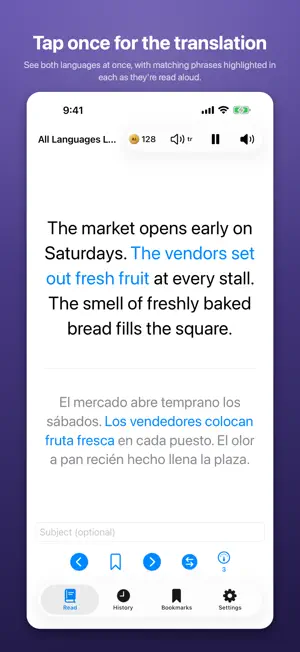
All Languages Learner shows you short AI-generated passages in a language you're learning, with a translation into one you already know, and narration that adapts to your own reading pace. Pick the languages you know and the ones you want to learn — 99 of them — then read. Tap to reveal the translation, tap again to move on, or swipe through cards. Every passage is written fresh by Claude: dialogs, everyday situations, science, history, opinion pieces, letters, interviews and more. LEARN A LANGUAGE, OR LEARN SOMETHING THROUGH ONE Choose what you're here for. Practising a language gives you varied passages across every register. Learning a subject makes that subject the content — type "orbital mechanics" or "Renaissance painting" and read about it in the language you're learning, with a dial that sets how deep into the subject it goes rather than how hard the grammar is. LISTEN, HANDS FREE Narration starts at a natural pace and eases toward your own reading speed the more you use the app. Turn on Autoplay and each card plays itself through — the passage, then its translation in a language you know — and moves on without a tap. It keeps going with the screen locked and your phone in a pocket, with lock-screen and headphone controls, so a reading session becomes a listening one. PICTURES THAT TEACH, NOT DECORATE Cards carry whatever the passage actually needs. A person, place or event gets a real photograph, found from Wikipedia and Wikimedia Commons and checked for relevance. A mechanism gets a labelled diagram, drawn for that passage. A passage about an equation gets the equation itself, properly set, under the words rather than described in them — a stacked fraction, an integral with its limits, a matrix. Pinch to zoom, press and hold to save. READ YOUR WAY Press and hold any word to have it explained where it stands, then press a word in the explanation to go deeper. Bookmark passages to revisit, copy any text with a long press, and your history syncs across your devices via iCloud. Skip the translation card entirely if you would rather not be shown the answer. Set your own photos behind the text and the deck works through them in turn, or shuffled. Swipe down to clear the screen of everything but the card. Works on iPhone, iPad and Mac, in portrait and landscape. TRAVEL BETWEEN LANGUAGES With several languages selected, each card moves to one spoken nearby — Spanish to Portuguese to Catalan to French — instead of jumping across the world, and won't repeat a language until the others have had a turn. NO API KEY NEEDED - PAY WITH AICOINS There is no API key to find, paste, or manage. The app runs on aicoins: 1 aicoin = 1 AI API call. Buy aicoins in the app, and every passage or narration clip spends exactly one coin from your balance. No subscription. HOW YOUR REQUESTS ARE HANDLED Whatever subject you type is sent to our relay server at proxy.aicoin.oeaio.com, which forwards it to a shared AI provider (Anthropic for passages, ElevenLabs for narration, Google for illustrations) using our own paid credentials, then returns the result to your device. Full details at https://aicoin.oeaio.com Terms of Use (EULA): https://www.apple.com/legal/internet-services/itunes/dev/stdeula/ Privacy Policy: https://tapacuk93.github.io/alllanguageslearner-support/PRIVACY.html
What’s new
Version 1.6 · Updated October 16, 2026
• Keep the frame readout on the platform its display link is on • A picture that is wrong is worse than no picture • Measure the stutter, then spend the main thread on nothing else • The mathematics is the part of a figure a reader came for • A caption on a full-screen picture is read at arm's length • Decode ahead only as far as the pictures can be kept • ⌘+ stops at the ceiling on the Mac too, which is where it is pressed • Break a long formula across lines instead of throwing it away • ⌘+ makes the text bigger, and only bigger • The page covers the card; the ink moves instead • Stop blurring three million pixels sixty times a second • Full screen on a Mac means the screen, not the screen minus three panels • A language should not come back after two cards • A Mac toolbar is a toolbar, and the paywall is warmed at launch • Mac: ask WebKit for the picture instead of copying its layer • Draw once, not every time: a formula was costing seven seconds • Fit the figure to the card, and stop taking the audio at launch • Put the card back in the middle of the screen, and close the boxes • Lay a figure out in the app rather than photographing a web page
App privacy
The developer, Taras Maslov, reported these privacy practices to Apple.
Data Not Collected
The developer does not collect any data from this app.
Alternatives to All Languages Learner
Looking for apps like All Languages Learner? Here are 6 similar apps on the App Store. The highest rated is 聖書, Japanese Bible Audio (3.7/5), and all 6 are free to download.
-
 SynDigi
-
 Slovo - Learn Russian Language
-
 Lernio
3.0
-
 聖書, Japanese Bible Audio
3.7
-
 Erla: Learn Swedish with AI
-
 Multilevell
| App | Rating | Price | Last updated | Compare |
|---|---|---|---|---|
| All Languages Learner | – | Free | October 16, 2026 | |
| SynDigi | – | Free | Jan 5, 2026 | Compare |
| Slovo - Learn Russian Language | – | Free | Oct 19, 2026 | Compare |
| Lernio | 3.0 / 5 (2) | Free | Jul 8, 2025 | Compare |
| 聖書, Japanese Bible Audio | 3.7 / 5 (3) | Free | Jun 4, 2025 | Compare |
| Erla: Learn Swedish with AI | – | Free | Oct 12, 2026 | Compare |
| Multilevell | – | Free | Oct 24, 2026 | Compare |