

Crownwise: Tree Risk Reports
anil sancar Productivity iPhoneiPadiPod touch
Crownwise: Tree Risk Reports is a free Productivity app for iPhone and iPad by anil sancar. Requires iOS 16.4. Updated October 13, 2026.
- Price
- Free
- on the App Store
- Size
- 52 MB
- Age 4+
- Updated
- Oct 13
- 2026 · v1.0.3
Screenshots

About Crownwise: Tree Risk Reports
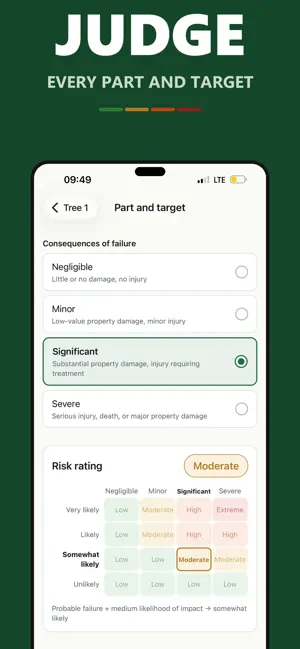
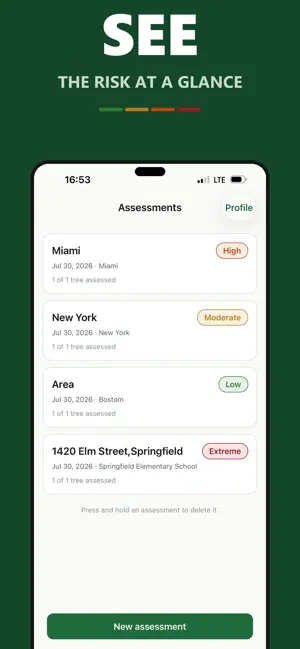
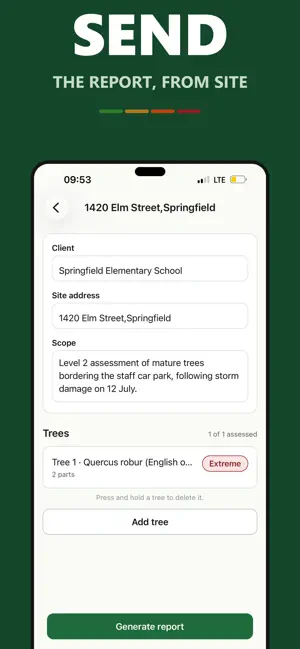
Crownwise is a field tool for qualified tree risk assessors. Record a Level 2 assessment on site, and leave with the report already written. WRITTEN ON SITE, NOT AT THE KITCHEN TABLE A Level 2 assessment is thirty minutes of looking and two hours of typing. Crownwise removes the second part. You record each tree, judge the parts and targets you can see, and the report assembles itself as you go. HOW IT WORKS 1. Start an assessment with the client, site and scope. 2. Add each tree: species, DBH, height, location, site conditions, health and structure, and anything that limited the inspection. 3. For every part that could fail, record its size, fall distance and load, then the target it could strike, the target zone, how often that zone is occupied and what protects the target. Judge the three inputs: likelihood of failure, likelihood of impacting the target, consequences of failure. 4. The rating appears immediately, with the matrix on screen so you can see where it came from. 5. Record the recommended work, the residual risk after it and when to reassess. Generate the report and send it before you get back to the truck. THE REPORT • Your letterhead: name, credentials, certification number and expiry • Your signature, drawn once and printed on every report • A summary table of every tree with its overall rating • Per part: size, fall distance, load, target zone, occupancy and protection, the three inputs, the derived rating, and the matrix reproduced with your cell marked • Whether the data is final or preliminary, and any advanced assessment you recommend • Recommended work, timeframe, residual risk and reassessment interval • Assumptions and limiting conditions The failure, target and follow-up fields match the 2025 basic tree risk assessment form. A rating whose derivation is invisible is not defensible. Crownwise prints the working. WORKS WHERE YOU WORK Once Crownwise Pro is active, no signal is needed. Nothing in the assessment needs a connection — not the matrix, not the photographs, not the report. Under canopy, in a basement car park, on a rural verge: it behaves the same. Buying needs a connection once. YOUR DATA STAYS YOURS No account. No sign-up. No analytics. Everything you record stays on your device, and the only thing that ever leaves is the report you choose to share. There is no server holding your assessments; the app only checks your purchase with the App Store, through RevenueCat. PHOTOGRAPHS ATTACHED TO FINDINGS The camera opens from inside the row you are recording, and the photograph is attached there and then. No matching a camera roll to findings afterwards. WHAT CROWNWISE IS NOT Crownwise does not perform tree risk assessment and does not give arboricultural advice. Every input is selected by you. The app applies published matrices to those inputs and assembles the result. The professional opinion in any report is yours, and you are responsible for it. It is a tool in the same sense that a calculator is a tool. Crownwise is an independent product. It is not affiliated with, endorsed by, sponsored by or certified by any professional body, standards organisation or certifying authority. CROWNWISE PRO Starting an assessment and generating a report require Crownwise Pro: a monthly subscription, or a single Lifetime purchase. Assessments already on your device stay readable without it. The monthly subscription renews automatically unless it is cancelled at least 24 hours before the end of the current period. Manage or cancel it in your Apple ID settings. Lifetime is a single payment and does not renew. SUPPORT [email protected] — every message gets a reply. Privacy policy: https://anilsancarr-web.github.io/crownwise-site/privacy/ Terms of use: https://anilsancarr-web.github.io/crownwise-site/terms/
What’s new
Version 1.0.3 · Updated October 13, 2026
• Records the 2025 basic assessment form's failure, target and follow-up fields: part size, fall distance, load, target zone, occupancy, protection, DBH, height, inspection limitations, data status, advanced assessment, residual risk and reassessment. All of them print in the report. • Crownwise Pro unlocks assessments and reports: a monthly subscription or a single Lifetime purchase. • Unused reports from your earlier version's allowance are kept.
App privacy
The developer, anil sancar, reported these privacy practices to Apple.
Data Not Linked to You
The following data, which may be collected but is not linked to your identity, may be used for the following purposes:
- Purchases: Purchase History
Used for: Analytics, App Functionality
Alternatives to Crownwise: Tree Risk Reports
Looking for apps like Crownwise: Tree Risk Reports? Here are 6 similar apps on the App Store. The highest rated is Tree Risk Assessment - Level 1 (5.0/5), and all 6 are free to download.
-
 Days Since: Habit Tracker
-
 Tree Inventory AI
-
 ezytreev Onsite
-
 Tree Risk Assessment - Level 1
5.0
Tree Risk Assessment - Level 1
5.0
-
 Arix - Ai Prompt Generator
-
 ArborNote Works For Tree Pros
4.0
ArborNote Works For Tree Pros
4.0
| App | Rating | Price | Last updated | Compare |
|---|---|---|---|---|
| Crownwise: Tree Risk Reports | – | Free | October 13, 2026 | |
| Days Since: Habit Tracker | – | Free | Oct 13, 2026 | Compare |
| Tree Inventory AI | – | Free | Sep 1, 2026 | Compare |
| ezytreev Onsite | – | Free | Oct 14, 2026 | Compare |
| Tree Risk Assessment - Level 1 | 5.0 / 5 (1) | Free | Jul 9, 2025 | Compare |
| Arix - Ai Prompt Generator | – | Free | Oct 15, 2025 | Compare |
| ArborNote Works For Tree Pros | 4.0 / 5 (6) | Free | Oct 16, 2026 | Compare |