

Monetra: Budget & Expenses
Ahmed Mansour Finance iPhoneiPadiPod touch
Monetra: Budget & Expenses is a free Finance app for iPhone and iPad by Ahmed Mansour. Requires iOS 15.1. Updated October 16, 2026.
- Price
- Free
- on the App Store
- Size
- 53 MB
- Age 17+
- Updated
- Oct 16
- 2026 · v1.1.6
Screenshots


About Monetra: Budget & Expenses
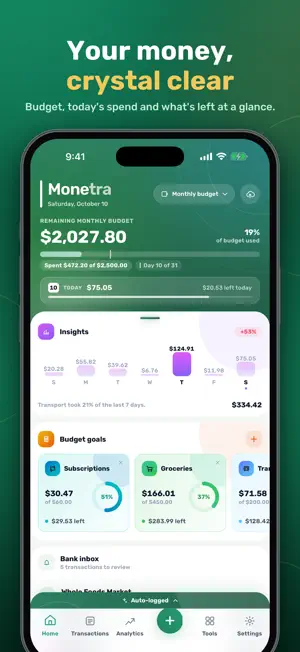
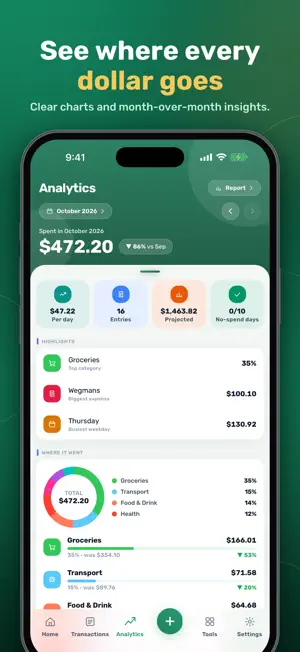
Monetra helps you see where your money goes. Log spending in seconds, let your bank alerts fill in your transactions, and get clear answers about your month from Sage, your AI money coach. Your data is stored on your iPhone first. You can use Monetra without an account, and cloud backup is optional. BANK ALERTS BECOME TRANSACTIONS • Your bank's purchase alerts become transactions you confirm with one tap • Connect email (Outlook, Gmail or any IMAP mailbox, read-only), or set up iOS Shortcuts automations for bank Messages and Wallet payments • Promotions, OTP codes, declined payments and bill reminders are filtered out • You get one heads-up per purchase, even if the same purchase arrives more than once • Each transaction is filed on the card or account you paid with • Purchases you already logged are not offered again • Bank messages are understood in all nine app languages SAGE, YOUR AI MONEY COACH • Ask about your month in plain language: "Where did most of my money go?" or "Am I on track this week?" • Sage sees only totals, never individual transactions or merchant names • AI receipt scan: snap a receipt and every item is logged • AI statement import from PDF, with smart categories • AI savings planner and suggestions for your budget goals BUDGETS, GOALS AND INSIGHTS • Monthly budget with caps for each category • Savings goals with progress tracking • Dashboard with today's spending, plus a week card with daily bars and a trend against last week • Weekly recap every Sunday: the week's total against last week, day-by-day spending, money in and out, and your biggest purchase • Analytics, charts and monthly reports ACCOUNTS, CARDS AND WORTH • Track spending accounts, credit cards and the things you own, such as gold or certificates • Transfers between your own accounts, including monthly standing orders • Money Flow: an account's balance day by day, with every income and expense • Card vault: cards named in your bank alerts can be added in one tap BILLS, SUBSCRIPTIONS AND MORE • Due bills on the home screen: Log it, Already logged or Skip • Subscription tracker with renewal reminders • Return and warranty deadlines, contracts, shopping list and notes FAMILY AND TRIPS • Shared family space with real-time sync • Allowances, approvals and split bills for household members • Shared trips: split costs with travel companions FAST, PRIVATE, YOURS • Quick add with merchant memory • Multi-currency entries with conversion preview • Face ID or Touch ID lock • Daily reminders and a nudge when bank transactions are waiting • Home Screen widgets, AMOLED dark mode and extra app icons • Nine languages: English, Arabic, Spanish, French, German, Italian, Portuguese, Russian and Chinese MONETRA PREMIUM Monetra is free to download and use for everyday expense tracking. Monetra Premium is optional and unlocks the bank inbox, Sage and the AI tools, unlimited transactions, accounts and cards, cloud backup, and family sync. • Monetra Premium Monthly: auto-renewing, 1 month • Monetra Premium Annual: auto-renewing, 1 year • Monetra Premium Lifetime: one-time purchase, does not renew Payment is charged to your Apple ID at confirmation of purchase. A subscription renews automatically for the same period and price unless auto-renew is turned off at least 24 hours before the end of the current period. Your account is charged for renewal within 24 hours before the current period ends. You can manage or cancel subscriptions in your App Store account settings. If a free trial is offered, any unused portion is forfeited when you buy a subscription. Terms of Use (EULA): https://www.apple.com/legal/internet-services/itunes/dev/stdeula/ Monetra Terms: https://monetra-app.web.app/terms Privacy Policy: https://monetra-app.web.app/privacy Support: https://monetra-app.web.app/support Monetra is a personal budgeting app. It is not a bank and does not move, lend or invest money.
What’s new
Version 1.1.6 · Updated October 16, 2026
What's new in 1.1.6 • Weekly recap: every Sunday, see your week against the last, day by day, with your biggest purchase • Week card on the dashboard with daily bars and a trend • Bank alerts are filed on the card you paid with, and ones you already logged aren't offered twice • Swipe through waiting bank transactions, with an end-of-day reminder • Due bills: Log it, Already logged or Skip • Ask Sage from the home screen • Friendlier notifications, a guided tour and a fresh new look
App privacy
The developer, Ahmed Mansour, reported these privacy practices to Apple.
Data Not Collected
The developer does not collect any data from this app.
Alternatives to Monetra: Budget & Expenses
Looking for apps like Monetra: Budget & Expenses? Here are 6 similar apps on the App Store. The highest rated is Hesabi - Invoice & Accounting (5.0/5), and all 6 are free to download.
-
 Tamweeli Books
-
 Quik: Budget App Money Manager
-
 Budgetly - Envelope Budget
-
 Aseta - Net Worth Tracker
-
 Spending Tracker: Bill Split
-
 Hesabi - Invoice & Accounting
5.0
Hesabi - Invoice & Accounting
5.0
| App | Rating | Price | Last updated | Compare |
|---|---|---|---|---|
| Monetra: Budget & Expenses | – | Free | October 16, 2026 | |
| Tamweeli Books | – | Free | Oct 9, 2026 | Compare |
| Quik: Budget App Money Manager | – | Free | Apr 3, 2025 | Compare |
| Budgetly - Envelope Budget | – | Free | Jul 29, 2026 | Compare |
| Aseta - Net Worth Tracker | – | Free | Oct 19, 2026 | Compare |
| Spending Tracker: Bill Split | – | Free | Sep 25, 2026 | Compare |
| Hesabi - Invoice & Accounting | 5.0 / 5 (2) | Free | Oct 17, 2026 | Compare |