

Faraday: Music Player
Andreas Michael Kelm Music iPhoneiPadiPod touchMac
Faraday: Music Player is a free Music app for iPhone and iPad by Andreas Michael Kelm. Requires iOS 17.0. Updated October 12, 2026.
- Price
- Free
- on the App Store
- Size
- 9 MB
- Age 4+
- Updated
- Oct 12
- 2026 · v1.0.3
Screenshots


About Faraday: Music Player
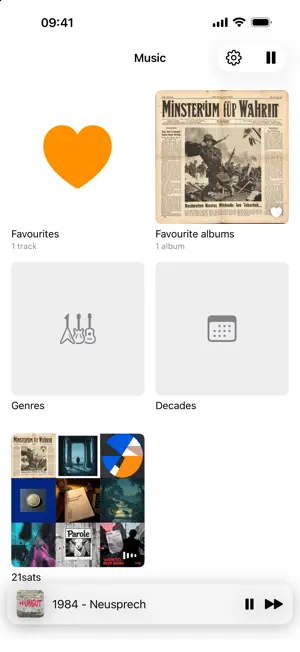
Faraday plays music that belongs to you: MP3 and M4A files from a folder in iCloud Drive that you choose yourself. No account, no subscription, no catalogue to pick from. The app exists because of dead zones. Music made with Suno can only be streamed in their app, and without a connection it goes quiet. Faraday downloads tracks to the device and plays them from there, in the car, on the train, on a plane. FOLDERS, NOT RULES Your folder structure stays as it is, as deep as you like: genre, artist, album, or something else entirely. A folder may hold tracks and subfolders at the same time. A button at the top plays a whole folder in one go, one album after the other. An artist folder shows all albums with their tracks. TWO LEVELS, SO YOU KNOW WHAT PLAYS OFFLINE A tap streams, the download button keeps a permanent copy. Each row shows whether a track is downloaded, whether iCloud is holding it on the device right now, or whether it is not there. In airplane mode you know beforehand what will play. FAVOURITES AND PLAYLISTS A heart marks tracks and albums across all folders. On iPad you can also mark a single disc of a multi-disc album. Playlists are files in your music folder; on iPad you create them, fill them by dragging and reorder their tracks. Rename or move an album folder and playlists and favourites follow it. GENRES AND DECADES Two cards on the start screen sort your albums by genre and by decade. A decade can be played in one go. IPAD At full width the iPad shows folders and playlists in a sidebar, all tracks as a table sortable by any column, and lyrics or the queue on the right. The queue takes tracks by drag and drop and can be saved as a playlist. A full-screen visualizer reacts to bass, mids and beat. CARPLAY The same folder tree as on the phone, plus your favourite tracks and albums. Repeat, shuffle and a heart below the timeline. LYRICS THAT FOLLOW ALONG Suno puts the lyrics into the file, but without timing. Faraday creates the timestamps on the device and stores them as an .lrc file next to the music. Analysed once, it stays. Requires iOS 26. SIRI AND SHORTCUTS "Remember this track in Faraday", "Repeat this track in Faraday", "Shuffle in Faraday". All of them are available in Shortcuts and can be put on the Action button. WHAT FARADAY DOES NOT DO No account, no sign-in, no ads, no tracking. On iPhone and iPad the app talks to no server. What it stores lives on your device and in your iCloud folder.
What’s new
Version 1.0.3 · Updated October 12, 2026
Playlists On iPad you create playlists, fill them by dragging and reorder their tracks. Each playlist is a file in your music folder, so it also shows up on iPhone as a card on the start screen. iPad with sidebar At full width the iPad shows folders and playlists on the left, tracks as a table in the middle, and lyrics or the queue on the right. In a narrow Split View the familiar layout stays. Queue On iPad you see what is playing and what comes next. Drag tracks in, reorder them, or save the whole queue as a playlist. Favourite albums A heart on an album keeps it for you. A "Favourite Albums" card then appears on the start screen, and in the car a row below Favourite Tracks. For albums with several discs, iPad also lets you mark a single disc. Genres and decades Two new cards on the start screen sort your albums by genre and by decade. A decade can be played in one go. All tracks as a table On iPad all tracks appear in one list with artist, album, genre, year, tempo and duration, sortable by any column and with filters above the columns. Visualizer On iPad a full-screen visualizer reacts to bass, mids and beat. Several styles, switched with a swipe. Albums like in the Music app Double albums get a heading for each disc. An artist folder shows all albums with their tracks. The header shows the total length, and when a track's artist differs from the album artist, it appears in the row. Rename without losing anything When you rename or move an album folder, playlists and favourite albums follow it.
App privacy
The developer, Andreas Michael Kelm, reported these privacy practices to Apple.
Data Not Collected
The developer does not collect any data from this app.
Alternatives to Faraday: Music Player
Looking for apps like Faraday: Music Player? Here are 6 similar apps on the App Store. The highest rated is Dirplay — Music & Video Player (5.0/5), and all 6 are free to download.
-
 Plus Media Player
4.3
-
 Dirplay — Music & Video Player
5.0
-
 Phono: FLAC Music Library
-
 Trove-Local Music Player
5.0
-
 Moosic Player
-
 Clickwheel - Classic Player
| App | Rating | Price | Last updated | Compare |
|---|---|---|---|---|
| Faraday: Music Player | – | Free | October 12, 2026 | |
| Plus Media Player | 4.3 / 5 (6) | Free | Aug 28, 2026 | Compare |
| Dirplay — Music & Video Player | 5.0 / 5 (1) | Free | Oct 18, 2026 | Compare |
| Phono: FLAC Music Library | – | Free | Oct 5, 2026 | Compare |
| Trove-Local Music Player | 5.0 / 5 (3) | Free | Oct 29, 2026 | Compare |
| Moosic Player | – | Free | Jul 24, 2026 | Compare |
| Clickwheel - Classic Player | – | Free | Oct 8, 2026 | Compare |