

Logmile
Maximilian Hartmann Travel iPhoneiPadiPod touchApple Watch
Logmile is a free Travel app for iPhone and iPad by Maximilian Hartmann. Requires iOS 15.1. Updated October 10, 2026.
- Price
- Free
- on the App Store
- Size
- 69 MB
- Age 4+
- Updated
- Oct 10
- 2026 · v1.5.0
Screenshots

About Logmile
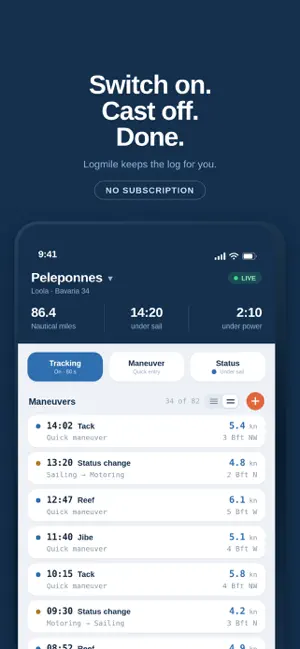
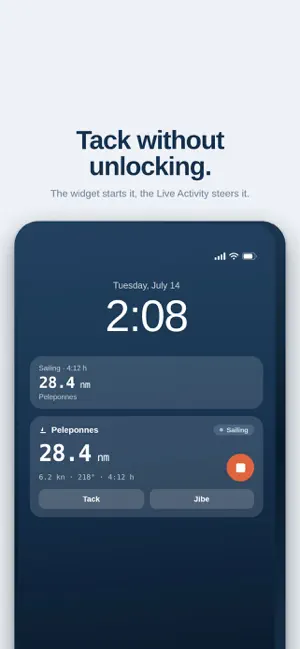
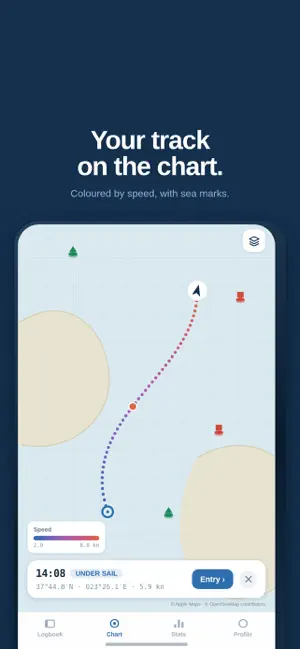
The logbook writes itself. Switch on tracking and cast off. Logmile records position, course, speed and distance — at the interval you choose. By the evening the day stands finished in the book. One cruise, one logbook. Just like aboard: the name of the cruise and the boat at the top, every entry of the voyage below. MANEUVERS AT ONE TAP Tack, jibe, reef, anchored, moored: tap it, and it is in the book with time, position and speed. Six maneuvers come prepared, and you have twenty slots in total — every one of them can be renamed, deleted or replaced. The buttons are big enough for swell and wet hands. CONTROL IT FROM THE LOCK SCREEN The widget starts the recording. The Live Activity shows elapsed time, distance, speed and course — and takes a tack, a jibe or the change between sail, engine and moored directly. No unlocking, no opening the app. YOUR TRACK ON THE CHART The track sits on the map, with sea marks from OpenSeaMap and coloured by speed. Tap any point: what happened here, how fast were you, where was the wind from? FORGOT TO START TRACKING? NO DRAMA Logmile spots the gap and asks: estimate the straight line, add the course with a few taps, or leave the gap as it is. You decide — nothing is quietly invented. And an outlier that was never there? Tap it on the chart and delete it — the distance is recalculated at the break. EVERY DAY ON ONE PAGE Every day has its own card: ports, distance sailed, weather and the beginning of whatever you wrote. Tap it and the day opens in full — with its figures, a weather review and the photos attached to its entries. Days you do not need right now, you collapse. THE CRUISE IN NUMBERS Nautical miles, hours under sail and under engine, wind and pressure over time, maximum and average values. For a single day or the whole cruise, shareable as a PDF. A REAL BOOK AT THE END Export the cruise as a print-ready logbook PDF — with a cover showing the route you actually sailed, and daily pages with chart, miles, weather and navigation data. Plus the sea time log for your mileage record, ready to print and sign. New: the sea time certificate as an A4 sheet — one cruise, one person, for your skipper to sign. Also for your crew, counting only the miles of their time aboard. If you need the raw data, export CSV or GPX. YOU KEEP CONTROL Logmile only records when you switch tracking on, and never stops it by itself. Three profiles — Precise, Balanced, Long passage — govern interval and background work; every value can be changed individually. YOUR DATA STAYS WITH YOU Everything lives on your iPhone first. Cloud sync only with an account, servers in the EU. No advertising, no data selling. PRICING WITHOUT SMALL PRINT Four days free with every feature. The trial starts with your first tracked nautical mile, not at download. After that, one single purchase: no subscription, no follow-up costs. Your entries stay readable even if you never buy. Logmile is a logbook, not a navigation or safety device.
What’s new
Version 1.5.0 · Updated October 10, 2026
More reliable recording, more honest reporting. No more point on the equator. When a recording started, the iPhone could report an invalid position – 0° north, 0° east. Logmile used to accept it, and the straight line from there to the harbour ended up in your mileage. Such positions are now discarded. An outlier that is already in your logbook can be selected and deleted on the chart. Stopping from the Lock Screen now asks first. A tap on the Live Activity's stop button ended the recording immediately – even by accident in a pocket. Now it asks for a few seconds, and "End" sits on the other side. You find out how a recording ended. If it was stopped on the Lock Screen or on Apple Watch, or Logmile was closed while recording – by you or by iOS –, the app tells you the next time you open it, with the time or the last recorded point. Choose your language. Logmile follows your iPhone's language out of the box. In Profile > Language you can now switch between English and German yourself – independent of your iPhone. The widget, Live Activity and system prompts are changed in iOS Settings under Logmile > Language; the app points you there after switching. Weather from ECMWF. New log entries now get their weather from the European ECMWF model at 9 km resolution by default. If you never changed the default, the update switches you over once; pick a different model any time in Profile > Weather model. Screens slide in. In Profile, in Statistics and when you open an entry, the next screen now slides in from the right, the way you know it from iOS. To go back, swipe from the left edge – the screen follows your finger. Smaller fixes: the first tab is now called "Logbooks" – like the screen it opens, which now speaks of logbooks throughout. "Clean up entries" in Profile is now "Bulk edit entries", and the sea-time certificate gives nautical miles as "nm". Collapsed days show their distance only once, the tracking icon in the tab bar is centred, the logbook overview has consistent margins, the active logbook now has a thin coral outline in the list, and the header in Profile stays in place when you scroll. Points on the chart are easier to tap for deletion and stay visible once selected. The solid-colour track on the chart is now a slim, continuous line instead of thick dots.
App privacy
The developer, Maximilian Hartmann, reported these privacy practices to Apple.
Data Linked to You
The following data, which may be collected and linked to your identity, may be used for the following purposes:
- Contact Info: Email Address, Name
- Identifiers: User ID, Device ID
- Usage Data: Product Interaction, Other Usage Data
- Diagnostics: Crash Data
- Purchases: Purchase History
- Location: Precise Location
- User Content: Photos or Videos
Used for: Analytics, Product Personalization, App Functionality
Alternatives to Logmile
Looking for apps like Logmile? Here are 6 similar apps on the App Store. The highest rated is Knot (5.0/5), and 5 of the 6 are free to download.
-
 Rubberduck: Sailing Log NMEA
-
 Glopho - Countries Visited Map
-
 Skipper: Ship’s Logbook
4.6
Skipper: Ship’s Logbook
4.6
-
 Blue Water App
-
 Light Pollution Map
4.1
Light Pollution Map
4.1
-
 Knot
5.0
Knot
5.0
| App | Rating | Price | Last updated | Compare |
|---|---|---|---|---|
| Logmile | – | Free | October 10, 2026 | |
| Rubberduck: Sailing Log NMEA | – | Free | Oct 16, 2026 | Compare |
| Glopho - Countries Visited Map | – | Free | May 20, 2026 | Compare |
| Skipper: Ship’s Logbook | 4.6 / 5 (36) | Free | Oct 21, 2026 | Compare |
| Blue Water App | – | Free | Sep 5, 2024 | Compare |
| Light Pollution Map | 4.1 / 5 (47) | 4.99 USD | May 29, 2026 | Compare |
| Knot | 5.0 / 5 (4) | Free | Apr 9, 2025 | Compare |
Compare Logmile with the top alternatives: ratings, updates, ASO score and keyword gaps →