

Carry - Family Budget
Serhii Pavlov Finance iPhoneiPadiPod touch
Carry - Family Budget is a free Finance app for iPhone and iPad by Serhii Pavlov. Requires iOS 16.0. Updated October 6, 2026.
- Price
- Free
- on the App Store
- Size
- 55 MB
- Age 4+
- Updated
- Oct 6
- 2026 · v1.1.2
Screenshots

About Carry - Family Budget
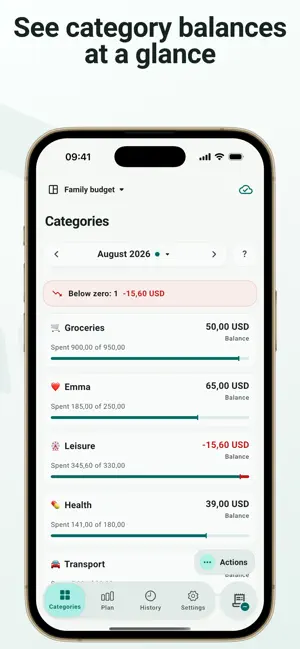
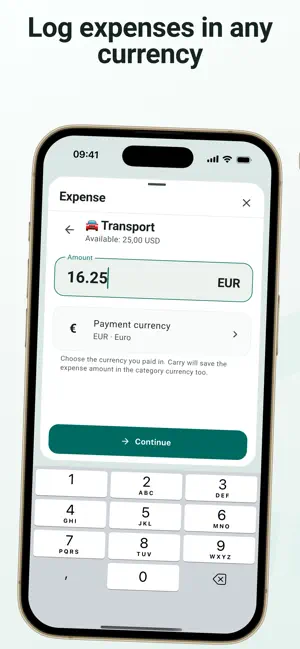
Add income and recurring payments, assign money to categories, and simply record what you spend. Carry shows what is already recorded and what is still expected, how much is left, and where you have overspent. Monthly and category breakdowns make it easy to compare your plan with actual spending. No need to add bank accounts, track how much cash you have, or record every currency exchange. Carry does not ask you to account for every cent. It shows how your budget changes as you spend. Carry will not stop you from recording an expense when a category runs short. Record it as it happened—the overspending stays visible, and the choice is yours: add more money to the category, move money from another category, or carry the overspending into next month. BALANCES AND OVERSPENDING CARRY FORWARD For example, put a small amount into an “Other” category every month. If you do not need it, its balance keeps growing. Later, record a large unplanned purchase in that category without rebuilding the whole budget. The new month begins with the carried-over category balance or overspending—not an artificial zero. DIFFERENT CURRENCIES — ONE BUDGET Your budget can use one currency while salary, extra income, subscriptions, or individual purchases use others. Carry keeps the original amount and currency and shows how each entry affects your budget. For example, keep your main budget in one currency, receive salary and extra income in others, and pay individual subscriptions in their billing currencies. RECORD AN EXPENSE IN SECONDS We believe the most common action in a budgeting app should not require searching through screens. Carry includes a dedicated quick expense flow and deep integration with Apple Shortcuts. Choose a category, enter the amount, and its balance updates immediately. Add expenses and check category balances from Control Center, the Action button on a compatible iPhone, or the Shortcuts widget—without opening the main budget screen first. MULTIPLE SPACES — ONE CARRY Create separate spaces for a family budget, personal spending, a trip, or a project, and switch between them. A local space is free and works without registration or a bank connection. With Carry Cloud, you can sync a budget between devices and manage it together with family. The owner assigns each person a role: administrator, member, or viewer. Only the owner needs a subscription. YOUR DATA STAYS YOURS Local data stays on the device unless you choose Carry Cloud. Export a readable Excel workbook, keep a personal backup in iCloud, and protect the app with App Lock. Carry is for people who want to control a budget, not spend their time maintaining a budgeting app. Plan once, record expenses as they happen, and always know what remains and where the plan changed. Carry does not connect to bank accounts and does not provide financial, tax, or investment advice. Carry Cloud is available through an auto-renewable monthly or annual subscription. Local budgets, Excel import and export, and personal iCloud backup are available without a subscription. Terms of Use: https://www.apple.com/legal/internet-services/itunes/dev/stdeula/
What’s new
Version 1.1.2 · Updated October 6, 2026
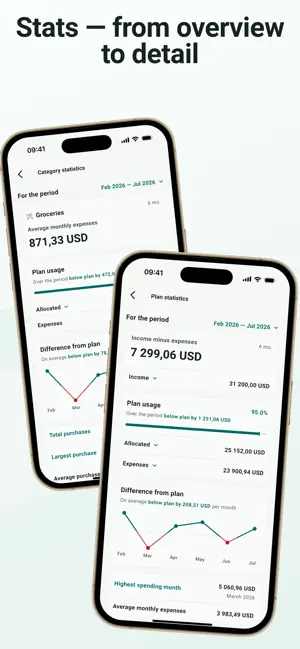
Completely redesigned statistics with clearer charts and more detailed insights into your budget and categories. Compare income and expenses, see how your spending compares to your plan, and explore trends over any period — from a single month to your entire budget history. Improved currency conversion for past periods and made Carry Cloud more reliable when transferring and importing large spaces.
App privacy
The developer, Serhii Pavlov, reported these privacy practices to Apple.
Data Linked to You
The following data, which may be collected and linked to your identity, may be used for the following purposes:
- Purchases: Purchase History
- Financial Info: Other Financial Info
- Contact Info: Email Address, Name
- User Content: Other User Content
- Identifiers: User ID
Used for: Analytics, App Functionality
Data Not Linked to You
The following data, which may be collected but is not linked to your identity, may be used for the following purposes:
- Usage Data: Product Interaction
- Diagnostics: Crash Data, Other Diagnostic Data
Used for: Analytics, App Functionality
Alternatives to Carry - Family Budget
Looking for apps like Carry - Family Budget? Here are 6 similar apps on the App Store. The highest rated is MrWallet: Money Tracker (5.0/5), and 5 of the 6 are free to download.
-
 MoneyDrive
-
 Monetto
-
 Родина Бюджет
-
 MrWallet: Money Tracker
5.0
-
 Pocket Ledger Expenses
-
 Budget & Expense Planner・Orrin
| App | Rating | Price | Last updated | Compare |
|---|---|---|---|---|
| Carry - Family Budget | – | Free | October 6, 2026 | |
| MoneyDrive | – | Free | Sep 28, 2026 | Compare |
| Monetto | – | Free | May 20, 2026 | Compare |
| Родина Бюджет | – | Free | Sep 15, 2026 | Compare |
| MrWallet: Money Tracker | 5.0 / 5 (1) | 2.99 USD | Nov 1, 2025 | Compare |
| Pocket Ledger Expenses | – | Free | Aug 23, 2026 | Compare |
| Budget & Expense Planner・Orrin | – | Free | Oct 28, 2026 | Compare |