

Foliant — Book Reader
Yana Khalikova Book iPhoneiPadiPod touch
Foliant — Book Reader is a free Book app for iPhone and iPad by Yana Khalikova. Requires iOS 17.0. Updated October 11, 2026.
- Price
- Free
- on the App Store
- Size
- 17 MB
- Age 4+
- Updated
- Oct 11
- 2026 · v1.1.2
Screenshots


About Foliant — Book Reader
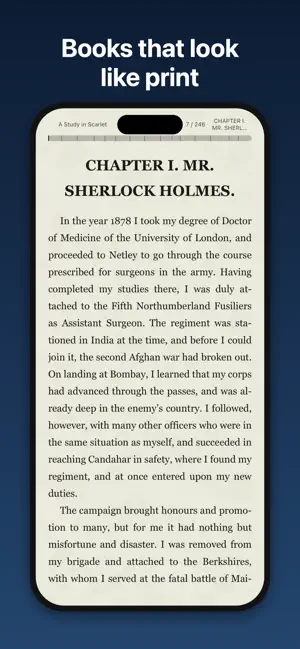
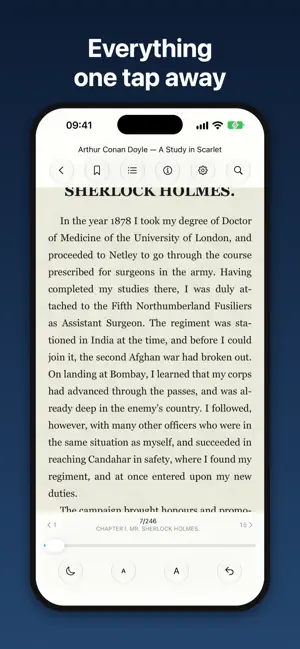
Foliant is a reader for people who read a lot, and for a long time. Books are typeset by its own engine, so a page looks the way a typesetter would set it — not like a web page. LIKE PRINT • Hyphenation and justified text — without rivers of spaces. • Footnotes at the bottom of the page, as in a printed book. A long footnote continues on the next page. • Images, tables and poems keep the look the book gives them. • Lines are never cut by the screen edge: a page holds only whole lines. TURN PAGES YOUR WAY • Tap, swipe or use the volume buttons. • Page turn effects: page peel or slide. Or none at all. • Scroll reading with auto-scroll — change the speed on the go. • Adjust brightness with a gesture at the screen edge. SERIES AND SHELVES • Books of a series gather on their own shelf, in order. • Finished a volume? The next one is already prepared — it opens with a page turn, no trip back to the library. • Your own shelves, “read” marks, ratings and thoughts about a book. • Recently added books wait at the top of the library. EVERYTHING AT HAND • Table of contents with progress by chapter. • Bookmarks, quotes and notes tied to a place in the book. • Search in a book and across the whole library. • Translate a selection and look words up in the system dictionary. MAKE IT YOURS • Fonts, size, line spacing, margins and indents. • Paper to choose from: rice, brown, beach sand, snow, night and more — with texture or a solid color. • Reading indicator at the top or bottom: chapter, pages, clock. • Give any book its own settings. BOOKS FROM ANYWHERE • Add books from Files, via Share (several at once) or from zip archives. • Book covers appear right in the Files app. • OPDS catalogs and WebDAV servers. • Sync your reading position with KOReader and other readers via KOSync. • “Continue reading” widget on the Home Screen. NO TRACKING No ads, analytics or sign-up. Your books and notes stay on your device; the app only connects to servers you add yourself.
What’s new
Version 1.1.2 · Updated October 11, 2026
Redesigned OPDS catalogs: add as many as you like, with a website-like home page — shelves, tiles and an alphabet. Catalog book card with description, genres and series; live search; books in a series appear in order. Select several books and download them at once. Books already in your library are marked and can be opened. Requests retry automatically when a server fails or times out. Books from catalogs now get their cover, series and description. Descriptions without paragraphs now also show at the start of the book. Title and author next to the island switch with an animation in the turn direction. On the «Finished» page a long next-book title wraps to two lines.
App privacy
The developer, Yana Khalikova, reported these privacy practices to Apple.
Data Not Collected
The developer does not collect any data from this app.
Alternatives to Foliant — Book Reader
Looking for apps like Foliant — Book Reader? Here are 6 similar apps on the App Store. The highest rated is Momo: Personalized Kids Books (5.0/5), and all 6 are free to download.
-
 VibeRead - Оффлайн ридер
-
 eLib: читалка для книг
-
 Yomu - Fast PDF Reader
-
 Momo: Personalized Kids Books
5.0
Momo: Personalized Kids Books
5.0
-
 JustReader: EPUB & FB2 Reader
-
 EPUB Reader: eBook & FB2
5.0
EPUB Reader: eBook & FB2
5.0
| App | Rating | Price | Last updated | Compare |
|---|---|---|---|---|
| Foliant — Book Reader | – | Free | October 11, 2026 | |
| VibeRead - Оффлайн ридер | – | Free | Aug 3, 2026 | Compare |
| eLib: читалка для книг | – | Free | Sep 5, 2026 | Compare |
| Yomu - Fast PDF Reader | – | Free | Aug 1, 2026 | Compare |
| Momo: Personalized Kids Books | 5.0 / 5 (4) | Free | Oct 13, 2026 | Compare |
| JustReader: EPUB & FB2 Reader | – | Free | Oct 2, 2026 | Compare |
| EPUB Reader: eBook & FB2 | 5.0 / 5 (1) | Free | Aug 18, 2026 | Compare |