

Salon Calendar
Taiki Yamagami Productivity iPhoneiPadiPod touch
Salon Calendar is a free Productivity app for iPhone and iPad by Taiki Yamagami. Requires iOS 17.0. Updated August 22, 2026.
- Price
- Free
- on the App Store
- Size
- 5 MB
- Age 4+
- Updated
- Aug 22
- 2026 · v1.2
Screenshots


About Salon Calendar
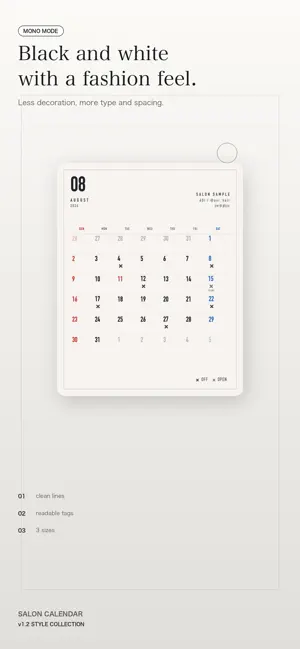
Salon Calendar helps stylists turn monthly availability into a polished image clients can read before they book. Even a small schedule image says something about your taste. Instead of posting a photo of a handwritten calendar or forcing a generic calendar app to fit, you can present the details clearly in a style that matches your salon. ■ Choose the post size first Pick the format before you design the calendar. - Square: 1080 x 1080; photo backgrounds require Pro - Portrait post: 1080 x 1350; photo backgrounds supported - Story: 1080 x 1920; photo backgrounds supported Because photos crop differently by format, choosing the destination first helps the final image feel intentional. ■ Tap dates to add availability Tap a date on the calendar and choose the schedule label for that day. Weekly days off or recurring shifts can be set in batches by weekday. Default labels include: - Off - Work - Early - Late - Available - Full - Class - Shoot Labels can be renamed, so you can use wording that fits your own way of posting. Short notes such as time slots can also be added. ■ Japanese holidays included National holidays, substitute holidays, and citizens' holidays are reflected automatically. Sundays and holidays are marked in red, and Saturdays in blue, so the month is easy to scan. The week can start on Sunday or Monday. ■ Match the look to your salon Choose a template to switch the layout, background, type, and readability treatment together. Your schedule and custom label names stay in place while the mood changes. - Photo placement: full, top, or none; square photo placement requires Pro - 29 templates - Static frames and light accents - 14 built-in backgrounds, or your own photos - 9 type styles - Schedule display as color markers or text inside cells - Editable label names; Pro adds schedule mark position and schedule mark font controls When a photo makes dates harder to read, adjust blur, brightness, and text backing to keep the calendar clear. Text color adapts to the brightness of the imported photo. ■ Export a static image The preview you edit becomes the exported image. Save it to Photos or share it directly to other apps from the Export tab. ■ No account and no developer server No account is required. Your schedule and imported photos stay on your device. The app does not send them to a developer-operated server, and it does not include ads or analytics. Terms of Use (Apple Standard EULA): https://www.apple.com/legal/internet-services/itunes/dev/stdeula/ Requires iOS 17.0 or later Provided by Better Day Tech
What’s new
Version 1.2 · Updated August 22, 2026
Expanded Pro templates with Rose Script, Korean Beige, Clear Blue, Mono Mode, and Urban Noir styles. Schedule marks and legends are now easier to present as polished calendar images for salon pages and social posts.
App privacy
The developer, Taiki Yamagami, reported these privacy practices to Apple.
Data Not Collected
The developer does not collect any data from this app.
Alternatives to Salon Calendar
Looking for apps like Salon Calendar? Here are 6 similar apps on the App Store. The highest rated is Simple HTML AI (5.0/5), and all 6 are free to download.


| App | Rating | Price | Last updated | Compare |
|---|---|---|---|---|
| Salon Calendar | – | Free | August 22, 2026 | |
| Instant Calendar | – | Free | Oct 15, 2026 | Compare |
| rotate by RotationOS | – | Free | Oct 24, 2026 | Compare |
| 瞬カレ|15秒で作るお店のカレンダー | – | Free | Aug 16, 2026 | Compare |
| Simple HTML AI | 5.0 / 5 (1) | Free | Oct 7, 2026 | Compare |
| ファミリーカレンダー | – | Free | Sep 28, 2026 | Compare |
| ToDo Tab | – | Free | May 13, 2025 | Compare |
Compare Salon Calendar with the top alternatives: ratings, updates, ASO score and keyword gaps →