

Foliova PDF: Scan & Edit
MUSTAFA NURI PEKDEMIR Productivity iPhoneiPadiPod touch
Foliova PDF: Scan & Edit is a free Productivity app for iPhone and iPad by MUSTAFA NURI PEKDEMIR. Requires iOS 15.0. Updated October 23, 2026.
- Price
- Free
- on the App Store
- Size
- 43 MB
- Age 4+
- Updated
- Oct 23
- 2026 · v1.0.1
Screenshots



About Foliova PDF: Scan & Edit
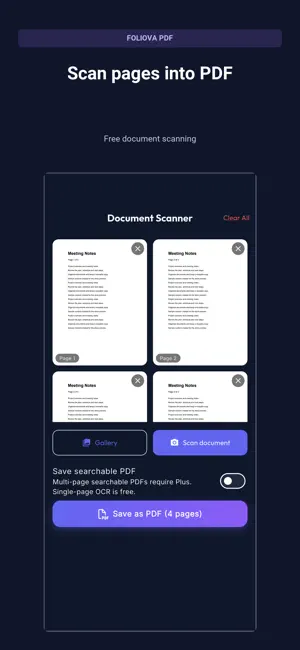
Your documents, from first scan to the final PDF. Foliova PDF brings scanning, reading, signing and organization together with no app account or ads. FREE ESSENTIALS • Scan documents or turn photos into PDFs. • Read, search, share and rename PDF files. • Merge two PDFs; reorder, export or remove pages. • Draw a handwritten signature and place it on a page. • Add password protection or remove a password you know. • Organize with folders, tags, favorites and bulk selection. • Recover documents from Trash and undo a move to Trash. • Extract text from one page or make a one-page searchable PDF. OPTIONAL FOLIOVA PDF PLUS — ONE PAYMENT • Change or delete supported existing PDF text. • Recognize and edit lines of text in scanned pages with OCR. • Add text, drawings, highlights and notes; select, move or edit your additions. • Choose text fonts, size and color. Zoom with two fingers while editing. • Reopen saved edits and continue persistent drafts. • Recognize multiple pages and create searchable PDFs. • Merge more than two PDFs, compress files and add watermarks. • Export PDFs and editable drafts together in a backup and import them on another device. CLEAR PURCHASES, LOCAL PROCESSING Basic tools stay free. Plus is an optional one-time purchase, with Restore Purchases in the app. No subscription. Restore Plus with the same Apple Account. Restoring purchases does not transfer documents. PDF processing happens on the device. Sharing or saving to a cloud destination is your choice. SDK diagnostics and store verification are described in our privacy policy. Complex fonts and difficult scans may limit recognition or editing accuracy. Scanned text edits flatten the affected page; this is not certified redaction. A drawn signature is not a certificate-based digital signature. Backups are not encrypted by the app; keep a safe external copy.
What’s new
Version 1.0.1 · Updated October 23, 2026
PDF Pro is now Foliova PDF. Edit supported existing text or scanned text with OCR. Use two fingers to zoom while editing, and keep editable drafts. Plus purchase and restore are easier to reach. Donation prompts removed; stability and large-text layouts improved. Move between PDF text and pages with a visible cursor. Keep your zoom level, return to the active text and edit dense pages more comfortably.
App privacy
The developer, MUSTAFA NURI PEKDEMIR, reported these privacy practices to Apple.
Data Not Collected
The developer does not collect any data from this app.
Alternatives to Foliova PDF: Scan & Edit
Looking for apps like Foliova PDF: Scan & Edit? Here are 6 similar apps on the App Store. The highest rated is Word to PDF Converter: PDF Pro (4.7/5), and all 6 are free to download.
-
 Word to PDF Converter: PDF Pro
4.7
Word to PDF Converter: PDF Pro
4.7
-
 RDC-DLD
-
 Wallet - Digital Wallet Card
4.4
Wallet - Digital Wallet Card
4.4
-
 Documents : Media File Manager
4.5
Documents : Media File Manager
4.5
-
 TeamViewer Remote Control
4.7
TeamViewer Remote Control
4.7
-
 MOI UAE
4.6
MOI UAE
4.6
| App | Rating | Price | Last updated | Compare |
|---|---|---|---|---|
| Foliova PDF: Scan & Edit | – | Free | October 23, 2026 | |
| Word to PDF Converter: PDF Pro | 4.7 / 5 (38) | Free | Aug 31, 2026 | Compare |
| RDC-DLD | – | Free | Dec 10, 2025 | Compare |
| Wallet - Digital Wallet Card | 4.4 / 5 (538) | Free | Dec 17, 2025 | Compare |
| Documents : Media File Manager | 4.5 / 5 (288) | Free | Apr 5, 2026 | Compare |
| TeamViewer Remote Control | 4.7 / 5 (44,908) | Free | Oct 27, 2026 | Compare |
| MOI UAE | 4.6 / 5 (10,102) | Free | Oct 21, 2026 | Compare |