

Tally - Track Your Progress
Cyan Villarin Health & Fitness iPhoneiPadiPod touch
Tally - Track Your Progress is a free Health & Fitness app for iPhone and iPad by Cyan Villarin. Requires iOS 26.2. Updated August 14, 2026.
- Price
- Free
- on the App Store
- Size
- 5 MB
- Age 4+
- Updated
- Aug 14
- 2026 · v1.0.0
Screenshots



About Tally - Track Your Progress
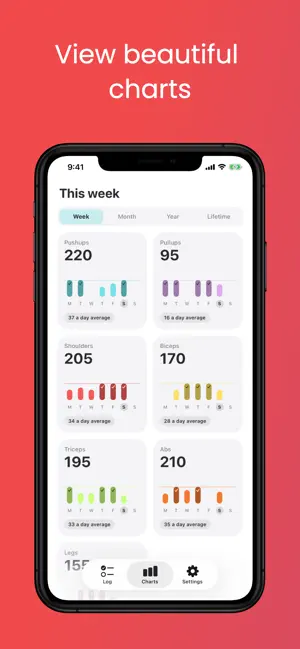
Tally is a simple, private counter for anything you do more than once a day. Set a daily target, tap to count, and watch the bar fill. Pushups, glasses of water, pages read, cigarettes skipped — if you can count it, you can tally it. KEY FEATURES • Tap To Count — Every tally has its own per-tap amount, so a 50-rep target is ten taps of five rather than fifty taps of one. Set it to 1 for the things you count one at a time. • Colourful Progress Bars — Each tally fills across its own coloured bar, so a glance down the list tells you exactly how the day is going. Hit the target and the button turns into a checkmark. • Charts Over Any Range — Every tally gets a chart with a goal line at your daily target, across a week, a month, a year, or all time. Days that reached the goal are marked, and the total sits underneath. • Swipe Back Through Days — Forgot to log yesterday? Swipe to any earlier day and fix it. One tap on "Today" brings you back. • Home Screen Widgets — A log widget you can tap to count without opening the app, and a charts widget showing the week at a glance. Both come in small, medium and large. • Count In Either Direction — Tapped one too many? Flip to subtract mode and tap it back off. Press and hold any tally to add or subtract any amount at once. • Put Them In Your Order — Drag your tallies into the order you actually do them. The order follows through to the charts and the widgets. • Make It Yours — Add, rename, recolour and delete tallies freely. Choose the daily target, the per-tap amount and the unit label, from a palette of seven colours. • Light And Dark — Follows your system theme, or lock it to whichever you prefer. • Back Up And Restore — Write every tally and every logged day to a single file, saved wherever you choose: iCloud Drive, Files, anywhere. Restore it on a new phone, or after a mistake. • No Account, No Ads — Tally never asks for a single permission, has no sign-up, and shows no advertising. Your counts stay on your device unless you choose to back them up. PERFECT FOR • Counting sets and reps through a workout • Building daily habits and keeping a streak honest • Water, steps, pages, practice minutes — anything with a number Tally starts you off with a set of exercise tallies, but nothing about them is fixed. Rename them, recolour them, delete the lot and build your own.
App privacy
The developer, Cyan Villarin, reported these privacy practices to Apple.
Data Not Linked to You
The following data, which may be collected but is not linked to your identity, may be used for the following purposes:
- Location: Coarse Location
- Usage Data: Product Interaction
- Diagnostics: Crash Data
Used for: Analytics