

PlanWith Natural To-Do
Myeonghyeon Han Productivity iPhoneiPadiPod touch
PlanWith Natural To-Do is a free Productivity app for iPhone and iPad by Myeonghyeon Han. Requires iOS 26.1. Updated September 1, 2026.
- Price
- Free
- on the App Store
- Size
- 21 MB
- Age 4+
- Updated
- Sep 1
- 2026 · v1.0.2
Screenshots


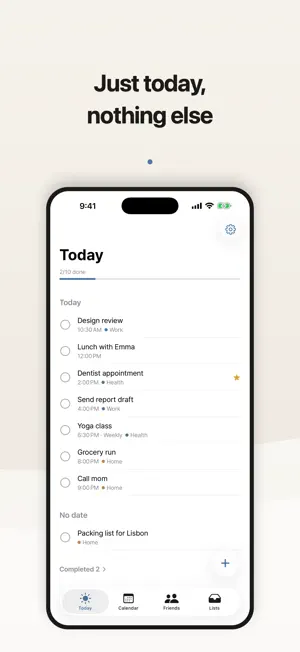
About PlanWith Natural To-Do
Write it the way you'd say it, and the schedule fills itself in. Type "team meeting tomorrow at 3pm" and PlanWith picks up the date and the time for you. No date pickers, no spinning dials, no repeat menus. ■ Input that understands you — English, Korean and Japanese · tomorrow, the day after tomorrow, next Tuesday, end of the month, last Friday · 3pm, noon, at 9 in the morning, quarter to six · every Monday, the 15th of each month, every 3 days, every other Wednesday · report by Friday (deadline), vacation Aug 1 to Aug 5 (a date range) · Written the way people actually write — "a week from tuesday", "by next business day", "half past two" · Korean and Japanese work just as naturally, each in its own idiom ■ Share plans with friends · Add friends by @username or QR code · Only the events you mark as shared are visible to them · Open a friend's calendar to see when they're free · Call a friend whatever you actually call them — the name shows only to you · Rename a friend to whatever you call them — the name shows only to you · Block, report, and delete your account whenever you want ■ A briefing to open the day · Today's tasks, how many you finished yesterday, and what's overdue — on one screen ■ So nothing slips · Time-based notifications, and a real alarm for the ones that must wake you · Home Screen widgets, Lock Screen widgets, and a monthly calendar widget · Tick things off straight from a widget ■ Organizing stays light · Categories, an Important mark, and subtasks (checklists) · Notes and photo attachments · Calendar view with public holidays, and Apple Calendar sync · Six accent themes and dark mode · iCloud sync across your devices · Delete just one occurrence of a repeating or multi-day event · Trash — nothing is gone by accident No ads. No tracking. Free. Your tasks stay on your device by default; only the events you choose to share go to the server.
What’s new
Version 1.0.2 · Updated September 1, 2026
• Fixed subtask lines carrying over text from the previous line when you press return. • Fixed the first letter of a word being dropped right after a time (for example "3pm brand meeting"). The same class of issue was fixed in Korean and Japanese as well. • Fixed adding a friend by QR code doing nothing. • Completing, deleting or snoozing a task now also clears its already-delivered notification. • Polished the Today tab section headers and the app icon spacing.
App privacy
The developer, Myeonghyeon Han, reported these privacy practices to Apple.
Data Linked to You
The following data, which may be collected and linked to your identity, may be used for the following purposes:
- Identifiers: User ID, Device ID
- Usage Data: Product Interaction
- Contact Info: Email Address, Name
- User Content: Photos or Videos, Other User Content
- Diagnostics: Other Diagnostic Data
Used for: Analytics, App Functionality
Alternatives to PlanWith Natural To-Do
Looking for apps like PlanWith Natural To-Do? Here are 6 similar apps on the App Store.
-
 Doblin: One-Task To-Do List
-
 Spill: Reminders & Calendar
-
 이따 - 시간 잡아주는 AI 할일앱
-
 Oneul - 오늘의 할 일
-
 TodoMato-ADHD Todo Routine
-
 TodayPin - Never Miss a Todo
| App | Rating | Price | Last updated | Compare |
|---|---|---|---|---|
| PlanWith Natural To-Do | – | Free | September 1, 2026 | |
| Doblin: One-Task To-Do List | – | Free | Oct 6, 2026 | Compare |
| Spill: Reminders & Calendar | – | Free | Oct 1, 2026 | Compare |
| 이따 - 시간 잡아주는 AI 할일앱 | – | Free | Oct 12, 2026 | Compare |
| Oneul - 오늘의 할 일 | – | Free | Oct 10, 2026 | Compare |
| TodoMato-ADHD Todo Routine | – | Free | Oct 5, 2026 | Compare |
| TodayPin - Never Miss a Todo | – | Free | Jun 16, 2026 | Compare |