

Rungle: Running Content Editor
Dongho Kim Health & Fitness iPhoneiPadiPod touch
Rungle: Running Content Editor is a free Health & Fitness app for iPhone and iPad by Dongho Kim. Requires iOS 17.0. Updated October 19, 2026.
- Price
- Free
- on the App Store
- Size
- 77 MB
- Age 4+
- Updated
- Oct 19
- 2026 · v2.2.0
Screenshots

About Rungle: Running Content Editor
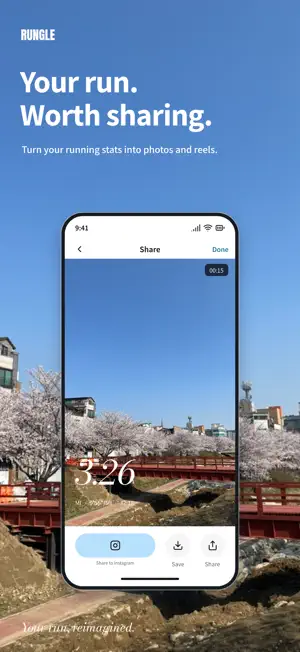
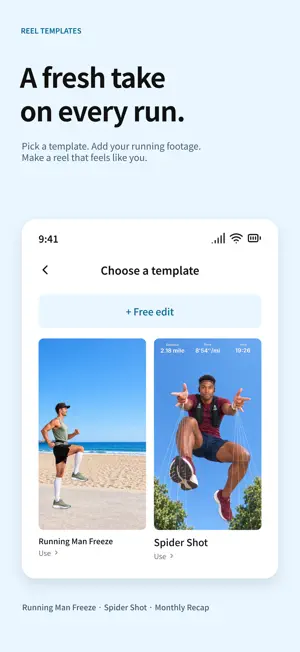
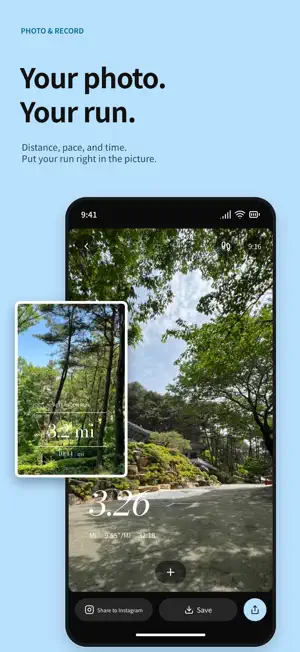
Great runs. Easier photo picks. Reels you'll love making. From running photos to reels, meet Rungle. You put in the effort. Give your run more than a stats screenshot! Add distance and pace to your photos, or turn your running clips into a reel. Let AI help pick the photos and templates get the edit started. Make something you'll want to post. ● Keep your running app. Bring your stats to Rungle. No need to switch the app you run with. Import distance, time, and pace from runs synced to Apple Health. No Health record? Import a screenshot from your running app. Rungle reads the stats so you can add them to a photo. ● Ten similar photos. A little help choosing. Plenty of photos, but still nothing picked? AI best cuts suggests shots worth sharing from your run. Choose your favorite from the picks, or skip the recommendations and pick a photo yourself. ● Your pace. Your photo. Your style. Give a great photo the stats to match. Choose from clean numbers, speech bubbles, ticket designs, and more. Move and resize them to suit your shot. No need to type out your distance, time, and pace each time. ● That running reel you've been watching? Make your own. Not sure where to start editing? Pick a template and follow along. Templates that need a particular shot come with filming guides, too. - Cut Edit: AI picks highlights from your running videos and joins them. - KM Splits: Bring together clips filmed at each kilometer. - Running Man Freeze: Hold your running pose in a freeze frame. - Spider Shot: Freeze your jump and add webs shooting from your fingertips. - Shoe Aura: Your thrown shoe returns with an aura glowing around it. - Web Shooter: Follow the filming guide, then let Rungle reverse the footage and add effects. Want to do the editing yourself? Use Free Edit to choose and trim your clips, your way. ● A whole month of runs. One reel to look back on. Those days add up! Choose a month, and AI picks a scene from each run's videos and stitches them together. Watch your distance and time build up in a Monthly Recap. You'll need running records and videos from those runs to make one. ● Save your progress. Share when you're ready. Shower first. Edit later. Save photos and reels you're working on in My projects, then pick up where you left off. Save finished photos and videos to Photos or share them to Instagram. Sign in and turn on project backup to back up your work and restore it later. ● For runners who know the feeling - You take photos every run, then never get around to choosing one to post. - You want your own photos with your stats, instead of the same old screenshot. - You see a fun running reel and think, "I want to try that." - You'd love to keep a month's runs in one video. ● Before you get started - You can get started and add stats to photos without signing in. AI best cuts, AI templates, and project backup and restore require sign-in. - AI features send the photos, videos, and other inputs needed for processing to the server. AI inputs are deleted after processing ends. If you enable project backup, your editing projects and related media are stored on the server. ● Permissions - Health: Import running records. Rungle doesn't write records to Apple Health. - Photos: Load photos and videos for editing and save finished work. - Notifications: Get post-run reminders, updates when work is ready, and other notices. An easy 3K or your very first 10K. Keep a moment you'll want to revisit with Rungle. Tell us what you loved and what could be better in a review. We're building the app you'll want to open after a run. To everyone who laced up today, The Rungle team
What’s new
Version 2.2.0 · Updated October 19, 2026
The run is done. Now for the photos and reels! Wrap up your run with Rungle. Version 2.2.0 adds running courses that draw pictures on the map, and lets you make reels from runs with only photos. ● New! Draw on the map as you run: Courses Not sure where to run today? Open the new Courses tab to browse 300+ courses in Seoul, Busan, and Jeonju, South Korea, all on one map. Each one turns your route into a picture, like a star, a heart, a puppy, or a capybara. Narrow them down by Region, Type, and Distance. Tap a course line you like, then tap [Export GPX] to save the route as a file. Load it into a running app or watch that supports GPX files, and follow the course on your run. You'll also find courses by region under Running Courses on Home. ● New! Reels from photo-only runs Only took photos on your run, no videos? Those deserve more than your camera roll. You can now tap [Make a reel] and pick a template even without videos. Cut Edit uses AI to pick shots from your run photos for a draft, and KM Splits makes a scene for each kilometer from the photos you took mid-run. Only a few video clips? Cut Edit fills the rest with photos. ● Monthly Recap: one scene for every run Until now, Monthly Recap only included runs where you filmed videos. Now every run that month gets a scene. For runs without videos, AI picks one of that run's photos. ● Other changes - AI best cuts now recommend just one of several identical photos taken in a row. - While you wait for best cuts, you'll see each step: sending your photos, then AI picking them. - When your own draft shows on the KM Splits card in Reel templates, tap the card to go straight to the editor. - In the reel editor, you can now choose a photo when you [Replace] a cut. - Fixed an issue where stats overlays with cadence spilled past the edges of your photo or video when first added. - Fixed an issue where a reel could finish without its stats overlay. If the overlay can't be added, you'll now see an error screen, and you can tap [Export again]. Made it this far? What picture will you draw on the map this weekend? Give the new Rungle a try, then leave a review with what you liked and what could be better. And if you got out for a run today: well done! The Rungle team
App privacy
The developer, Dongho Kim, reported these privacy practices to Apple.
Data Used to Track You
The following data may be used to track you across apps and websites owned by other companies:
- Identifiers: Device ID
- Usage Data: Product Interaction, Advertising Data
- Other Data: Other Data Types
Data Linked to You
The following data, which may be collected and linked to your identity, may be used for the following purposes:
- Identifiers: Device ID, User ID
- Usage Data: Product Interaction, Advertising Data
- Other Data: Other Data Types
- Health & Fitness: Fitness, Health
- Diagnostics: Other Diagnostic Data, Crash Data
- Contact Info: Email Address
- User Content: Photos or Videos
Used for: Developer’s Advertising or Marketing, Analytics, Product Personalization, App Functionality
Alternatives to Rungle: Running Content Editor
Looking for apps like Rungle: Running Content Editor? Here are 6 similar apps on the App Store. The highest rated is Log X: Fitness Tracker (5.0/5), and all 6 are free to download.
-
 What's In? 와츠인
-
 Grinds
-
 Log X: Fitness Tracker
5.0
Log X: Fitness Tracker
5.0
-
 SyncRun - Group & Solo Running
-
 카멜루트: 즐거움을 찾아 달리세요
-
 runclip – run photo tracker
| App | Rating | Price | Last updated | Compare |
|---|---|---|---|---|
| Rungle: Running Content Editor | – | Free | October 19, 2026 | |
| What's In? 와츠인 | – | Free | Aug 13, 2026 | Compare |
| Grinds | – | Free | Mar 5, 2026 | Compare |
| Log X: Fitness Tracker | 5.0 / 5 (1) | Free | Apr 20, 2026 | Compare |
| SyncRun - Group & Solo Running | – | Free | Oct 20, 2026 | Compare |
| 카멜루트: 즐거움을 찾아 달리세요 | – | Free | Jul 9, 2025 | Compare |
| runclip – run photo tracker | – | Free | Oct 20, 2026 | Compare |