

QuickLLM - AI Model Manager
KAZUHIRO KAKIMOTO Productivity iPhoneiPadiPod touchMac
QuickLLM - AI Model Manager is a free Productivity app for iPhone and iPad by KAZUHIRO KAKIMOTO. Requires iOS 16.4. Updated August 20, 2026.
- Price
- Free
- on the App Store
- Size
- 68 MB
- Age 4+
- Updated
- Aug 20
- 2026 · v1.0.2
Screenshots
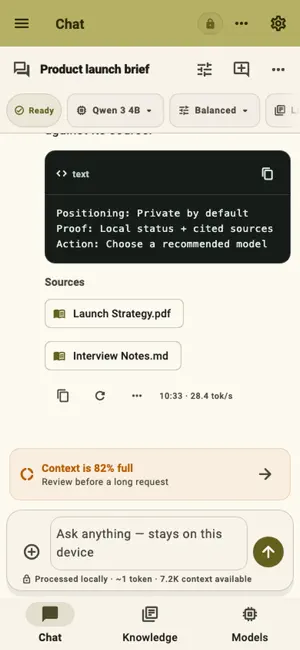
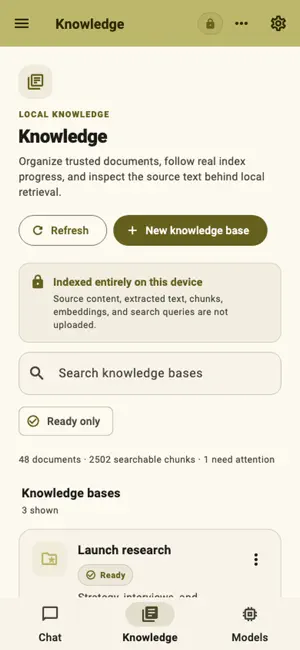


About QuickLLM - AI Model Manager
QuickLLM is a private local AI workspace designed for iOS and macOS. QuickLLM keeps inference, conversations, documents, embeddings, retrieval, and generated text on your device while making model fit and network purpose visible. KEY FEATURES: - Private local chat: Run conversations through packaged local inference with visible model, Profile, Knowledge, context, generation, and Stop state. - Model fit: Measure device capability, compare memory and storage needs, download verified models, and explain unsupported configurations. - Knowledge Bases: Ingest supported documents, build local indexes, retrieve grounded excerpts, and open citations at their source. - Profiles and LoRA: Save model, context, sampling, backend, and adapter combinations for repeatable work. - Templates and Actions: Reuse private prompts and run shared-text workflows that keep results available for copy, share, or conversation. - Portable control: Export conversations, run a desktop local API when explicitly enabled, and create encrypted backup and restore files. PERFECT FOR: - Private drafting, brainstorming, summarization, and coding assistance - Offline or local-only conversations with downloaded models - Question answering over personal PDFs, DOCX, Markdown, and text - Reusable local Profiles, Templates, Actions, and encrypted backups GETTING STARTED: - Run device diagnostics and choose a model that fits. - Download, verify, and load the model. - Start a conversation and choose a Profile. - Optionally create a Knowledge Base, add trusted documents, and verify citations. - Export important work or create an encrypted backup before moving or deleting data. PRIVACY & SECURITY: - Prompts, conversations, documents, embeddings, retrieval, and generated text stay on-device. - Mobile share inputs are temporary and external originals are never deleted. - App-owned workspace data and managed copies can be removed through the reviewed privacy workflow. FREE AND PRO: - Start with a seven-day ad-free trial. - Free keeps the full feature set and may show mobile advertising or a daily desktop support reminder. - QuickLLM Pro removes ads and reminders through a yearly subscription or a one-time lifetime purchase. Terms of Use: https://kakitiro.com/quickapps/quickllm/terms/
App privacy
The developer, KAZUHIRO KAKIMOTO, reported these privacy practices to Apple.
Data Linked to You
The following data, which may be collected and linked to your identity, may be used for the following purposes:
- Location: Coarse Location
- Identifiers: Device ID
- Usage Data: Product Interaction, Advertising Data
Used for: Third-Party Advertising, Developer’s Advertising or Marketing, Analytics, App Functionality
Data Not Linked to You
The following data, which may be collected but is not linked to your identity, may be used for the following purposes:
- Diagnostics: Performance Data, Other Diagnostic Data, Crash Data
Used for: Third-Party Advertising, Developer’s Advertising or Marketing, Analytics, App Functionality
Alternatives to QuickLLM - AI Model Manager
Looking for apps like QuickLLM - AI Model Manager? Here are 6 similar apps on the App Store. The highest rated is NobodyWho Chat (5.0/5), and all 6 are free to download.
-
 MextAI: AI Workspace
-
 Gizmo: Local AI Agent
-
 smallm - local AI chat
-
 NobodyWho Chat
5.0
NobodyWho Chat
5.0
-
 Observer AI
-
 Pocket Council
| App | Rating | Price | Last updated | Compare |
|---|---|---|---|---|
| QuickLLM - AI Model Manager | – | Free | August 20, 2026 | |
| MextAI: AI Workspace | – | Free | Sep 17, 2026 | Compare |
| Gizmo: Local AI Agent | – | Free | Jun 30, 2026 | Compare |
| smallm - local AI chat | – | Free | May 8, 2026 | Compare |
| NobodyWho Chat | 5.0 / 5 (2) | Free | Sep 23, 2026 | Compare |
| Observer AI | – | Free | Sep 21, 2026 | Compare |
| Pocket Council | – | Free | Dec 24, 2025 | Compare |