

QuickDIY - Sketch & Build
KAZUHIRO KAKIMOTO Productivity iPhoneiPadiPod touchMac
QuickDIY - Sketch & Build is a free Productivity app for iPhone and iPad by KAZUHIRO KAKIMOTO. Requires iOS 13.0. Updated September 26, 2026.
- Price
- Free
- on the App Store
- Size
- 107 MB
- Age 4+
- Updated
- Sep 26
- 2026 · v5.0.4
Screenshots



About QuickDIY - Sketch & Build
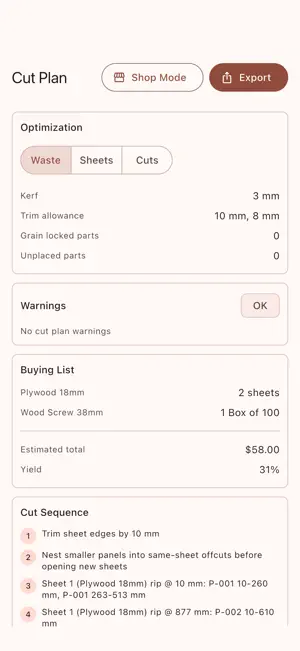
QuickDIY is a woodworking project and cut-planning tool designed for iOS and macOS. QuickDIY connects a simple dimension-driven project canvas to stock-aware cut planning and workshop-ready information. KEY FEATURES: - Dimensioned design: Create rectangular parts and place them in Top, Front, Side, or ISO views. - Material presets: Assign sheet goods, lumber, colors, grain direction, cost, and edge treatment. - Cut Plan: Account for stock size, kerf, trim allowance, grain lock, edge banding, and unplaced parts. - Parts and hardware: Track part labels, quantities, hardware, cost, and buying-list requirements. - Shop Mode: Use a read-only, larger-text view for the store or workshop. - Project export: Create shop-ready cut, label, assembly, and buying outputs while preserving .qdiy projects. PERFECT FOR: - Shelves, cabinets, boxes, workbenches, and simple furniture - Woodworkers planning sheet goods and dimensional lumber - Estimating stock, hardware, edge banding, and project cost - Taking a clear cut sequence and buying list into the shop GETTING STARTED: - Create a .qdiy project or begin with a template. - Add rectangular parts and enter exact width, depth, thickness, and position. - Assign materials, grain, labels, edge banding, and hardware. - Open Cut Plan and resolve unplaced parts or stock warnings. - Review Shop Mode, then export the cut, label, buying, or assembly output you need. PRIVACY & SECURITY: - Projects and calculations are processed locally. - The Library scans only locations you configure. - Project metadata and exports stay in user-selected storage. - No account is required for core design work. FREE AND PRO: - Start with a seven-day ad-free trial. - Free keeps the full feature set and may show mobile advertising or a daily desktop support reminder. - QuickDIY Pro removes ads and reminders through a yearly subscription or a one-time lifetime purchase. Terms of Use: https://kakitiro.com/quickapps/quickdiy/terms/
App privacy
The developer, KAZUHIRO KAKIMOTO, reported these privacy practices to Apple.
Data Linked to You
The following data, which may be collected and linked to your identity, may be used for the following purposes:
- Location: Coarse Location
- Identifiers: Device ID
- Usage Data: Product Interaction, Advertising Data
Used for: Third-Party Advertising, Developer’s Advertising or Marketing, Analytics, App Functionality
Data Not Linked to You
The following data, which may be collected but is not linked to your identity, may be used for the following purposes:
- Diagnostics: Performance Data, Other Diagnostic Data, Crash Data
Used for: Third-Party Advertising, Developer’s Advertising or Marketing, Analytics, App Functionality