

LensLingo: Photo Translate
玉凤 崔 Photo & Video iPhoneiPadiPod touch
LensLingo: Photo Translate is a free Photo & Video app for iPhone and iPad by 玉凤 崔. Requires iOS 18.0. Updated August 7, 2026.
- Price
- Free
- on the App Store
- Size
- 3 MB
- Age 4+
- Updated
- Aug 7
- 2026 · v1.0.0
Screenshots
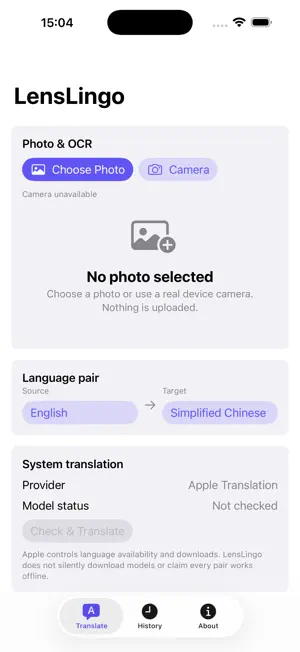
About LensLingo: Photo Translate
Translate text in photos with a reviewable, line-by-line workflow — no account required. Choose a photo or use the camera on a supported device. LensLingo uses Apple Vision to recognize text, keeps source lines editable, and connects supported Apple Translation language resources for line-by-line review. • Select a photo or capture one on a device with a camera • Inspect ordered OCR lines and confidence • Edit source text before translation • Choose a language pair and see language-resource availability • Compare source and translated lines, then copy reviewed text • Export Markdown or TXT review packages and revisit local history Photos and review packages stay on your device. Language availability and translation results depend on the languages and resources supported by iOS. LensLingo does not require an account.
App privacy
The developer, 玉凤 崔, reported these privacy practices to Apple.
Data Not Collected
The developer does not collect any data from this app.
Alternatives to LensLingo: Photo Translate
Looking for apps like LensLingo: Photo Translate? Here are 6 similar apps on the App Store. The highest rated is UnmarkIt (4.9/5), and all 6 are free to download.
-
 AI Stickers - Your Face Pack
-
 Live2play
-
 pixOcam
-
 UnmarkIt
4.9
UnmarkIt
4.9
-
 Videos to Photos / Images 2
4.8
Videos to Photos / Images 2
4.8
-
 Photo Metadata EXIF Remover
4.1
Photo Metadata EXIF Remover
4.1
| App | Rating | Price | Last updated | Compare |
|---|---|---|---|---|
| LensLingo: Photo Translate | – | Free | August 7, 2026 | |
| AI Stickers - Your Face Pack | – | Free | Sep 22, 2026 | Compare |
| Live2play | – | Free | Oct 1, 2026 | Compare |
| pixOcam | – | Free | Oct 6, 2026 | Compare |
| UnmarkIt | 4.9 / 5 (18) | Free | Jul 10, 2026 | Compare |
| Videos to Photos / Images 2 | 4.8 / 5 (150) | Free | Sep 26, 2025 | Compare |
| Photo Metadata EXIF Remover | 4.1 / 5 (161) | Free | Jul 12, 2024 | Compare |