

ShadowTag: Easy Label Printer
Ludwig Chafen Utilities iPhoneiPadiPod touch
ShadowTag: Easy Label Printer is a free Utilities app for iPhone and iPad by Ludwig Chafen. Requires iOS 17.0. Updated September 27, 2026.
- Price
- Free
- on the App Store
- Size
- 7 MB
- Age 4+
- Updated
- Sep 27
- 2026 · v1.7
Screenshots



About ShadowTag: Easy Label Printer
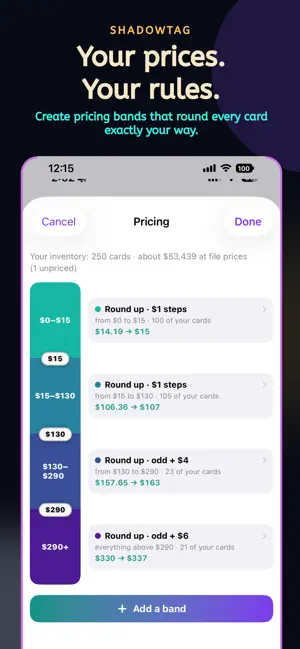
Your prices, on real stickers, from the phone in your pocket. ShadowTag turns your trading-card inventory into professional price labels—without rebuilding your collection or surrendering control of your prices. Import your file, choose your pricing rules, customize your label, and print an entire show from your iPhone. YOUR PRICES. YOUR RULES. • Your imported price is the price. ShadowTag does not second-guess it. • Pin any price so it stays exactly where you set it. • Build pricing bands for different value ranges. • Round to clean dollars, odd-dollar prices, even-dollar prices, or add your own bump. PRINT WITH CONFIDENCE • Select individual cards or print a full batch. • Quantities create the correct number of physical labels. • Pause and resume printing without losing your place. • Follow real sticker progress in the app and Dynamic Island. • Interrupted labels remain queued instead of being silently marked as printed. • Print through compatible Bluetooth thermal label printers. MAKE EVERY LABEL YOURS • Add the card name, your own text, logo, and QR code. • Preview the finished label before printing. • Keep a consistent, professional look across your entire booth. KNOW WHAT NEEDS PRINTING ShadowTag remembers your labels and separates new, changed, and previously printed cards, so you can update stale prices without reprinting everything. BRING YOUR INVENTORY WITH YOU Import compatible files from Collectr, Shiny, TCGplayer, and common spreadsheet formats. ShadowTag handles singles, graded cards, sealed products, quantities, and individual copies. SHADOWSNAP + SHADOWTAG Send scanned cards directly from ShadowSnap into ShadowTag, ready to price and print. Scan it. Price it. Print it. PRIVATE BY DESIGN Your inventory stays on your device. ShadowTag does not require an account and does not collect your personal data. Third-party product names are trademarks of their respective owners. ShadowTag is not affiliated with or endorsed by Collectr, Shiny, or TCGplayer.
What’s new
Version 1.7 · Updated September 27, 2026
Pricing your table just got faster. • New Detailed sticker: card number, set, and a condition or grade box (NM, PSA 10). Pick it in the Label studio. • "To print" list: see only the cards that need a new sticker, including ones whose price changed. • Quicker labelling: mark cards as already labelled, print just some of your copies, or tap a price to change it. • Smarter imports: see what a Collectr or TCGplayer file will change before it does, and re-import without doubling your counts. • Add singles, slabs or sealed products from the + button. • Many more card pictures, plus the 30th Celebration sets in search. • Tape counter: a heads-up before your roll runs out mid-show. • Printer fixes: the Nelko P21 Darkness slider works, no more false "lid open" stops, and printed QR codes scan reliably.
App privacy
The developer, Ludwig Chafen, reported these privacy practices to Apple.
Data Not Collected
The developer does not collect any data from this app.
Alternatives to ShadowTag: Easy Label Printer
Looking for apps like ShadowTag: Easy Label Printer? Here are 6 similar apps on the App Store. The highest rated is On Deck by MDC (5.0/5), and all 6 are free to download.
-
 On Deck by MDC
5.0
On Deck by MDC
5.0
-
 TapGuards
5.0
TapGuards
5.0
-
 JeilMTech PinMarking JS2200
-
 Hi There Print
-
 Trovie
4.8
Trovie
4.8
-
 Collector Pro TCG
5.0
Collector Pro TCG
5.0
| App | Rating | Price | Last updated | Compare |
|---|---|---|---|---|
| ShadowTag: Easy Label Printer | – | Free | September 27, 2026 | |
| On Deck by MDC | 5.0 / 5 (1) | Free | Sep 30, 2026 | Compare |
| TapGuards | 5.0 / 5 (3) | Free | Nov 29, 2025 | Compare |
| JeilMTech PinMarking JS2200 | – | Free | Oct 27, 2026 | Compare |
| Hi There Print | – | Free | Oct 26, 2026 | Compare |
| Trovie | 4.8 / 5 (18) | Free | Oct 12, 2026 | Compare |
| Collector Pro TCG | 5.0 / 5 (1) | Free | Jul 14, 2026 | Compare |