

Rosemary: Expense Tracker
Damir Kombikov Finance iPhoneiPadiPod touch
Rosemary: Expense Tracker is a free Finance app for iPhone and iPad by Damir Kombikov. Requires iOS 26.0. Updated October 12, 2026.
- Price
- Free
- on the App Store
- Size
- 8 MB
- Age 4+
- Updated
- Oct 12
- 2026 · v1.0.7
Screenshots



About Rosemary: Expense Tracker
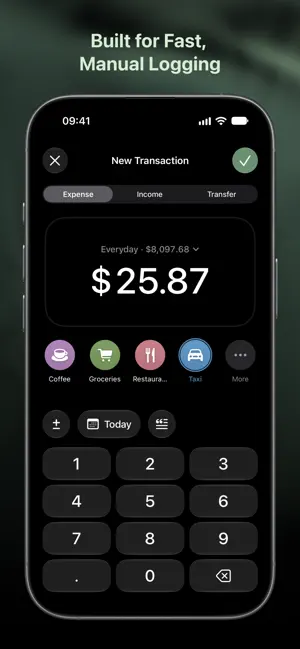
Rosemary is an expense tracker with manual entry. You write down what you spend, and the app keeps the record. Entering a Transaction Takes a Few Seconds A full-screen keypad rather than a form: the amount first, the category second. It does arithmetic in place, for when a bill is being split, and offers the two categories you have used most recently for similar amounts. Transfers between your own accounts are a separate mode, so moving money is never counted as spending. Several Currencies, and Crypto Alongside Them Accounts can be held in any number of currencies. Rosemary converts them into one base currency for the total, using rates that are downloaded and then cached, so the figures are there without a connection. Bitcoin, Ethereum and other coins are kept in the same list as cash and cards, and priced the same way. Where the Month Went, Category by Category A month or a year at a time. Each category is a row: its share of the period, the amount, and how it compares with the period before. The chart doubles as the period picker — a tap on a bar moves to that month. Categories You Build Yourself Your own, with subcategories, from 77 symbols and twelve colors. The Data Stays on Your Devices There is no account to create and no server behind the app. Data is stored on the device and synced through your private iCloud, which only you can read. No analytics, no advertising, no tracking. Everything can be exported to CSV. What Rosemary Does not Do It does not connect to banks, does not categorize with AI, and does not scan receipts. Entry takes a few seconds and the record is yours. One Purchase, No Subscription Free for fourteen days, then a single purchase.
What’s new
Version 1.0.7 · Updated October 12, 2026
- Scheduled transactions: date a payment ahead or set it to repeat, then confirm it with one tap when it's due. - Plan next month: switch between this month and next and set both at once. - Smarter entry: Rosemary suggests a category from the amount you type, and a transfer's destination follows its source. - A redesigned Plan screen, with categories grouped under their parent and a clear "on track" summary. - Stats now say when a category goes over its plan, and the period comparison waits for enough data before showing a change. - Fixed: incoming transfers now appear on the receiving account's screen.
App privacy
The developer, Damir Kombikov, reported these privacy practices to Apple.
Data Not Collected
The developer does not collect any data from this app.
Alternatives to Rosemary: Expense Tracker
Looking for apps like Rosemary: Expense Tracker? Here are 6 similar apps on the App Store. The highest rated is The Vault: Wallet (5.0/5), and all 6 are free to download.
-
 The Vault: Custody
-
 The Vault: Wallet
5.0
-
 Altery
3.3
-
 Generali Srbija
2.2
-
 Bill Organizer
4.4
-
 Citycom Old
3.7
| App | Rating | Price | Last updated | Compare |
|---|---|---|---|---|
| Rosemary: Expense Tracker | – | Free | October 12, 2026 | |
| The Vault: Custody | – | Free | Oct 17, 2026 | Compare |
| The Vault: Wallet | 5.0 / 5 (1) | Free | Sep 28, 2026 | Compare |
| Altery | 3.3 / 5 (7) | Free | Sep 24, 2026 | Compare |
| Generali Srbija | 2.2 / 5 (13) | Free | Aug 31, 2026 | Compare |
| Bill Organizer | 4.4 / 5 (4,894) | Free | Feb 5, 2026 | Compare |
| Citycom Old | 3.7 / 5 (23) | Free | Apr 16, 2026 | Compare |