

FocusPass: App Blocker
James Gray Productivity iPhoneiPadiPod touchApple Watch
FocusPass: App Blocker is a free Productivity app for iPhone and iPad by James Gray. Requires iOS 18.0. Updated November 14, 2026.
- Price
- Free
- on the App Store
- Size
- 18 MB
- Age 4+
- Updated
- Nov 14
- 2026 · v2.3.0
Screenshots

About FocusPass: App Blocker
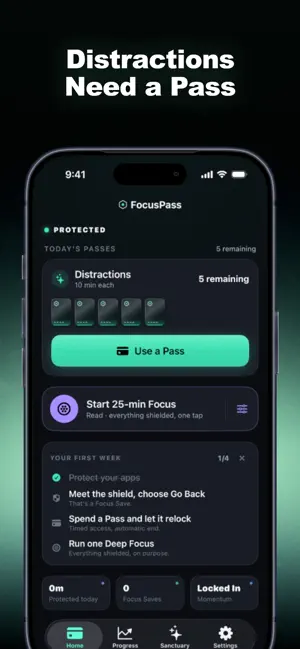
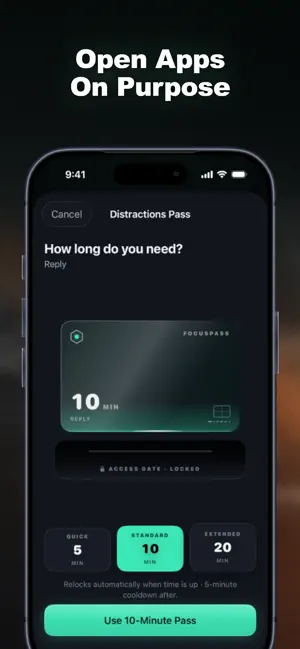
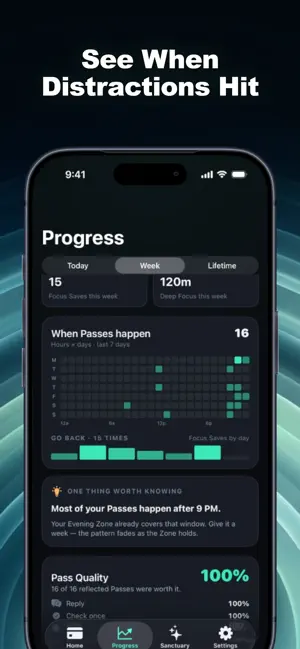
Your distracting apps need a Pass. FocusPass blocks the apps you choose with Apple's Screen Time, lets you take a short timed Pass when you really need one, and shows the time you take back when you choose not to. NEW: TIME RECLAIMED Every time a shield holds and you choose Go Back, that's a moment reclaimed. Add the Deep Focus you actually finish and the Pass time you hand back by ending a Pass early, and you get Time Reclaimed: a calm jar that fills by day, week and month. Every number comes from something that really happened on your device. Nothing is estimated. WEEKLY GOALS THAT BEND, NOT BREAK Pick a goal that fits your week: fewer Passes a day, no Passes for a Wallet before a set hour, nothing after a set hour, or a few minutes of Deep Focus each day. Each week allows one "life happens" day, so a single slip bends your streak instead of breaking it. FOCUS LEVELS AND SEASONS Kept weeks raise your Focus Level, from Spark to Steady, Anchored and Unshakeable. Levels never drop. Seasons turn every four weeks into a chapter with three goals and end with a recap card you can share. WHERE PASSES GO See the hours and Wallets that cost you the most Passes, worked out on your device, so you know where a Focus Zone would help. ON YOUR HOME AND LOCK SCREEN Widgets show Passes left, what's protected and your Time Reclaimed at a glance. HOW A PASS WORKS Pick apps, categories or websites with Apple's Screen Time picker. Opening one shows a shield with two choices: GO BACK, or USE A PASS for a set length with an optional reason. The relock is scheduled with iOS before the app opens, so protection resumes when the Pass ends even if FocusPass is closed. End a Pass early any time. BUILD RULES FOR YOUR ROUTINE • Wallets: a daily Pass plan for a group of apps • Focus Zones: protected hours for Work, Study, Evening or Sleep • Task Access: a few minutes for one specific task when you're out of Passes • Essentials: apps you must always reach stay available • Deep Focus: 25 to 90-minute sessions from Home, Siri, Apple Watch or a widget, with a Live Activity YOU STAY IN CONTROL Turn Off All Protection always works and is never locked behind a purchase or a streak. Protection Check shows what's working and how to fix what isn't. If a parent or organisation manages Screen Time, their settings come first. PRIVATE BY DESIGN No account. No ads. No analytics SDKs. Your rules, goals and history stay on your device, and Apple keeps your app selections private, even from FocusPass. Purchases are validated through Apple and RevenueCat using an anonymous ID. FREE AND PRO Free is useful forever: shields, Go Back, timed Passes, automatic relocking, one Wallet, one Focus Zone, one Deep Focus session a day, today's Time Reclaimed, one weekly goal, Focus Levels and 7-day insights. FocusPass Pro adds up to 6 Wallets with 4 Focus Zone schedules each, up to 3 weekly goals, Seasons with recap cards, full Time Reclaimed history, 30 and 90-day insights, the Time Reclaimed widget, custom Pass lengths, unlimited Deep Focus, Task Access, Rule Profiles and premium Pass materials. Pro never sells a way around your own rules. Works on iPhone and iPad with iOS 18 or later. The Apple Watch app shows your status and focus timer; blocking always happens on iPhone. FocusPass Pro is an auto-renewing subscription, billed monthly or yearly. The yearly plan includes a free trial for eligible new subscribers. Prices appear in your local currency before purchase. Payment is charged to your Apple Account and renews unless cancelled at least 24 hours before the period ends. Manage or cancel any time in Settings > Apple Account > Subscriptions. Terms of Use: https://www.apple.com/legal/internet-services/itunes/dev/stdeula/ Privacy Policy: https://ifocuspass.rork.app/privacy.html
What’s new
Version 2.3.0 · Updated November 14, 2026
FocusPass 2.3 is about the time you take back. • Time Reclaimed: every Go Back at a shield, every finished Deep Focus and every Pass you end early fills a calm jar for the day. Pro adds week and month history. • Weekly goals: pick a goal like fewer Passes on weekdays or no Passes after 9 PM. One "life happens" day a week bends your streak instead of breaking it. • Focus Levels: kept weeks take you from Spark to Steady, Anchored and Unshakeable. Levels never drop. • Seasons (Pro): four-week chapters with three goals and a recap card to share. • Where Passes go: the hours and Wallets that cost you the most Passes. • A new Time Reclaimed widget for the Home and Lock Screen (Pro). • A clearer FocusPass Pro screen with Restore Purchases, Terms and Privacy always visible. Everything is still counted on your device.
App privacy
The developer, James Gray, reported these privacy practices to Apple.
Data Not Linked to You
The following data, which may be collected but is not linked to your identity, may be used for the following purposes:
- Purchases: Purchase History
Used for: Analytics, App Functionality
Alternatives to FocusPass: App Blocker
Looking for apps like FocusPass: App Blocker? Here are 6 similar apps on the App Store.
-
 AetherLife
-
 MyLife - Your Life Organized
-
 Apper: Save Apps as Ideas
-
 NextUp: Client Meeting Notes
-
 App Vault – Apps & Usage
-
 Pact: App Blocker & Time Limit
| App | Rating | Price | Last updated | Compare |
|---|---|---|---|---|
| FocusPass: App Blocker | – | Free | November 14, 2026 | |
| AetherLife | – | Free | May 29, 2026 | Compare |
| MyLife - Your Life Organized | – | Free | Nov 14, 2026 | Compare |
| Apper: Save Apps as Ideas | – | Free | Nov 18, 2026 | Compare |
| NextUp: Client Meeting Notes | – | Free | Nov 11, 2026 | Compare |
| App Vault – Apps & Usage | – | Free | Nov 5, 2026 | Compare |
| Pact: App Blocker & Time Limit | – | Free | Nov 14, 2026 | Compare |