

TrackOSC
Joel Lewis Developer Tools iPhoneiPadiPod touch
TrackOSC is a free Developer Tools app for iPhone and iPad by Joel Lewis. Rated 5.0/5 from 2 ratings. Requires iOS 18.0. Updated September 24, 2026.
- Rating
- 5.0
- 2 ratings
- Price
- Free
- on the App Store
- Size
- 4 MB
- Age 4+
- Updated
- Sep 24
- 2026 · v1.6.0
Screenshots
About TrackOSC
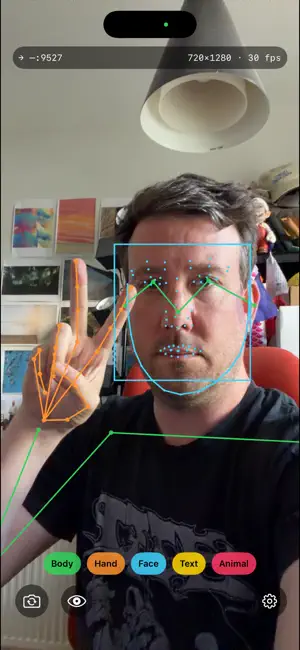
TrackOSC turns your iPhone into a wireless motion-tracking camera. Point it at a person and it streams live tracking data – body poses in 2D and 3D, hand poses, face landmarks, recognised text, animals, people, barcodes, outlines, the horizon and rectangles – over your local network as OSC (Open Sound Control) messages, ready for TouchDesigner, Max/MSP, Processing, openFrameworks, Pure Data, SuperCollider, Unity, or anything else that speaks OSC. All processing happens on-device with Apple's Vision framework. No video ever leaves your phone – only numbers. WHAT IT TRACKS • 2D Body: a 17-joint skeleton in pixels • 3D Body: a 17-joint skeleton in metres – real depth from a single camera, with each joint's pixel position alongside • Hand: 21 joints per hand, up to two hands • Face: the face box, head rotation and jawline contour, and Face Landmarks: the full 76-point constellation – eyes, pupils, brows, nose, lips, jaw • Text: recognised text with its bounding box • Animal: cat and dog boxes, and Animal Pose: full 25-joint cat and dog skeletons • Human: whole-body boxes that keep counting people at distances where pose estimation gives up • Barcode: QR codes and 1D/2D barcodes with position, corners, symbology and payload • Contours: every edge outline in the frame as closed polylines • Horizon: the horizon's angle and a line across the frame • Rectangles: screens, paper, doors – a box plus four corners FEATURES • Live tracking overlays on the camera view, colour-coded per detector • One chip per detector – run just what you need for the best frame rate; 3D Body runs in its own lane so it never slows the others • Front or back camera, with a natural selfie mirror (wire data is never mirrored) • Portrait and landscape, with an orientation lock for phones mounted on tripods and rigs • Automatic discovery of receivers on your network via Bonjour – or type any IP and port • Hide-video mode: tracking overlay only, on black – for stage and installation use • Free, notarised macOS companions – a Receiver with 2D and 3D views, a Recorder that records and replays the stream, a Speaker that reads it aloud, and a Router that turns it into MIDI, Shortcuts, key presses and HTTP – plus open-source receiver examples for Processing, Python, p5.js, TouchDesigner, Max/MSP, Pure Data, openFrameworks and SuperCollider, all from the project page COMPATIBILITY TrackOSC speaks exactly the same OSC wire format as VisionOSC and PoseOSC, so existing receivers and patches work unchanged. The newer detectors arrive as additional messages that older receivers simply ignore. Coordinates are in pixels, origin top-left, with the frame dimensions in every message. PRIVACY No accounts, no analytics, no ads. Camera frames are analysed on the device and discarded; tracking data is sent only to the destination you choose. TrackOSC is open source: https://github.com/JGL/TrackOSC
What’s new
Version 1.6.0 · Updated September 24, 2026
Three new things to track, a clearer face, and a new chip for landmarks. • Face Landmarks: a chip of its own next to Face. Face sends the box with head angles and the jawline; Face Landmarks sends the full 76-point constellation – eyes, pupils, brows, nose, lips, jaw – now drawn feature by feature on the overlay. • Contours: every edge outline in the frame, simplified and streamed as closed polylines. • Horizon: the angle of the horizon and a line across the frame. • Rectangles: screens, sheets of paper, doors – box plus four corners in the rectangle's own orientation. • Twelve detector chips, in a row that scrolls sideways. The new data goes out as three additional OSC messages (/contours/arr, /horizon, /rectangles/arr); every earlier message is unchanged, so existing receivers keep working. The free macOS apps – Receiver, Recorder, Speaker and Router – gain a true full-screen mode with a chosen background colour, and a Senders setting so a recording played back is never mixed with a live phone. Everything is still processed on the device; no video ever leaves your phone.
App privacy
The developer, Joel Lewis, reported these privacy practices to Apple.
Data Not Collected
The developer does not collect any data from this app.
Alternatives to TrackOSC
Looking for apps like TrackOSC? Here are 6 similar apps on the App Store. The highest rated is ZIGCAM (5.0/5), and all 6 are free to download.
-
 ZIGCAM
5.0
-
 NeoServer SSH Mosh Terminal
4.8
-
 Fonts - Find, install any font
4.1
-
 daily.dev: AI & Tech News Feed
4.3
-
 SSH Client - Terminal & Termux
3.6
-
 Xogot: Godot for iPad & iPhone
4.1
| App | Rating | Price | Last updated | Compare |
|---|---|---|---|---|
| TrackOSC | 5.0 / 5 (2 ratings) | Free | September 24, 2026 | |
| ZIGCAM | 5.0 / 5 (1) | Free | Mar 24, 2026 | Compare |
| NeoServer SSH Mosh Terminal | 4.8 / 5 (299) | Free | Oct 7, 2026 | Compare |
| Fonts - Find, install any font | 4.1 / 5 (103) | Free | Aug 11, 2026 | Compare |
| daily.dev: AI & Tech News Feed | 4.3 / 5 (41) | Free | Oct 30, 2026 | Compare |
| SSH Client - Terminal & Termux | 3.6 / 5 (407) | Free | Oct 15, 2026 | Compare |
| Xogot: Godot for iPad & iPhone | 4.1 / 5 (161) | Free | Nov 2, 2026 | Compare |
Compare TrackOSC with the top alternatives: ratings, updates, ASO score and keyword gaps →