

Calisthenics Timer
Joshua Van der Merwe Photo & Video iPhoneiPadiPod touch
Calisthenics Timer is a free Photo & Video app for iPhone and iPad by Joshua Van der Merwe. Requires iOS 15.1. Updated August 26, 2026.
- Price
- Free
- on the App Store
- Size
- 32 MB
- Age 4+
- Updated
- Aug 26
- 2026 · v1.0.3
Screenshots



About Calisthenics Timer
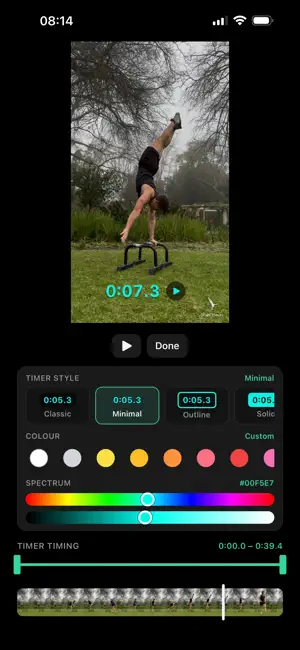
Add a timer to your hold and see how long it actually was. Pick a clip, drop a stopwatch on it, and set exactly when it starts and stops. Add text and drawings if desired. You see the result while you edit it, then export the video with all of it baked in. For handstands, planches, levers, and anything else you want to time. WHAT YOU CAN DO • Place a stopwatch and set its start and end to the frame • Four timer styles, and any colour you want • Drag, pinch and rotate anything on the video • Add as many text notes as you need, each with its own timing • Style captions properly: weight, opacity, shadow, outline, label • Draw over the video, and time each stroke separately • Watch the whole thing full screen before you commit • Export at original, 1080p or 720p • Save to Photos or Files, or share it straight out YOUR VIDEO NEVER LEAVES YOUR PHONE Everything is processed on the device. There's no account, and nothing is uploaded. Calisthenics Timer is free, with ads. Free exports carry a small Cali Timer watermark — tap it before exporting to watch a rewarded ad and clear it from that video. If there's no ad to show, it comes off anyway.
What’s new
Version 1.0.3 · Updated August 26, 2026
Text overlays got real controls. Thickness, opacity, shadow, border and label are each their own setting now instead of four fixed presets, so a caption can look the way you want it. • Shadow — how strong it is and which way it falls • Border — an outline around the letters themselves • Label — a plate behind the text, with its own colour and translucency • Full colour spectrum for text, timer and drawing colours • Hold any timing lane to zoom into the timeline Fixes: overlays now show on the very first frame of a trimmed clip, a faded caption exports faded instead of solid, and the text panel no longer hides behind the keyboard on smaller iPhones.
App privacy
The developer, Joshua Van der Merwe, reported these privacy practices to Apple.
Data Used to Track You
The following data may be used to track you across apps and websites owned by other companies:
- Identifiers: Device ID
Data Linked to You
The following data, which may be collected and linked to your identity, may be used for the following purposes:
- Location: Coarse Location
- Identifiers: Device ID
- Usage Data: Product Interaction, Advertising Data
Used for: Third-Party Advertising, Developer’s Advertising or Marketing, Analytics
Data Not Linked to You
The following data, which may be collected but is not linked to your identity, may be used for the following purposes:
- Diagnostics: Performance Data, Other Diagnostic Data, Crash Data
- Purchases: Purchase History
Used for: Third-Party Advertising, Developer’s Advertising or Marketing, Analytics, App Functionality
Alternatives to Calisthenics Timer
Looking for apps like Calisthenics Timer? Here are 6 similar apps on the App Store. The highest rated is HyperChrono (5.0/5), and all 6 are free to download.
-
 HyperChrono
5.0
-
 Video Stopwatch Camera
3.0
-
 Simple Sepia Photo
5.0
-
 Buongiorno AI
4.3
-
 Pictify AI: Avatar Generator
4.2
-
 How Attractive am I Test
2.4
| App | Rating | Price | Last updated | Compare |
|---|---|---|---|---|
| Calisthenics Timer | – | Free | August 26, 2026 | |
| HyperChrono | 5.0 / 5 (5) | Free | Mar 19, 2026 | Compare |
| Video Stopwatch Camera | 3.0 / 5 (1) | Free | Oct 15, 2026 | Compare |
| Simple Sepia Photo | 5.0 / 5 (3) | Free | Jul 15, 2026 | Compare |
| Buongiorno AI | 4.3 / 5 (9) | Free | Sep 16, 2026 | Compare |
| Pictify AI: Avatar Generator | 4.2 / 5 (18) | Free | Oct 19, 2026 | Compare |
| How Attractive am I Test | 2.4 / 5 (10) | Free | Oct 16, 2026 | Compare |
Compare Calisthenics Timer with the top alternatives: ratings, updates, ASO score and keyword gaps →