

PhotoSweep: Swipe & Clean
海燕 董 Photo & Video iPhoneiPadiPod touch
PhotoSweep: Swipe & Clean is a free Photo & Video app for iPhone and iPad by 海燕 董. Requires iOS 16.0. Updated October 25, 2026.
- Price
- Free
- on the App Store
- Size
- 5 MB
- Age 9+
- Updated
- Oct 25
- 2026 · v1.0.8
Screenshots


About PhotoSweep: Swipe & Clean
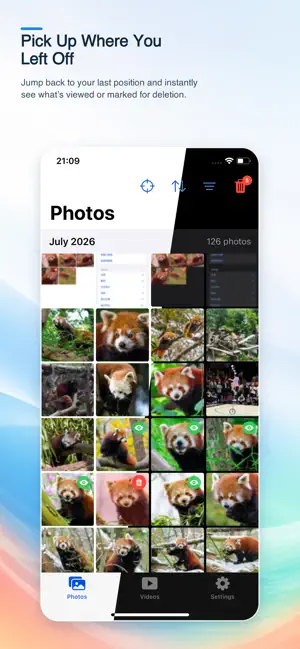
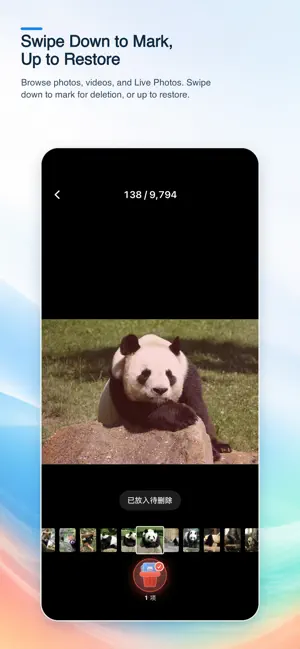
PhotoSweep — Swipe to tidy up your photo library Photos and videos keep piling up and taking over your storage, but where do you begin? Which ones have you reviewed, and which ones are ready to go? Let PhotoSweep help you sort it all out. [Smart Duplicate Detection] Turn on the Duplicates filter and PhotoSweep will continuously identify potential duplicate photos right on your device, showing each group as soon as it is found. Compare photos group by group, then decide what to keep or add to Pending Deletion. Results are stored locally to reduce repeat scans, and nothing is ever deleted automatically. [Organize with a Swipe] Swipe left or right to view the previous or next item. Don’t want to keep something? Swipe down to add it to Pending Deletion. Changed your mind? Swipe up to bring it right back. Everything marked for deletion is collected on one confirmation page. Only after you make the final call will PhotoSweep ask the iOS system photo library to delete those items—so organizing stays fast and worry-free. Enjoy the familiar feel of the native iOS Photos experience, with more efficient organizing tools: • Smartly identify and group potential duplicate photos • Mark items as reviewed or pending deletion • Sort by date or choose a specific album • Filter out reviewed, pending-delete, or duplicate items • Jump back to where you left off • Browse and organize photos, videos, and Live Photos • Preview videos directly; long-press to play Live Photos • Track how many items you’ve browsed, marked, and cleaned • Estimate how much storage you can reclaim [Privacy Protection] Browsing, filtering, marking, organizing, and duplicate detection all happen locally on your device. Nothing is uploaded to our servers. Duplicate detection uses only thumbnails currently available on your device and will not download iCloud originals for analysis. Your browsing progress, Pending Deletion records, and detection results are also stored only on your current device. Swiping down only adds an item to Pending Deletion—it does not delete it immediately. The app asks iOS to perform the deletion only after you confirm again on the Pending Deletion page. Your photo library always stays in your hands. Fewer taps, more ease. One swipe to lighten your photo library. Terms of Use (EULA): https://www.apple.com/legal/internet-services/itunes/dev/stdeula/ Privacy Policy: https://photosweep.cchdb.top/privacy.html Contact: [email protected] Developer: CC Studio
What’s new
Version 1.0.8 · Updated October 25, 2026
Improved app interactions.
App privacy
The developer, 海燕 董, reported these privacy practices to Apple.
Data Not Collected
The developer does not collect any data from this app.
Alternatives to PhotoSweep: Swipe & Clean
Looking for apps like PhotoSweep: Swipe & Clean? Here are 6 similar apps on the App Store. The highest rated is Photo Cleaner - Swipe44 (5.0/5), and all 6 are free to download.
-
 DupeLens: Photo Cleaner
-
 Photo Cleaner - Swipe44
5.0
Photo Cleaner - Swipe44
5.0
-
 Sweep : Clean Up Camera Roll
5.0
Sweep : Clean Up Camera Roll
5.0
-
 浣熊吃照片 - 相册清理照片整理
-
 CleanSpace:Photo Video Cleaner
-
 Clearoll: Screenshot Cleaner
| App | Rating | Price | Last updated | Compare |
|---|---|---|---|---|
| PhotoSweep: Swipe & Clean | – | Free | October 25, 2026 | |
| DupeLens: Photo Cleaner | – | Free | Oct 17, 2026 | Compare |
| Photo Cleaner - Swipe44 | 5.0 / 5 (6) | Free | Oct 4, 2026 | Compare |
| Sweep : Clean Up Camera Roll | 5.0 / 5 (1) | Free | Sep 9, 2026 | Compare |
| 浣熊吃照片 - 相册清理照片整理 | – | Free | May 21, 2026 | Compare |
| CleanSpace:Photo Video Cleaner | – | Free | Jul 23, 2026 | Compare |
| Clearoll: Screenshot Cleaner | – | Free | Oct 18, 2026 | Compare |