

EML & MSG Email File Viewer
Sheenu Jain Utilities iPhoneiPadiPod touch
EML & MSG Email File Viewer is a free Utilities app for iPhone and iPad by Sheenu Jain. Requires iOS 17.0. Updated October 23, 2026.
- Price
- Free
- on the App Store
- Size
- 18 MB
- Age 4+
- Updated
- Oct 23
- 2026 · v1.2
Screenshots


About EML & MSG Email File Viewer
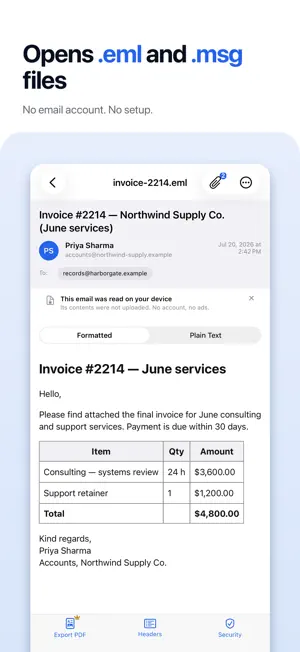
Opens .eml and .msg email files, and the winmail.dat attachments other apps refuse. No email account, nothing uploaded. Free. One Pro unlock: PDF export. Open, read, search, get attachments out and scan whole folders. Review EML and MSG records on iPhone, or use a true three-column workspace on iPad for professional work. Files are parsed entirely on your device; Remote Content Off blocks external loads, and Security Check summarizes on-device indicators. Preview attachments, search within the message, and inspect full headers or raw source, all free. With Pro, export Letter/A4 PDFs with metadata, attachment inventory, and page numbers. OPEN EML AND MSG FILES FROM ANYWHERE • Open .eml and .msg files from the Files app, Mail attachments, AirDrop, iCloud Drive, and third-party storage providers • Scan a whole folder: recursive discovery collects every EML and MSG file into one list • Recent files stay one tap away • Also opens .oft templates, .emlx files, and .mbox archives: page through every message in an archive • Opens winmail.dat attachments too (the file Windows mail servers send that other apps refuse), including its attachments and meeting details BUILT FOR PROFESSIONAL REVIEW • iPad: a real three-column workspace shows the message list, record details with attachments, and the message body side by side • iPhone: a focused reader with the same record controls • Search within the message and jump from match to match ON-DEVICE PROCESSING • Your files are parsed on your device and never uploaded; no account, no ads, no cross-app tracking • Remote Content Off blocks external images and resources before they load • Security Check summarizes indicators found in the opened file, such as links, attachments, and authentication headers. Plain information, never a verdict CLEAN PDF RECORDS (PRO) • Unlocked with Pro; everything else in this app is free • Export a finished Letter or A4 PDF of the message • Include optional metadata, an attachment inventory, and page numbers • Share or store the record wherever your files live INSPECT THE ORIGINAL SOURCE • Full headers and raw source, exactly as stored in the file • Authentication-Results shown verbatim: SPF, DKIM, and DMARC as reported ATTACHMENTS AT A GLANCE • See every attachment with its name, type, and size • Preview supported types full screen with Quick Look WORKS OFFLINE, SPEAKS YOUR LANGUAGE • Everything works without a network connection • Interface available in English, German, French, Spanish, Italian, Japanese, Korean, Russian, Vietnamese, Brazilian Portuguese, Simplified Chinese, and Traditional Chinese COMMON USES • Open .eml files exported from webmail or desktop mail apps • Review .msg message files from work archives • Save important messages as clean PDF records for your files (Pro) Questions, feedback, or a file that will not open? Visit the support page from the app. Every report is read. Privacy Policy: https://eml-msg-viewer.vercel.app/privacy Terms of Use (EULA): https://www.apple.com/legal/internet-services/itunes/dev/stdeula/
What’s new
Version 1.2 · Updated October 23, 2026
Version 1.2 opens more of the files people send you, and makes long emails easier to read. • Zip files of emails now open, and so do .mbox mailboxes up to 1 GB. • An email attached to an email opens in the viewer, including an Outlook message inside another. • Meeting invitations show the event, with Add to Calendar. • Office files, PDFs and photos open in a preview instead of showing an error. • Quick Look: in Files and Mail, see who sent an email, when, and what is attached, without opening the app. • A simpler home screen: Open File and your Recent files. Files shared from other apps stay there and keep opening. • The email you were reading is still on screen after iOS closes the app. • Long emails scroll as one page. On iPhone, swipe from the edge to go back. • Find in Email takes you straight to the message text. • On iPad, drag emails in and attachments out. Keyboard shortcuts on iPad and Mac. • New: Report a Problem with This Email, in the ⋯ menu on iPhone and below the actions on iPad. It sends only app and device details, never your file. • Four new interface languages: Korean, Russian, Vietnamese and Traditional Chinese. • Stability fixes on iPad and Mac.
App privacy
The developer, Sheenu Jain, reported these privacy practices to Apple.
Data Not Linked to You
The following data, which may be collected but is not linked to your identity, may be used for the following purposes:
- Identifiers: Device ID
- Usage Data: Product Interaction
- Diagnostics: Crash Data, Performance Data, Other Diagnostic Data
Used for: Analytics
Alternatives to EML & MSG Email File Viewer
Looking for apps like EML & MSG Email File Viewer? Here are 6 similar apps on the App Store. The highest rated is Horista (5.0/5), and all 6 are free to download.


| App | Rating | Price | Last updated | Compare |
|---|---|---|---|---|
| EML & MSG Email File Viewer | – | Free | October 23, 2026 | |
| EML Buddy | – | Free | Aug 11, 2026 | Compare |
| EML Forensic Viewer | – | Free | May 26, 2026 | Compare |
| マドベヤ - 写真・動画を隠す保管庫 | – | Free | Sep 29, 2026 | Compare |
| CarletesAI | – | Free | Sep 1, 2026 | Compare |
| Proton SRL | – | Free | Apr 2, 2026 | Compare |
| Horista | 5.0 / 5 (2) | Free | Jun 7, 2026 | Compare |