

Fruit Timer
AKIHIRO OHNO Education iPhoneiPadiPod touch
Fruit Timer is a free Education app for iPhone and iPad by AKIHIRO OHNO. Requires iOS 17.0. Updated September 20, 2026.
- Price
- Free
- on the App Store
- Size
- 16 MB
- Age 4+
- Updated
- Sep 20
- 2026 · v2.0
Screenshots
About Fruit Timer
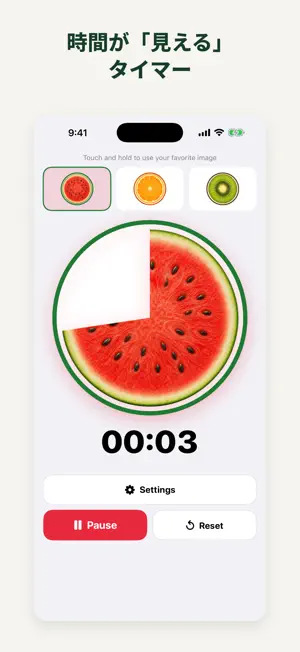
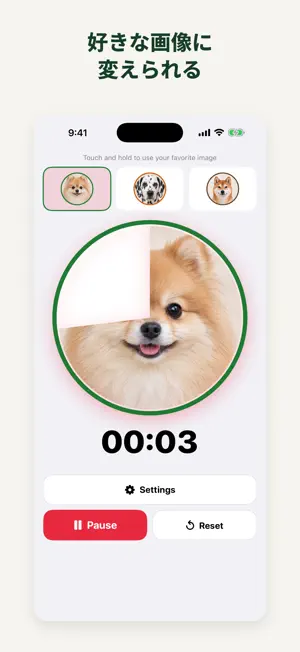
Fruit Timer is a visual countdown timer that gradually reveals an image clockwise as time passes. Follow the picture and large countdown to see how much time remains. Choose watermelon, orange, or kiwi, use a favorite photo, or try the included Pomeranian, Dalmatian, and Shiba Inu portraits. Use it for studying, focused work, getting ready, tidying up, and taking breaks. Tap the large time display, choose a duration, and tap Start. Switch images while the timer is running, or pause, resume, and reset whenever you need to. Make the timer your own • Touch and hold an image button to choose a dog portrait or a photo • Zoom and adjust the position to fit the circular display • Use Settings to apply one image to one, several, or all three slots • Adjust a saved image again or restore the original fruit for each slot Everyday features • Set a duration from 1 second to 59 minutes 59 seconds • Large remaining-time digits and a circular image that shows elapsed time • Pause, resume, reset, and repeat the same duration • Separate sound and vibration settings • A local completion notification when notifications are allowed • Live Activities with remaining time on the Lock Screen and in the Dynamic Island on supported iPhones • An option to keep the screen awake during a timer • Portrait display on iPhone; adaptable portrait, landscape, and window layouts on iPad • An optional hiragana and katakana display mode when using Japanese • 21 language and regional localizations No account is required, and there are no ads. The timer, included dog portraits, and editing of imported images work offline. Selected photos are stored in the app and are not uploaded to a developer-operated server. Your original photos are not modified. No in-app purchase is needed to use the timer or image features. Settings includes an optional “Buy the developer a coffee” purchase. This consumable support purchase can be made more than once, provides no extra features or benefits, and is not a subscription. Notifications and Live Activities depend on your device and system settings. Loading a photo from iCloud, making a support purchase, or opening store and support pages may require an internet connection.
What’s new
Version 2.0 · Updated September 20, 2026
Version 2.0 brings your favorite images to Fruit Timer. • Use a photo in one, several, or all three image slots. Zoom, adjust its position, edit it again, or restore the original fruit. • Choose from three included dog portraits: Pomeranian, Dalmatian, and Shiba Inu. Touch and hold an image button or open Settings to get started. • Native iPad support adapts to portrait, landscape, window sizes, and larger text. iPhone now uses a consistent portrait layout. • Live Activities show remaining time on the Lock Screen and in the Dynamic Island on supported iPhones. • A Japanese display option uses hiragana and katakana for app controls, notifications, and Live Activities. • A simpler main screen gives the image and time more space. Sound and vibration controls are now in Settings. • Image settings and developer support are easier to reach. The arithmetic check before the support screen has been removed. Support remains optional and provides no extra benefits. • A review link is available in Settings, with Apple's standard review request at occasional usage milestones. • Improved repeated photo changes, touch handling around zoomed images, timer recovery after background use, and notification and Live Activity updates. Existing preferences and saved images are preserved. Support for 21 language and regional localizations continues.
App privacy
The developer, AKIHIRO OHNO, reported these privacy practices to Apple.
Data Not Collected
The developer does not collect any data from this app.
Alternatives to Fruit Timer
Looking for apps like Fruit Timer? Here are 6 similar apps on the App Store.
-
 ことばのたね - 発語を促す写真の絵カード
-
 Uptie(アップティー) - 英作文と英語添削
-
 Done Timer: Kids Visual Timer
-
 Sage: Study Coach
-
 Fidget Spinner !
-
 WaCard – Kids Voice Flashcards
| App | Rating | Price | Last updated | Compare |
|---|---|---|---|---|
| Fruit Timer | – | Free | September 20, 2026 | |
| ことばのたね - 発語を促す写真の絵カード | – | Free | Jul 14, 2026 | Compare |
| Uptie(アップティー) - 英作文と英語添削 | – | Free | Aug 1, 2026 | Compare |
| Done Timer: Kids Visual Timer | – | Free | Oct 9, 2026 | Compare |
| Sage: Study Coach | – | Free | May 30, 2026 | Compare |
| Fidget Spinner ! | – | Free | Aug 19, 2026 | Compare |
| WaCard – Kids Voice Flashcards | – | Free | Mar 28, 2026 | Compare |
Compare Fruit Timer with the top alternatives: ratings, updates, ASO score and keyword gaps →