

CalendarNotes: Daily Planner
wada shuri Productivity iPhoneiPadiPod touch
CalendarNotes: Daily Planner is a free Productivity app for iPhone and iPad by wada shuri. Requires iOS 15.1. Updated October 4, 2026.
- Price
- Free
- on the App Store
- Size
- 38 MB
- Age 4+
- Updated
- Oct 4
- 2026 · v1.8
Screenshots


About CalendarNotes: Daily Planner
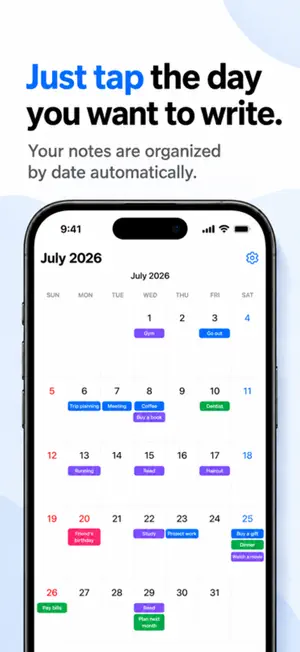
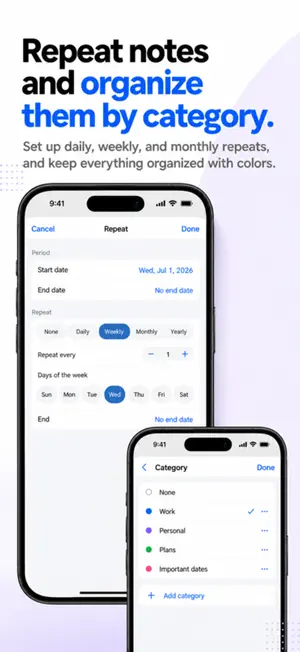
Tap a date on your calendar, and just start writing. That's the whole app — a simple notes app built right into your calendar. Bold text, bullet lists, checklists, quotes, and links are all supported, from a quick one-line journal entry to a full trip itinerary. It all fits inside a single calendar. No sign-up required. Everything you write stays only on your device. ■ Who it's for ・Anyone who wants to keep solid notes alongside their schedule, tied to the day ・Anyone who wants to keep a packing list or itinerary linked to a specific date ・Anyone who wants to jot down a shopping list or wish list the moment it comes to mind ・Anyone keeping a diary or health log somewhere private ・Anyone tired of cloud sync and account sign-ups ■ Write as much as you need Tap a date and that day's notes open right away. Headings, bold text, bullet lists, and checklists let you write anything from a quick note to a long entry. Everything saves automatically as soon as you stop typing — there's no save button. ■ Doubles as a planner Add as many notes as you like to a single day. Notes can span multiple days, and repeat daily, weekly, monthly, or yearly — weekly repeats even let you pick the day of the week. All date-related settings live together in Advanced Settings, so day to day you can just focus on writing. ■ Color-coded at a glance Add a category to a note and a colored dot shows up on the calendar. Categories can be freely added, renamed, and recolored — split work from personal, organize by family member, or however suits you. ■ Your notes never leave your device No account needed. What you write is never sent off your device — it's stored only on your phone, where no one, not even the developer, can see it. * The app connects to the network only to show the banner ad at the bottom of the screen. Your notes have nothing to do with the ads. ■ Take it with you Before switching phones or reinstalling, export a backup from the Settings screen — formatting and categories come back exactly as they were. The app also supports .ics import/export to exchange data with other calendar apps. * Notes don't sync across devices. When you switch phones, use backup export/import instead. ■ About pricing The app is free with no feature limits. A banner ad appears at the bottom of the screen. A one-time in-app purchase, "Remove Ads," removes this ad for good. It's not a subscription — pay once and you're done.
What’s new
Version 1.8 · Updated October 4, 2026
Minor bug fixes and internal improvements.
App privacy
The developer, wada shuri, reported these privacy practices to Apple.
Data Used to Track You
The following data may be used to track you across apps and websites owned by other companies:
- Identifiers: Device ID
Data Linked to You
The following data, which may be collected and linked to your identity, may be used for the following purposes:
- Identifiers: Device ID
Used for: Third-Party Advertising
Alternatives to CalendarNotes: Daily Planner
Looking for apps like CalendarNotes: Daily Planner? Here are 6 similar apps on the App Store.
-
 見やすいカレンダー
-
 Mycalia マイカリア|カレンダー予定管理
-
 Memon for Mobile
-
 MieruPlan 見える予定表
-
 Monthly Calendar & Agenda
-
 Meno - Calendar, To-Do & Notes
| App | Rating | Price | Last updated | Compare |
|---|---|---|---|---|
| CalendarNotes: Daily Planner | – | Free | October 4, 2026 | |
| 見やすいカレンダー | – | Free | May 15, 2026 | Compare |
| Mycalia マイカリア|カレンダー予定管理 | – | Free | Sep 15, 2026 | Compare |
| Memon for Mobile | – | Free | Oct 1, 2026 | Compare |
| MieruPlan 見える予定表 | – | Free | Aug 7, 2026 | Compare |
| Monthly Calendar & Agenda | – | Free | Oct 16, 2026 | Compare |
| Meno - Calendar, To-Do & Notes | – | Free | Sep 23, 2026 | Compare |