

Orbit Lab: Kepler Physics
MEHMET CANKER (TR) Education iPhoneiPadiPod touch
Orbit Lab: Kepler Physics is a free Education app for iPhone and iPad by MEHMET CANKER (TR). Requires iOS 15.1. Updated September 17, 2026.
- Price
- Free
- on the App Store
- Size
- 59 MB
- Age 4+
- Updated
- Sep 17
- 2026 · v1.0
Screenshots


About Orbit Lab: Kepler Physics
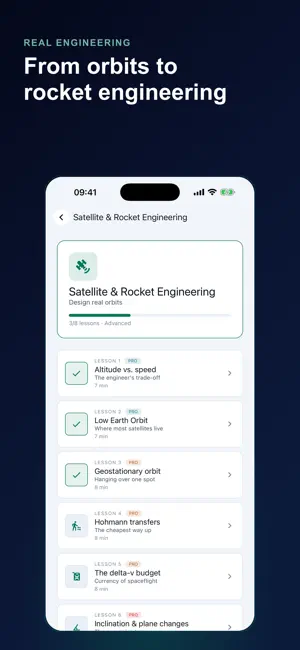
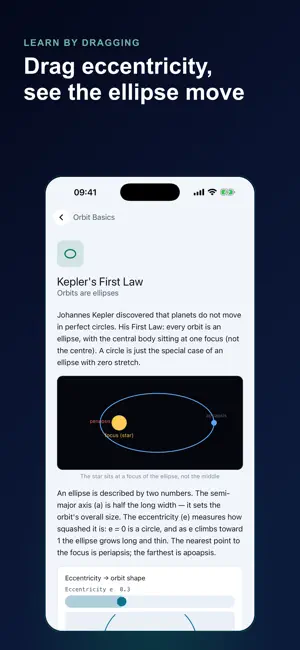
Orbital Lab teaches orbital mechanics by making you fly it: set a launch speed and angle, and a real two-body Kepler solver draws the exact orbit that results — not a canned animation standing in for physics. Every one of the app's 31 lessons ends on a live 3D workbench. Drag the speed slider and watch the path bulge, open into a wide ellipse, or dive into the star; nudge the launch angle and the shape changes again. The same solver computes eccentricity, periapsis, apoapsis, and orbital period from scratch on every frame — nothing is pre-rendered behind the numbers. A lesson only marks complete when you've actually done what it asked — raised the launch speed past the true escape boundary and recovered an orbit just under it, or hunted down the exact speed that avoids a crash — not for pressing Play. Curriculum, unit by unit: • Unit 1 – Orbits from scratch: what an ellipse, periapsis, and escape velocity actually mean • Unit 2 – Solar System missions: fly from Mercury and Venus out past Mars to Jupiter and beyond • Unit 3 – Space engineering: Hohmann transfers, delta-v budgets, gravity-assist flybys • Unit 4 – Deep Space (Pro): the workbench switches engines to a hand-written Verlet n-body integrator, where Kepler's one-body assumption starts to break down Deep Space runs six curated three-body scenes — a figure-eight choreography, a Sun–planet–Trojan system locked at a genuinely stable Lagrange point, and a three-body pass that turns authentically chaotic. Each scene is checked to hold its total energy over the run, so what plays out is real gravity working, not an animation dressed up to look unstable. Explore is a second sandbox: no lesson, no lock, no limit. Set any launch speed and angle and watch the trajectory resolve in real time on the same solver, wide open. Tight circular orbits, wild eccentric ellipses that graze the surface, hyperbolic escapes — try as many launches as you want. Two hand-written physics engines sit behind every screen: a closed-form Kepler solver for two-body mechanics — the exact analytic solution for that problem — and a symplectic Verlet integrator for the n-body cases where Kepler's math stops applying. Neither is a physics library wrapped in a UI. The first Deep Space lesson runs both engines on the same star-and-planet setup side by side, so you can watch them agree. What's free: • Unit 1 in full, plus Mercury through Mars in Unit 2 — 11 of 31 lessons with their live workbenches • The Explore sandbox, unlimited and always available • Progress tracking across all four units • Full light and dark themes, 10 languages What Pro adds: • The rest of the curriculum — outer-planet missions, space engineering, and all of Deep Space — 20 more lessons and their workbenches • Deep Mode: six real three-body simulations • An AI tutor that explains the orbit currently on your screen • No ads Built for the space-curious adult, the physics or astronomy student who wants "orbital velocity" to mean more than a line in a textbook, and anyone who's flown a space sim and wants the actual laws behind it. No science background required — the lessons build the vocabulary as you go. Orbital Lab starts as a guest — no account to create, no sign-in wall. Explore, the first eleven lessons, and your progress are all there the moment you open the app. Sign in later only if you want to. Monthly and annual subscriptions unlock the rest of the curriculum and all of Deep Space, and both plans start with a 3-day free trial. Payment is charged to your account at confirmation of purchase. Subscriptions renew automatically unless auto-renew is turned off at least 24 hours before the end of the current period; manage or cancel anytime in your device's Account Settings. Full terms and our privacy practices are linked below. Terms of Use https://www.apple.com/legal/internet-services/itunes/dev/stdeula/ Privacy Policy https://coddykit.com/terms/privacy-policy
App privacy
The developer, MEHMET CANKER (TR), reported these privacy practices to Apple.
Data Used to Track You
The following data may be used to track you across apps and websites owned by other companies:
- Identifiers: Device ID
- Usage Data: Advertising Data
Data Linked to You
The following data, which may be collected and linked to your identity, may be used for the following purposes:
- User Content: Other User Content
- Identifiers: User ID
Used for: App Functionality
Data Not Linked to You
The following data, which may be collected but is not linked to your identity, may be used for the following purposes:
- Identifiers: Device ID
- Usage Data: Advertising Data, Product Interaction
- Diagnostics: Crash Data, Performance Data
- Purchases: Purchase History
Used for: Third-Party Advertising, Analytics, App Functionality
Alternatives to Orbit Lab: Kepler Physics
Looking for apps like Orbit Lab: Kepler Physics? Here are 6 similar apps on the App Store. The highest rated is World Atlas: Geography Quiz (5.0/5), and all 6 are free to download.
-
 World Atlas: Geography Quiz
5.0
-
 WILL School of Antipolo
-
 USSF Guardian One
5.0
-
 StudyLock: Block Distractions
4.0
-
 MyState
3.0
-
 Celestia - Space Simulator
4.4
| App | Rating | Price | Last updated | Compare |
|---|---|---|---|---|
| Orbit Lab: Kepler Physics | – | Free | September 17, 2026 | |
| World Atlas: Geography Quiz | 5.0 / 5 (4) | Free | Aug 27, 2026 | Compare |
| WILL School of Antipolo | – | Free | Sep 10, 2026 | Compare |
| USSF Guardian One | 5.0 / 5 (19) | Free | Oct 10, 2026 | Compare |
| StudyLock: Block Distractions | 4.0 / 5 (2) | Free | Oct 14, 2026 | Compare |
| MyState | 3.0 / 5 (80) | Free | Aug 25, 2026 | Compare |
| Celestia - Space Simulator | 4.4 / 5 (337) | Free | Oct 19, 2026 | Compare |