

TokenWatch - Usage Monitor
Science Fiction Inc. Utilities iPhoneiPadiPod touch
TokenWatch - Usage Monitor is a paid Utilities app for iPhone and iPad by Science Fiction Inc. Requires iOS 17.0. Updated November 21, 2026.
- Price
- 2.99 USD
- on the App Store
- Size
- 8 MB
- Age 9+
- Updated
- Nov 21
- 2026 · v2.0.3
Screenshots
Save to Pinterest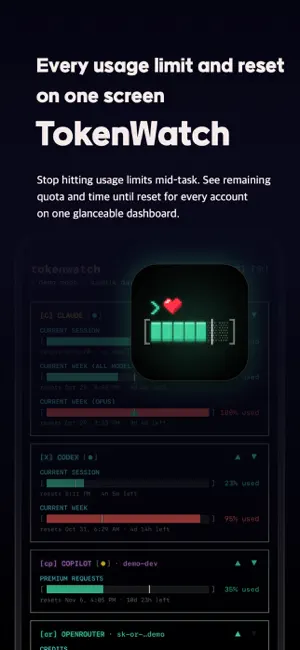

About TokenWatch - Usage Monitor
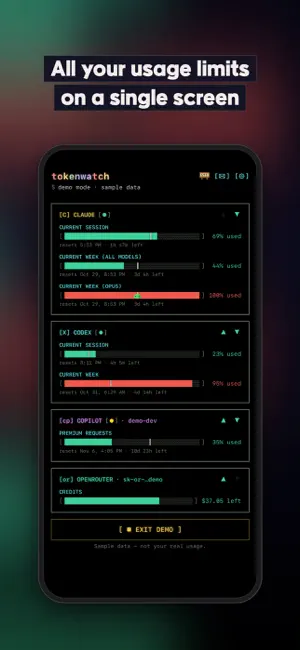
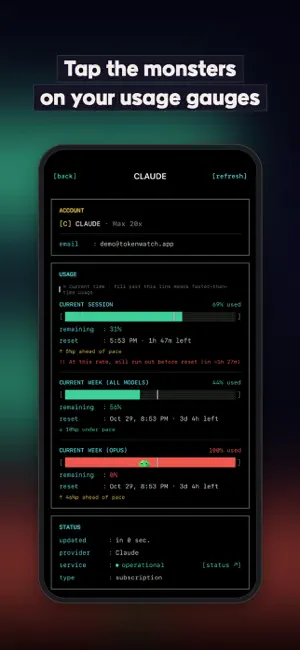
Keep your coding flow with a glanceable dashboard for usage limits, reset times, and quota pace. Leave TokenWatch open on your desk while you work. Clear gauges organize current usage, remaining allowance, reset schedules, and connection status in one place, so you can check what needs attention without repeatedly opening account pages. ■ One-screen overview View session and weekly limits across compatible accounts. Compare accounts side by side and reorder cards to match your workflow. ■ Color-coded usage pace Clear colors help you spot normal usage, approaching limits, and usage that may reach a limit before the next reset. A time marker shows how far the current usage period has progressed. ■ Reset times and alerts See how long remains until each reset. Optional on-device notifications can alert you when a session or weekly limit resets. ■ Work-hours baseline Set your working hours to compare weekly usage with the time you actually plan to work. ■ Adaptive refresh TokenWatch refreshes more frequently while values are changing and less frequently while they remain stable. ■ Desk dashboard Keep the app visible while you code and read the most important numbers with a quick glance. ■ Demo mode Explore the interface with static sample data before connecting an account. ■ Monster hunting and Adventurer Ranks Tap the monsters that appear on your usage gauges and climb the weekly and all-time top 10 with your points. To join the ranks, sign in with Apple or Google and pick a nickname and a pixel avatar. Signing in is optional. ■ Privacy Connection details remain in your device’s Keychain. Usage information is requested directly from your device, without a developer-operated relay server. Optional anonymous product analytics can be disabled in Settings and does not include account details, connection secrets, or usage values. If you sign in, your nickname, avatar, and monster records are stored on our server; usage values and your connected accounts are never sent. TokenWatch is a read-only usage dashboard. A compatible account is required for live data, and data availability may vary by account.
What’s new
Version 2.0.3 · Updated November 21, 2026
· The first screen and sign-in are now easier to use. · Fixed a bug with how monsters appear.
App privacy
The developer, Science Fiction Inc., reported these privacy practices to Apple.
Data Linked to You
The following data, which may be collected and linked to your identity, may be used for the following purposes:
- Contact Info: Email Address
- User Content: Gameplay Content, Other User Content
- Identifiers: User ID
Used for: App Functionality
Data Not Linked to You
The following data, which may be collected but is not linked to your identity, may be used for the following purposes:
- Location: Coarse Location
- Identifiers: Device ID
- Usage Data: Product Interaction
- Diagnostics: Other Diagnostic Data
Used for: Analytics, App Functionality
Alternatives to TokenWatch - Usage Monitor
Looking for apps like TokenWatch - Usage Monitor? Here are 6 similar apps on the App Store. The highest rated is AI Limit: Usage & Reset Alerts (5.0/5), and all 6 are free to download.
-
 AI Limit: Usage & Reset Alerts
5.0
-
 다모앙 UI 확장
-
 Kairos: Smart Alarm
-
 TransWindow: Screen Translator
-
 따르륵
-
 Airothy - Remote for Mac
5.0
| App | Rating | Price | Last updated | Compare |
|---|---|---|---|---|
| TokenWatch - Usage Monitor | – | 2.99 USD | November 21, 2026 | |
| AI Limit: Usage & Reset Alerts | 5.0 / 5 (1) | Free | Oct 5, 2026 | Compare |
| 다모앙 UI 확장 | – | Free | Nov 13, 2026 | Compare |
| Kairos: Smart Alarm | – | Free | Nov 1, 2026 | Compare |
| TransWindow: Screen Translator | – | Free | Nov 18, 2026 | Compare |
| 따르륵 | – | Free | Nov 25, 2026 | Compare |
| Airothy - Remote for Mac | 5.0 / 5 (1) | Free | Nov 13, 2026 | Compare |