

Tachiichi: Formations to Video
Yuya Tanaka Productivity iPhoneiPadiPod touch
Tachiichi: Formations to Video is a free Productivity app for iPhone and iPad by Yuya Tanaka. Requires iOS 17.0. Updated October 13, 2026.
- Price
- Free
- on the App Store
- Size
- 6 MB
- Age 4+
- Updated
- Oct 13
- 2026 · v1.7.2
Screenshots


About Tachiichi: Formations to Video
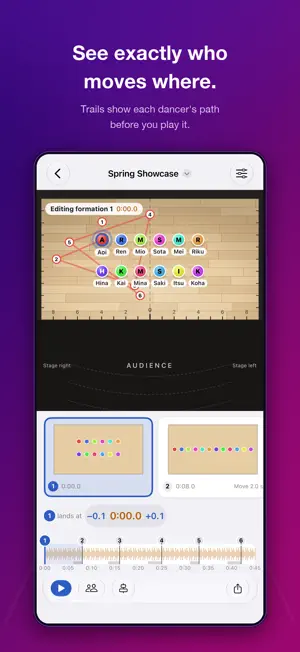
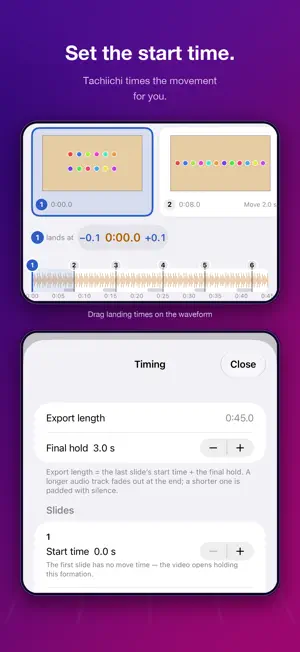
Lay out where each dancer stands, then export the whole routine as an MP4 with your own music — straight from your device. ■ A VIDEO WITH MUSIC Arrange positions slide by slide; the movement between slides is filled in automatically. Play it back to check the transitions, then export an MP4 with your imported audio track. Hand the video to your team instead of a screen recording. Audio comes from your own DRM-free files — protected tracks from streaming services cannot be imported, since they cannot be muxed into a video. ■ ARRANGE WITH YOUR FINGER Set the stage aspect ratio from presets — gym, stage, outdoor — or your own numbers. Add dancers, drag them into place, and align them with grid snapping, even spacing, and left-right mirroring. Enter a start time for each slide to decide exactly where in the song each formation lands; Tachiichi works out the hold time for you. ■ PAPER, TOO Export every slide as a PDF, four formations per page, in the order they appear in your project — ready to hand out before rehearsal. ■ WORKS WITHOUT A SIGNAL Your project and audio stay on this device. No account, no ads. A basement studio or an outdoor field does not change what you can do. ■ HOW SAVING WORKS Saves are written as versions; if a save is interrupted, the app reopens the last complete version. Audio files are checked against a stored hash, and if one becomes unreadable you are told, not silently exported as silence. Deleted pieces go to the Trash until you empty it. A single-file backup, audio included, can be made and restored later. ■ IPHONE AND IPAD Edit in portrait or landscape on iPad, and rotating the device does not lose what you were editing. ■ HOW THIS IS DIFFERENT Among apps for planning dance formations, exporting a finished video with music is uncommon — most stop at screen recordings, and the few that offer it place it behind a subscription. Tachiichi's video export is a one-time purchase, not a subscription. ■ PRICING Free: 1 piece, 12 dancers, 6 slides — including MP4 and PDF export, with a small watermark in the corner of exported videos. Tachiichi Pro (one-time purchase, not a subscription) removes the piece and slide limits, raises the dancer limit to 100, and removes the export watermark. ■ WHAT THIS APP DOES NOT DO ・Protected streaming tracks cannot be imported ・Movement between slides is linear; entrances and exits from off-stage are not modeled ・Undo for slides and dancers lasts only while that editor stays open ・Share exported videos within the rights you hold to the audio — this app does not grant any music license
What’s new
Version 1.7.2 · Updated October 13, 2026
• You can now send feedback or report a problem from Settings (a form opens in your browser).
App privacy
The developer, Yuya Tanaka, reported these privacy practices to Apple.
Data Not Collected
The developer does not collect any data from this app.
Alternatives to Tachiichi: Formations to Video
Looking for apps like Tachiichi: Formations to Video? Here are 6 similar apps on the App Store. The highest rated is DanceNote (5.0/5), and all 6 are free to download.
-
 Castograph: Dance Formation
-
 立ち位置ノート - ダンスフォーメーション作成
-
 Formation App
-
 mo-sim
3.0
mo-sim
3.0
-
 mubo - dance formation editor
-
 DanceNote
5.0
DanceNote
5.0
| App | Rating | Price | Last updated | Compare |
|---|---|---|---|---|
| Tachiichi: Formations to Video | – | Free | October 13, 2026 | |
| Castograph: Dance Formation | – | Free | Oct 22, 2026 | Compare |
| 立ち位置ノート - ダンスフォーメーション作成 | – | Free | Oct 8, 2026 | Compare |
| Formation App | – | Free | Sep 3, 2026 | Compare |
| mo-sim | 3.0 / 5 (4) | Free | Oct 16, 2026 | Compare |
| mubo - dance formation editor | – | Free | Oct 17, 2026 | Compare |
| DanceNote | 5.0 / 5 (3) | Free | May 20, 2025 | Compare |