

LendLock: Privacy & Child Lock
Shama Software LLC Utilities iPhoneiPadiPod touchApple Watch
LendLock: Privacy & Child Lock is a free Utilities app for iPhone and iPad by Shama Software LLC. Rated 4.5/5 from 2 ratings. Requires iOS 17.0.
- Rating
- 4.5
- 2 ratings
- Price
- Free
- on the App Store
- Size
- 6 MB
- Age 4+
- Updated
- Sep 14
- 2026 · v1.3
Screenshots


About LendLock: Privacy & Child Lock
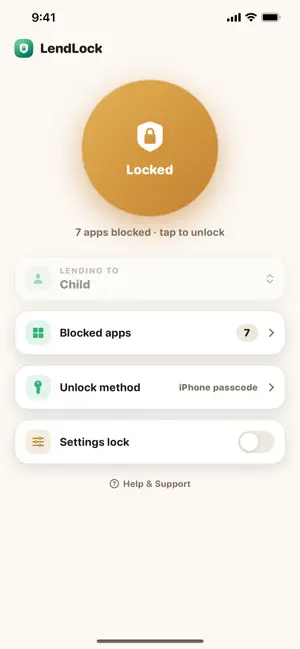
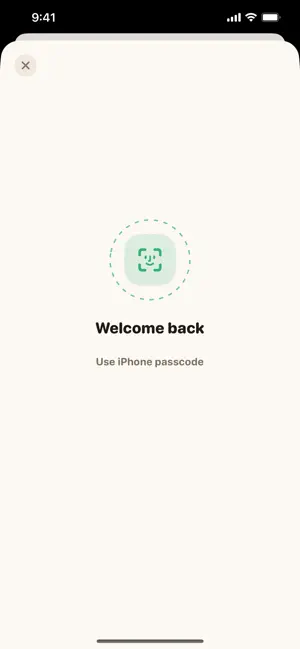
"Can I play on your phone?" LendLock makes that an easy yes. One tap locks the apps you choose — Messages, Mail, photos, purchases — before you hand your phone over. When you get it back, Face ID unlocks everything. MADE FOR FAMILIES • Lend your phone to your kid: they get the games, your private apps show a lock screen • Kid-proof the family iPad: install LendLock, choose what's allowed, and lock the settings behind a code only you know • Timed lock: hand over the iPad for 30 or 60 minutes of free play — when time's up, the apps you chose lock automatically. Games off, reading apps still open. HOW IT WORKS • Pick apps or whole categories once, and save named setups — Kid, Guest, Games Only • Lock with one tap in the app, from the Home Screen widget, or right from your Apple Watch — turn the Digital Crown to pick a setup, and the watch-face complication shows lock status at a glance • Locked apps show a block screen and stay quiet — their notifications are silenced too • Unlock with Face ID, or set a private 6-digit LendLock code for kids who already know your iPhone passcode • Settings lock: every change asks for Face ID first, so nothing can be changed while the device is out of your hands • Settings lockdown: while locked, the device can't delete LendLock, change the passcode or Face ID, sign out of iCloud, install apps, make in-app purchases, or change the date and time WHY NOT THE BUILT-IN APP LOCK? iOS can require Face ID for an app, but leaving it on changes how your phone behaves every day — locked apps stop working properly in places like CarPlay. LendLock is a toggle: everything is normal while the phone is yours, and locked only while it's lent. PRIVATE BY DESIGN LendLock locks apps using Apple's own Screen Time system, entirely on your device. No account, no servers, no analytics, no data collection — it can't even see which apps you picked. FREE AND PRO Free: lock whole app categories, the widget, the Apple Watch app, timed lock, and your own unlock code. LendLock Pro ($4.99, one time): pick exact apps and save multiple setups. One purchase covers your whole family through Family Sharing. No subscription. Requires iOS 17 or later on iPhone or iPad. Questions? lendlock.app/support
What’s new
Version 1.3 · Updated September 14, 2026
Locked means locked. • Settings lockdown: while LendLock is locked, the device can't delete LendLock, change the passcode or Face ID, sign out of iCloud, install apps, make in-app purchases, or change the date and time. Everything is restored the moment you unlock. On by default — see the new "Lock down Settings" row. • Localized App Store screenshots, and a small layout fix for the timed-lock countdown.
App privacy
The developer, Shama Software LLC, reported these privacy practices to Apple.
Data Not Collected
The developer does not collect any data from this app.
Alternatives to LendLock: Privacy & Child Lock
Looking for apps like LendLock: Privacy & Child Lock? Here are 6 similar apps on the App Store. The highest rated is App Lock: Lockstead (5.0/5), and all 6 are free to download.
-
 Kids Mode - App Blocker
-
 Kinsera: Parental Controls
-
 Safeinest Connect
-
 App Lock: Lockstead
5.0
-
 dozzzo — family screen time
-
 ScreenHush- Focus & Sleep
| App | Rating | Price | Last updated | Compare |
|---|---|---|---|---|
| LendLock: Privacy & Child Lock | 4.5 / 5 (2 ratings) | Free | September 14, 2026 | |
| Kids Mode - App Blocker | – | Free | Aug 9, 2026 | Compare |
| Kinsera: Parental Controls | – | Free | Oct 15, 2026 | Compare |
| Safeinest Connect | – | Free | Sep 30, 2026 | Compare |
| App Lock: Lockstead | 5.0 / 5 (1) | Free | Oct 9, 2026 | Compare |
| dozzzo — family screen time | – | Free | Sep 18, 2026 | Compare |
| ScreenHush- Focus & Sleep | – | Free | Oct 6, 2026 | Compare |