

Nagomi: Screen Time Limit
Yasutaka Shinzaki Productivity iPhoneiPadiPod touch
Nagomi: Screen Time Limit is a free Productivity app for iPhone and iPad by Yasutaka Shinzaki. Requires iOS 18.0. Updated October 23, 2026.
- Price
- Free
- on the App Store
- Size
- 2 MB
- Age 4+
- Updated
- Oct 23
- 2026 · v1.2
Screenshots

About Nagomi: Screen Time Limit
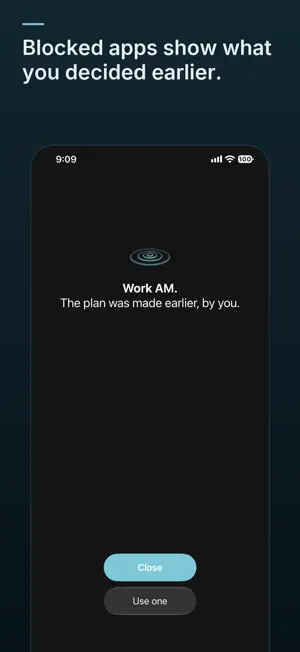
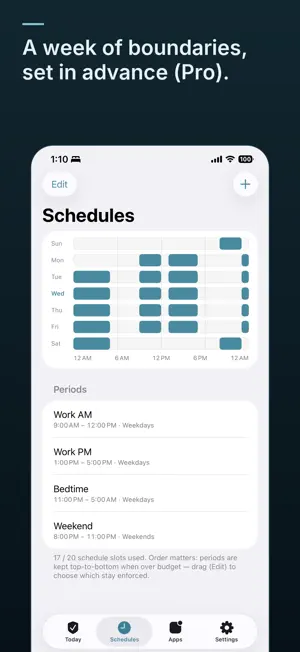
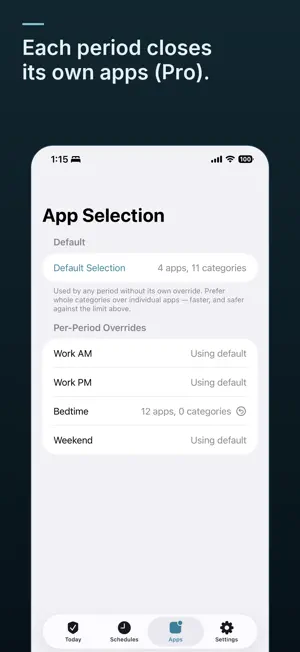
Your phone is built to be opened without thinking. Nagomi is for the hours when you would rather it stayed closed. You decide in advance: which apps, which hours, and how many times you may open them anyway. During those hours the apps show a quiet black screen. Close is the big button. Beneath it, a smaller one lets you open the apps on purpose, for three minutes, as many times as you allowed yourself when you set it up. Three by default. The screen never asks whether you are sure. It only tells you what you decided earlier, and how many openings are left. Afterwards, Nagomi shows you the boundary held: how many times you closed the screen, how many times you opened it on purpose, and whether every scheduled boundary actually fired. • Blocking periods on a schedule, including periods that cross midnight • An allowance per period: a set number of three minute openings, decided in advance • A shield that tells instead of asking, with Close as the default • Today: openings left, last night, this week • A reliability log of every boundary, readable and exportable Pro adds: • More than one boundary, each with its own apps and its own allowance • A different set of periods for each day of the week • Strict Mode: any change that loosens a running period waits 15, 30 or 60 minutes • History: every opening and every close, by day and by boundary Free includes one enabled period, on any days you choose, the shield, the allowance, and the full reliability log. Your Screen Time data never leaves your device. No account, no ads, no analytics: Nagomi collects nothing.
What’s new
Version 1.2 · Updated October 23, 2026
Blocked apps now show the Nagomi mark at the center of the screen, in place of the system hourglass. The free plan is now one enabled period, on any days you choose. Before, a free period ran every day. Other periods can stay saved and switched off, and you can change which one is on. Pro lifts that limit.
App privacy
The developer, Yasutaka Shinzaki, reported these privacy practices to Apple.
Data Not Collected
The developer does not collect any data from this app.