

UltraAlarm: Get Up Alarm Clock
UltraLoop LLC Health & Fitness iPhoneiPadiPod touch
UltraAlarm: Get Up Alarm Clock is a free Health & Fitness app for iPhone and iPad by UltraLoop LLC. Rated 5.0/5 from 13 ratings. Requires iOS 26.5.
- Rating
- 5.0
- 13 ratings
- Price
- Free
- on the App Store
- Size
- 184 MB
- Age 4+
- Updated
- Oct 23
- 2026 · v1.1.1
Screenshots
About UltraAlarm: Get Up Alarm Clock
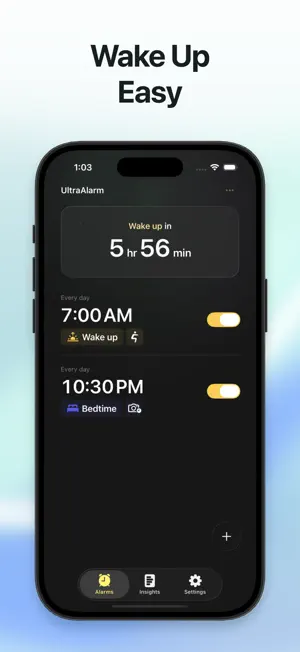
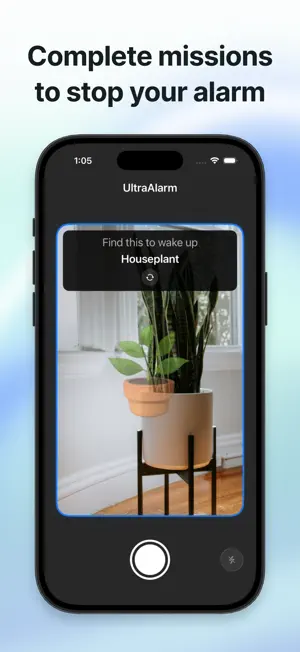
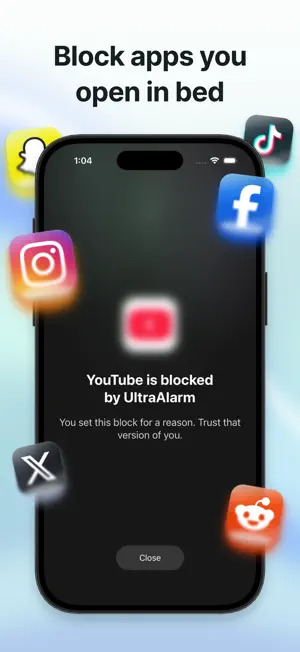
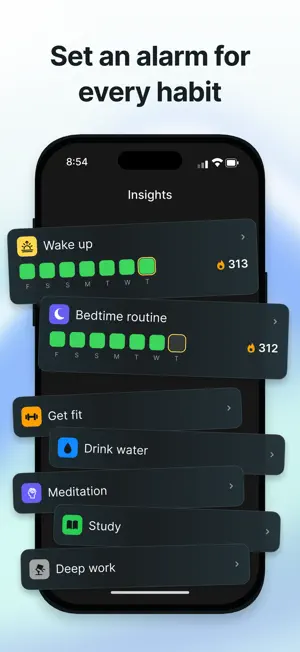
UltraAlarm is a loud, mission-powered alarm clock built to get you awake, out of bed, and moving. A normal alarm is easy to silence and forget. AlarmUltra turns waking up into an action. Attach a mission to your alarm and complete it before returning to bed. If you use the system Stop control without solving your mission, AlarmUltra schedules a follow-up alarm to help prevent you from drifting back to sleep. WAKE UP FOR REAL • Solve math problems to get your mind moving • Complete camera-counted squats or jumping jacks • Scan a saved barcode or QR code away from your bed • Find an everyday object with your camera • Match a reference photo • Chain several missions into one wake-up sequence BUILD A BETTER MORNING • Connect alarms to habits and morning routines • Build streaks by completing your wake-up commitments • Add proof photos to your Photo Journal • Review wake times, solve times, alarm history, and progress insights MAKE EVERY ALARM YOURS • Choose from classic, music, energizing, nature, animal, and voice sounds • Record and trim your own alarm sound • Set the snooze duration and maximum snoozes for each alarm • Follow your next alarm through Live Activities RELIABLE BY DESIGN AlarmUltra uses Apple’s alarm system so scheduled alarms can alert you even when the app is closed. Mission alarms are designed to keep following up until you complete the wake-up task. Cloud backup and restore are available when you sign in with Apple or Google. SUBSCRIPTION AlarmUltra requires an auto-renewing subscription for access. Monthly and annual plans are available. Eligible new subscribers who choose the annual plan may receive a 3-day free trial; the monthly plan has no trial. The exact price and terms are shown before purchase. Subscriptions renew automatically unless canceled at least 24 hours before the end of the current period. Manage or cancel your subscription in your Apple Account settings. Privacy Policy: https://alarmultra.com/privacy Terms of Service: https://alarmultra.com/tos
Ratings & reviews
5.0
13 ratings
What’s new
Version 1.1.1 · Updated October 23, 2026
Introducing holiday skipping: You can now skip repeating alarms on specific days and holidays automatically
App privacy
The developer, UltraLoop LLC, reported these privacy practices to Apple.
Data Linked to You
The following data, which may be collected and linked to your identity, may be used for the following purposes:
- Usage Data: Product Interaction
- Contact Info: Email Address, Name
Used for: Analytics, App Functionality
Data Not Linked to You
The following data, which may be collected but is not linked to your identity, may be used for the following purposes:
- User Content: Photos or Videos, Audio Data
- Contact Info: Phone Number
Used for: App Functionality, Other Purposes
Alternatives to UltraAlarm: Get Up Alarm Clock
Looking for apps like UltraAlarm: Get Up Alarm Clock? Here are 6 similar apps on the App Store. The highest rated is Period Tracker & Pregnancy App (5.0/5), and all 6 are free to download.
-
 Shivaki - Yoga & Stretching
-
 Volero: Bike Computer GPS
-
 Period Tracker & Pregnancy App
5.0
Period Tracker & Pregnancy App
5.0
-
 iUnloop
-
 GymViz - Workout Tracking
-
 The Workout App: Home Workout
| App | Rating | Price | Last updated | Compare |
|---|---|---|---|---|
| UltraAlarm: Get Up Alarm Clock | 5.0 / 5 (13 ratings) | Free | October 23, 2026 | |
| Shivaki - Yoga & Stretching | – | Free | Sep 14, 2026 | Compare |
| Volero: Bike Computer GPS | – | Free | Sep 14, 2026 | Compare |
| Period Tracker & Pregnancy App | 5.0 / 5 (4) | Free | Sep 9, 2026 | Compare |
| iUnloop | – | Free | Jan 14, 2026 | Compare |
| GymViz - Workout Tracking | – | Free | Sep 14, 2026 | Compare |
| The Workout App: Home Workout | – | Free | Oct 9, 2026 | Compare |