

Go Remote Viewing
KEVIN CHRISTOPHER FLANAGAN Education iPhoneiPadiPod touch
Go Remote Viewing is a free Education app for iPhone and iPad by KEVIN CHRISTOPHER FLANAGAN. Requires iOS 17.0. Updated October 9, 2026.
- Price
- Free
- on the App Store
- Size
- 17 MB
- Age 12+
- Updated
- Oct 9
- 2026 · v1.7.0
Screenshots

About Go Remote Viewing
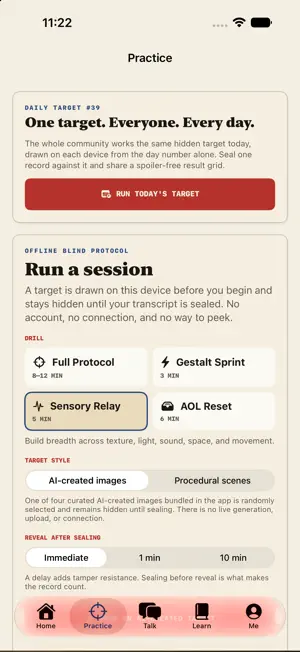
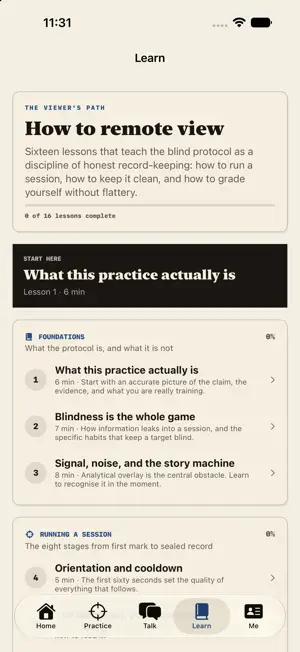
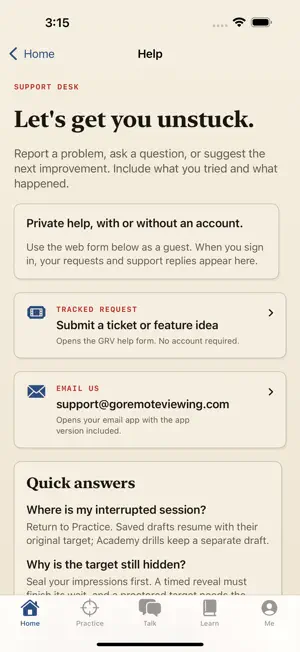
Learn a blind practice protocol, keep an honest record, and compare what you noticed. Go Remote Viewing brings daily practice, a private field journal and 16 native lessons into a warm paper, ink and red field desk. Home helps you start or resume a session, continue learning, and review your local streak. Practice, Talk, Learn and Me keep the next step easy to find. AN HONEST EXPERIMENT Remote viewing is scientifically disputed. GRV makes no claim of paranormal ability. Record impressions while a target is hidden, seal your original record, then compare it with feedback without moving the goalposts. 16 LESSONS — BUILT IN Learn foundations, session technique, analytical overlay, honest judging and fair practice design. Lessons and checkpoints work offline with no account. NATIVE BLIND PRACTICE • Accept a random, non-descriptive coordinate. • Draw an ideogram with Apple Pencil or your finger. • Capture raw gestalt and sensory impressions. • Keep named guesses separate as analytical overlay. • Seal your record before revealing the target. • Compare coverage and precision against structured target descriptors. Choose illustrated procedural scenes or four curated AI-created images bundled in the app. Local practice needs no prompt, account, connection or external AI service. The image and its identity stay hidden until sealing. Calibration compares descriptors; it does not prove psychic ability. PRACTICE WITH A PARTNER A partner privately views a random target, sets a four-digit PIN and hands over a covered device. The viewer receives only the coordinate. After sealing, feedback, scoring and sharing stay locked until the proctor enters the correct PIN. A salted verifier is stored inside the encrypted session; the PIN itself is never saved. YOUR PRIVATE FIELD JOURNAL Resume interrupted practice with the same hidden target, notes and sketch. Practice and Academy keep separate encrypted drafts. Search completed sessions, revisit original ideograms and add private reflections after feedback. Sealed impressions and the first calibration stay unchanged, including misses. Practice records use a device-only Keychain key and are excluded from backups. Local practice stays on your device unless you deliberately choose to share. Guest users can erase local sessions in the app. ONE DAILY TARGET — NO SPOILERS Every device derives the same procedural Daily Target for the calendar day. Seal it, build a streak and share a spoiler-free result grid. Home Screen and Lock Screen widgets show only the blind coordinate, completion and streak. App Shortcuts open daily practice or report your streak. Optional reminders are scheduled on device. OPTIONAL COMMUNITY Choose when to publish a session story. The generated result-facts draft excludes your transcript, notes, ideogram, sensory tags and analytical overlay. Guests see a local read-only preview; sign in to edit and publish. Shared discussions, synced challenges and private labs require an account and connection. Community includes reporting, blocking, moderation and in-app account deletion. PRIVATE HELP Signed-in viewers can submit problems, questions and feature ideas, read staff replies and follow up in the app. Only the ticket owner and GRV support admins can access a request. Guests can use the web form or email [email protected]. No subscriptions, payments, advertising or cross-app tracking. For education, experimental practice and entertainment only. Never use sessions for medical, legal, financial or safety decisions; claims about named people; or missing-person and criminal investigations.
What’s new
Version 1.7.0 · Updated October 9, 2026
A new field desk for your daily practice. • Home, Practice, Talk, Learn and Me now share the website’s warm paper, ink and red design. • Start or resume a blind session, find your next lesson, and see your daily streak from Home. • Create private help requests, read staff replies, and follow up inside the app when signed in. • Your 1.6 field journal stays intact: encrypted draft recovery, original sketches, search and separate post-reveal reflections. • Better iPad navigation preserves an unfinished session across tabs and app relaunches. • Account and community checks prevent delayed sync responses from restoring the wrong cached record. • Fixed occasional repeated image targets during longer practice runs. Learning and local practice work offline, with no account required.
App privacy
The developer, KEVIN CHRISTOPHER FLANAGAN, reported these privacy practices to Apple.
Data Linked to You
The following data, which may be collected and linked to your identity, may be used for the following purposes:
- Contact Info: Email Address, Name
- User Content: Gameplay Content, Customer Support, Other User Content
- Identifiers: User ID
- Usage Data: Product Interaction
- Other Data: Other Data Types
Used for: App Functionality
Alternatives to Go Remote Viewing
Looking for apps like Go Remote Viewing? Here are 6 similar apps on the App Store. The highest rated is Kandili: Daily Bible Readings (5.0/5), and all 6 are free to download.
-
 Aperture: Remote Viewing
-
 Psi Sense Trainer
-
 Wave Interference Simulator
-
 Kandili: Daily Bible Readings
5.0
Kandili: Daily Bible Readings
5.0
-
 The children to sleep | MonCan
3.7
The children to sleep | MonCan
3.7
-
 ABC123 Cash Register App
3.0
ABC123 Cash Register App
3.0
| App | Rating | Price | Last updated | Compare |
|---|---|---|---|---|
| Go Remote Viewing | – | Free | October 9, 2026 | |
| Aperture: Remote Viewing | – | Free | Aug 21, 2026 | Compare |
| Psi Sense Trainer | – | Free | Mar 16, 2026 | Compare |
| Wave Interference Simulator | – | Free | Aug 17, 2026 | Compare |
| Kandili: Daily Bible Readings | 5.0 / 5 (35) | Free | Oct 19, 2026 | Compare |
| The children to sleep | MonCan | 3.7 / 5 (3) | Free | Feb 28, 2024 | Compare |
| ABC123 Cash Register App | 3.0 / 5 (8) | Free | Oct 2, 2025 | Compare |
Compare Go Remote Viewing with the top alternatives: ratings, updates, ASO score and keyword gaps →