

Stampyfi: Capture & Collect
Robert Knobloch Photo & Video iPhoneiPadiPod touch
Stampyfi: Capture & Collect is a free Photo & Video app for iPhone and iPad by Robert Knobloch. Rated 5.0/5 from 1 ratings. Requires iOS 18.0.
- Rating
- 5.0
- 1 ratings
- Price
- Free
- on the App Store
- Size
- 81 MB
- Age 4+
- Updated
- Oct 3
- 2026 · v1.4.0
Screenshots

About Stampyfi: Capture & Collect
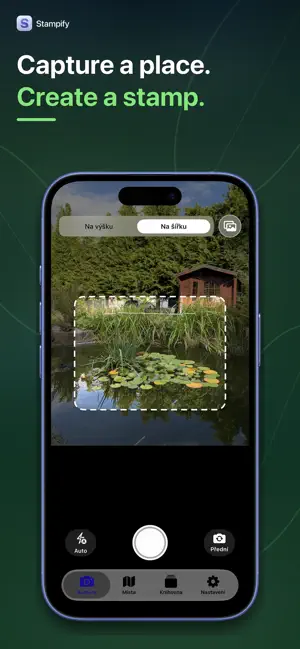
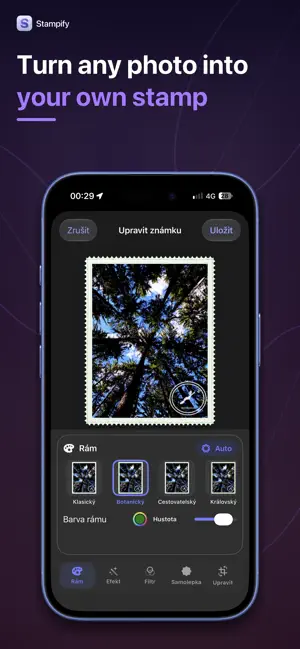
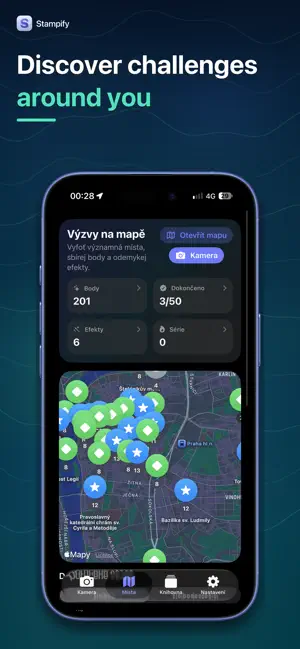
Turn your memories into digital postage stamps. Stampify gives everyday photos a new meaning. Transform every trip, walk, favorite place, or special moment into an original stamp and save it to your personal collection. Over time, you’ll create a visual travel journal filled with places and stories worth remembering. CAPTURE. CREATE. COLLECT. Take a new photo or choose one from your library. Select a stamp format and customize it with frames, filters, effects, stickers, and postmarks. Every stamp can have its own style and capture the atmosphere of that moment. Save, edit, export, and share your finished stamps with friends. Turn your collection into creative collages or display your favorite memories using a widget. DISCOVER NEW PLACES Stampify encourages you to get outside and see your surroundings from a fresh perspective. Explore photo challenges and interesting nearby places on the map. Visit them, create your own stamps, earn points, and unlock new visual effects. Use the map, compass, or augmented reality to help guide you to selected locations. Even an ordinary walk can become a small adventure. YOUR PERSONAL MEMORY JOURNAL Every stamp represents a place, a moment, and a story you actually experienced. Build a unique collection from your travels, day trips, important events, and the little joys of everyday life. Stampify is more than a photo editor. It’s a creative way to notice the world around you, discover new places, and preserve your memories in a format that feels fun and personal. MORE MOVEMENT, MORE REWARDS Optional integration with the Health app lets you earn additional points for steps and walking or running distance. Your everyday activity can become part of your collecting journey. This feature is optional, and health data is never used for advertising. STAMPIFY PREMIUM Premium unlocks additional stamp styles, private iCloud storage, premium export, and an ad-free experience. Choose a monthly subscription with a seven-day free trial for eligible users or make a one-time lifetime purchase. PRIVACY FIRST Photos, location information, and activity data are processed primarily on your device. Access to photos, location, activity, and iCloud is optional and can be changed at any time in the app or iOS Settings. Start building a collection that is uniquely yours—one photo, one place, and one stamp at a time. Stampify is free to download. The free version may contain advertising, and certain features can be unlocked through purchases or a subscription. Some features require an internet connection. Terms of Use: https://www.apple.com/legal/internet-services/itunes/dev/stdeula/ The Privacy Policy is available in the app under Settings → Privacy.
What’s new
Version 1.4.0 · Updated October 3, 2026
Added iPad support with portrait and landscape layouts. The stamp editor now displays tools beside the photo on larger screens. Improved iPad layouts for the map, stamp details, and onboarding. Optimized thumbnail loading and editor preview rendering. Improved memory management and camera rotation handling. Thank you for using Stampify and helping us make the app better!
App privacy
The developer, Robert Knobloch, reported these privacy practices to Apple.
Data Used to Track You
The following data may be used to track you across apps and websites owned by other companies:
- Identifiers: Device ID
Data Linked to You
The following data, which may be collected and linked to your identity, may be used for the following purposes:
- Location: Coarse Location
- Identifiers: Device ID
- Usage Data: Product Interaction, Advertising Data
- User Content: Customer Support
Used for: Third-Party Advertising, Analytics, App Functionality
Data Not Linked to You
The following data, which may be collected but is not linked to your identity, may be used for the following purposes:
- Diagnostics: Performance Data, Other Diagnostic Data, Crash Data
- Purchases: Purchase History
- Usage Data: Other Usage Data
Used for: Third-Party Advertising, Analytics, App Functionality
Alternatives to Stampyfi: Capture & Collect
Looking for apps like Stampyfi: Capture & Collect? Here are 6 similar apps on the App Store. The highest rated is AI Photo Generator: Headshots (5.0/5), and all 6 are free to download.
-
 Cosmo Sherpa
-
 AI Photo Generator: Headshots
5.0
AI Photo Generator: Headshots
5.0
-
 Creava: Content Planner
1.0
Creava: Content Planner
1.0
-
 PureRaw: Camera & Film Grain
4.9
PureRaw: Camera & Film Grain
4.9
-
 Sol: AI Tan Photo Editor
-
 Restore Old Photos - Fixpics
5.0
Restore Old Photos - Fixpics
5.0
| App | Rating | Price | Last updated | Compare |
|---|---|---|---|---|
| Stampyfi: Capture & Collect | 5.0 / 5 (1 rating) | Free | October 3, 2026 | |
| Cosmo Sherpa | – | Free | Aug 27, 2026 | Compare |
| AI Photo Generator: Headshots | 5.0 / 5 (1) | Free | Oct 22, 2026 | Compare |
| Creava: Content Planner | 1.0 / 5 (1) | Free | Aug 8, 2026 | Compare |
| PureRaw: Camera & Film Grain | 4.9 / 5 (35) | Free | Oct 17, 2026 | Compare |
| Sol: AI Tan Photo Editor | – | Free | Oct 24, 2026 | Compare |
| Restore Old Photos - Fixpics | 5.0 / 5 (1) | Free | Aug 18, 2026 | Compare |