

Ham Engineering
Yousif AL Balushi Utilities iPhoneiPadiPod touch
Ham Engineering is a free Utilities app for iPhone and iPad by Yousif AL Balushi. Requires iOS 13.0. Updated August 26, 2026.
- Price
- Free
- on the App Store
- Size
- 21 MB
- Age 4+
- Updated
- Aug 26
- 2026 · v1.1.0
Screenshots


About Ham Engineering
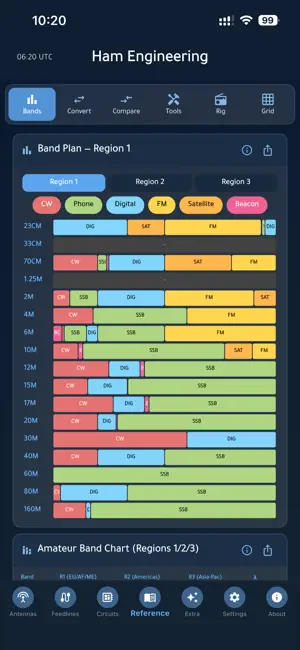
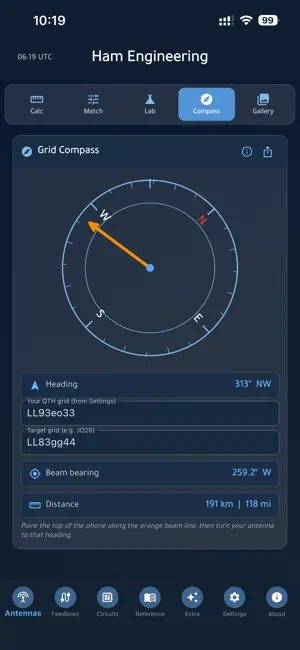
Ham Engineering is the engineering bench for amateur radio — antenna and feedline maths, circuit design, propagation and a deep reference library, all completely offline. No account, no ads, no tracking, and not a single network call. ANTENNAS • Half-wave dipole with adjustable k (velocity) factor, quarter-wave and 5/8-wave verticals, ground-plane radials, end-fed half-wave, random wire, full-wave loop and a 3-element Yagi estimator • Matching: L-network, Pi-network, quarter-wave transformer, balun/unun ratios and stub matching • Antenna Lab — a live elevation radiation-pattern plot with directivity, realized gain, takeoff angle, beamwidth, front-to-back, mismatch loss, feedline loss and system gain, each explained • Grid Compass that rotates with your phone, showing beam bearing and distance from your grid to a target grid • Antenna gallery — every common type drawn as scalable vector art, with what it is, what it is for and what to watch out for FEEDLINES & RF • Coax loss by cable type, frequency and run length; velocity-factor electrical length • SWR from forward/reflected power, plus return loss and mismatch loss • Antenna A/B comparison and receiver noise-floor estimation • RF power conversions: dBm, watts, ERP and EIRP • Propagation: free-space path loss, radio horizon and Fresnel-zone clearance • NanoVNA and tinySA quick-start guides, and a coax + connector gallery CIRCUITS • Ohm's law, series/parallel resistance, voltage dividers, RC and RL time constants • Reactance, LC resonance, Q and bandwidth, stored energy • RC and LC filter cutoffs, a constant-k Pi/T filter designer, a bandpass/notch calculator and a Butterworth low-pass designer • Resistor, capacitor and inductor code decoders, an AWG wire table and a 555 timer calculator • A live RLC resonance lab and a 50-part component gallery REFERENCE & EXTRA • Filterable amateur band plan for ITU Regions 1, 2 and 3 • Unit converters including watts, dBm and microvolts • Comparison tables for coax, connectors, antennas and batteries • Tools-and-gear and rig-controls galleries — what every knob and button is called across manufacturers • Maidenhead grid tools and great-circle beam headings • 300+ searchable tips, 40+ formulas, a rich glossary and a constants reference • Curated external links to major retailers, brands and references BUILT FOR THE BENCH • Nearly 200 illustrations drawn as scalable vector art — nothing to download, everything sharp at any size • Works fully offline. The app makes no network calls at all • Export any panel or diagram as a theme-aware image to share or file • An (i) explanation on every panel — this is a tool and a guide, not a quiz • Light and dark themes, adjustable font size, weekly tips and in-app version history • Your callsign, grid and email stay on your device and are never transmitted PERFECT FOR • Licensed operators designing, building and tuning antennas • Anyone putting up a first dipole or vertical and wanting the numbers right • Homebrewers and kit builders working with filters, matching and components • SWLs and newcomers who want the reference material without the exam drill • Club elmers and anyone teaching antenna and RF fundamentals PRIVACY • Your callsign, grid and email are stored only on your device. • No account, no sign-up, no ads, no analytics SDKs, no advertising ID and no tracking of any kind. 73 de A41UX Yousuf AL Balushi — Unixeer, Oman
What’s new
Version 1.1.0 · Updated August 26, 2026
Enter the frequency once. - Antennas -> Calc now has a single Design Frequency at the top of the page that fills in every antenna calculator below it: half-wave dipole, quarter-wave and 5/8-wave verticals, ground-plane radials, end-fed half-wave, random wire, full-wave loop and the 3-element Yagi. Pick a band to load its center frequency, or type any frequency yourself. - The band edges are shown under the field, so you can nudge the frequency to the part of the band you actually operate instead of accepting the middle of it. This matters most on the wide bands - on 160 m the band centre is over two metres of wire away from where a CW dipole should be cut. - Each calculator keeps its own frequency field, so you can still tweak a single antenna without disturbing the rest. - The dipole k-factor and the random-wire length stay per-panel, because they are not frequency. - Your chosen band and frequency are remembered between sessions. 73 de A41UX
App privacy
The developer, Yousif AL Balushi, reported these privacy practices to Apple.
Data Not Collected
The developer does not collect any data from this app.
Alternatives to Ham Engineering
Looking for apps like Ham Engineering? Here are 6 similar apps on the App Store. The highest rated is CoronaSDR: RTL-SDR Client (5.0/5), and all 6 are free to download.
-
 Field Kit: Ham Radio Calc
-
 RF Toolbox: Ham Radio Tools
-
 Dipole calculator
4.2
-
 Antenna Tools
4.7
-
 CoronaSDR: RTL-SDR Client
5.0
-
 QRV - Ham Radio Multitool
4.9
| App | Rating | Price | Last updated | Compare |
|---|---|---|---|---|
| Ham Engineering | – | Free | August 26, 2026 | |
| Field Kit: Ham Radio Calc | – | Free | Jul 18, 2026 | Compare |
| RF Toolbox: Ham Radio Tools | – | Free | Jun 2, 2026 | Compare |
| Dipole calculator | 4.2 / 5 (6) | Free | Oct 4, 2025 | Compare |
| Antenna Tools | 4.7 / 5 (21) | Free | Jun 18, 2026 | Compare |
| CoronaSDR: RTL-SDR Client | 5.0 / 5 (10) | Free | Oct 21, 2026 | Compare |
| QRV - Ham Radio Multitool | 4.9 / 5 (80) | Free | Oct 24, 2026 | Compare |
Compare Ham Engineering with the top alternatives: ratings, updates, ASO score and keyword gaps →