

Eye-Comfort Sudoku: Classic
BLISS AI Inc. Games iPhoneiPadiPod touch
Eye-Comfort Sudoku: Classic is a free Games app for iPhone and iPad by BLISS AI Inc. Requires iOS 15.0. Updated August 14, 2026.
- Price
- Free
- on the App Store
- Size
- 27 MB
- Age 4+
- Updated
- Aug 14
- 2026 · v1.1
Screenshots


About Eye-Comfort Sudoku: Classic
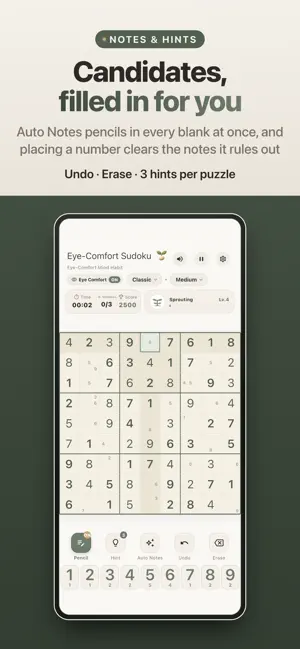
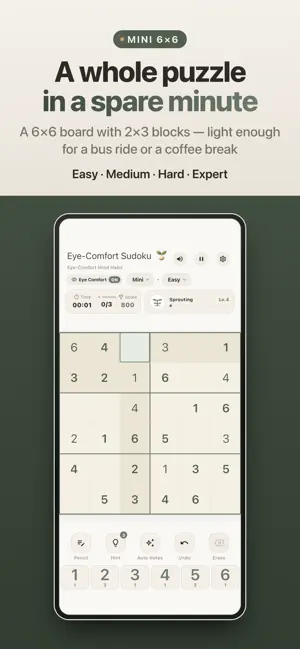
Sudoku that stays comfortable however long you play. Instead of a stark white grid and saturated colors, the whole board is painted in warm paper tones and calm sage green — easier on your eyes late at night and through long sessions. ■ Easy on the eyes • A warm paper background with quiet sage green accents • The selected cell's row, column and 3×3 box tinted softly • Matching numbers highlighted together, so the board is easy to scan • Wrong entries shown in a gentle red rather than a harsh alert ■ Three modes • Classic 9×9 — sudoku the way you know it • Mini 6×6 — 2×3 blocks, light enough for a spare minute • Time Attack — one focused run against the clock ■ Four difficulty levels • Easy · Medium · Hard · Expert • Time Attack gives you longer as the board gets harder (5 · 7 · 10 · 12 minutes) • Best score saved separately for every mode and level ■ Tools that keep you moving • Auto Notes — pencil in the candidates for every blank at once • Pencil mode — jot your own candidates cell by cell • Placing a number automatically clears the notes it rules out • Hint — three per puzzle, for when a cell will not budge • Undo and Erase — step back at any time • Keypad count badges — see how many of each digit are left ■ Focus you can watch grow • A sprout that keeps growing across every game you play — it never starts over • Every square you work out yourself adds to it, and finishing a board adds more • Seedling → Sprouting → Deep Focus → Blooming → Perfect Master • Finish a board and see your clear time, final score and mistakes together ■ Sound and touch • Distinct sounds for selecting, placing, noting, erasing, hints and victory • A light buzz as digits go in and come out — switch it off in settings • Mute the sound whenever you like ■ Make it yours • Auto-remove notes on entry — on or off • Highlight wrong entries instantly — on or off • Three mistakes allowed, with pause and restart always available • 한국어 · English · 日本語 · 简体中文 · 繁體中文 ■ Light and undemanding • No sign-up and no login • Plays without an internet connection • Your records stay on your device A calm habit for your mind — start with one board today.
What’s new
Version 1.1 · Updated August 14, 2026
• New rescue — watch a short ad after a loss to get the board back, twice per game • Losing no longer leaves the board silent: you get your result and a way to start again • The board is repainted in warm ivory, with the cells filling the frame edge to edge • A new app icon, and the same sprout mark beside the title • Time Attack now gives you longer as the board gets harder (5 · 7 · 10 · 12 minutes) • Haptics can be switched off in settings, and the language can follow your device • The growth stages are re-spaced, so the sprout grows from your very first board • The victory screen, the header and the keypad have been tidied up • Settings gains a link to the games homepage and shows the app version • Fixed: undo no longer hands back a mistake you have already used
App privacy
The developer, BLISS AI Inc., reported these privacy practices to Apple.
Data Used to Track You
The following data may be used to track you across apps and websites owned by other companies:
- Identifiers: Device ID
Data Linked to You
The following data, which may be collected and linked to your identity, may be used for the following purposes:
- Location: Coarse Location
- Identifiers: Device ID
- Usage Data: Product Interaction, Advertising Data
Used for: Third-Party Advertising, Developer’s Advertising or Marketing, Analytics
Data Not Linked to You
The following data, which may be collected but is not linked to your identity, may be used for the following purposes:
- Diagnostics: Performance Data, Other Diagnostic Data, Crash Data
Used for: Third-Party Advertising, Developer’s Advertising or Marketing, Analytics
Alternatives to Eye-Comfort Sudoku: Classic
Looking for apps like Eye-Comfort Sudoku: Classic? Here are 6 similar apps on the App Store. The highest rated is Sudoku musuby - Number Puzzle (5.0/5), and all 6 are free to download.
-
 Simple Puzzle 9×9
-
 Sudoku musuby - Number Puzzle
5.0
Sudoku musuby - Number Puzzle
5.0
-
 SudoClash - Sudoku Battle
5.0
SudoClash - Sudoku Battle
5.0
-
 Grid Arcade
5.0
Grid Arcade
5.0
-
 Sudoku Mastermind
-
 Sudoku - Quiet
4.9
Sudoku - Quiet
4.9
| App | Rating | Price | Last updated | Compare |
|---|---|---|---|---|
| Eye-Comfort Sudoku: Classic | – | Free | August 14, 2026 | |
| Simple Puzzle 9×9 | – | Free | Dec 22, 2025 | Compare |
| Sudoku musuby - Number Puzzle | 5.0 / 5 (1) | Free | Sep 17, 2026 | Compare |
| SudoClash - Sudoku Battle | 5.0 / 5 (1) | Free | Oct 2, 2026 | Compare |
| Grid Arcade | 5.0 / 5 (2) | Free | Oct 24, 2026 | Compare |
| Sudoku Mastermind | – | Free | Aug 25, 2026 | Compare |
| Sudoku - Quiet | 4.9 / 5 (10) | Free | Oct 21, 2026 | Compare |