

TimerLync
JUKI JUNG Utilities iPhoneiPadiPod touchApple Watch
TimerLync is a free Utilities app for iPhone and iPad by JUKI JUNG. Requires iOS 17.0. Updated October 20, 2026.
- Price
- Free
- on the App Store
- Size
- 5 MB
- Age 4+
- Updated
- Oct 20
- 2026 · v1.1.3
Screenshots


About TimerLync
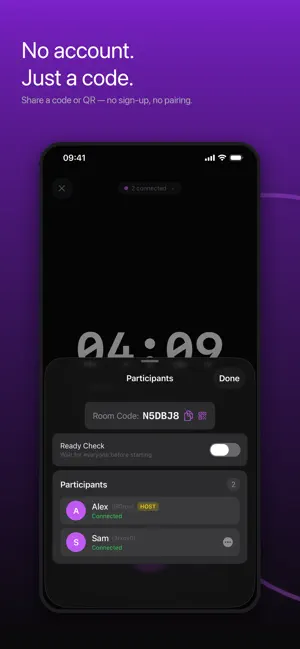
One countdown. Every device. One alarm. TimerLync keeps a countdown in sync across every device in the room. Set the time once, and every phone, iPad, and Apple Watch shows the same remaining seconds — then alarms at the same instant. WHY IT STAYS IN SYNC Devices agree on a single end time using network time, then count down locally. Even if Wi-Fi drops or a device goes to sleep, the alarm still fires on schedule — it's scheduled ahead of time, not pushed at the last second. FAIR STARTS A 3·2·1 lead-in lands at the same instant on every screen, so whoever taps Start doesn't get a head start. BUILT FOR GROUPS • Create a room, share a code or QR — no account, no sign-in • The host starts; pause, +0:30, +1:00 and reset can be opened to everyone • Co-hosts and host hand-off when you need to step away • Ready check: wait until everyone confirms before starting • Works nearby over Bluetooth/Wi-Fi, or across networks when you're apart FOR TALKS AND EVENTS • Stage View: a full-screen, big-digit display for the podium • Host messages: send "Please wrap up" to every screen in the room • When it ends: hold at 00:00, count the overtime, flash, or show the clock, set once for the whole room • Strong Alarm: rings even in Silent mode or Focus (iOS 26 or later) MORE THAN A TIMER • Sequences: Talk 10 min → Q&A 5 min, switching automatically on every device • Group Pomodoro: focus and break cycles the whole team shares • History: look back on what you actually ran • Live Activity and Dynamic Island — glance without unlocking • Apple Watch companion with its own alarm, even away from your phone • Lock Screen widget and Siri: "Start a countdown in TimerLync" SOLO WORKS TOO No room needed. Quick Timer is a plain countdown with the same reliable alarm. TimerLync Pro (one-time in-app purchase) unlocks rooms of up to 8 devices and CSV export of session history. Rooms of 2 devices and joining any room stay available to everyone.
What’s new
Version 1.1.3 · Updated October 20, 2026
- More reliable rooms across distance: devices reconnect automatically after a network drop, and a room stays alive until the timer ends even when the host's phone is away - Clearer status when joining over the internet isn't available - More accurate alarms when a device can't reach the time server - Stronger security for rooms and PINs - New +30 seconds button - Haptic feedback when the host changes the timer - New "Rate TimerLync" link in Settings - Bug fixes
App privacy
The developer, JUKI JUNG, reported these privacy practices to Apple.
Data Not Linked to You
The following data, which may be collected but is not linked to your identity, may be used for the following purposes:
- Identifiers: Device ID
Used for: App Functionality
Alternatives to TimerLync
Looking for apps like TimerLync? Here are 6 similar apps on the App Store. The highest rated is Out The Door (5.0/5), and all 6 are free to download.
-
 WhoseTurn: Shared Timer
-
 Sync Alarm - Share with Family
-
 Out The Door
5.0
-
 Clockery: Flip Clock Watchface
-
 ShareTimers
-
 ShareTimer
| App | Rating | Price | Last updated | Compare |
|---|---|---|---|---|
| TimerLync | – | Free | October 20, 2026 | |
| WhoseTurn: Shared Timer | – | Free | Oct 6, 2026 | Compare |
| Sync Alarm - Share with Family | – | Free | Oct 5, 2026 | Compare |
| Out The Door | 5.0 / 5 (2) | Free | Jan 2, 2026 | Compare |
| Clockery: Flip Clock Watchface | – | Free | Jun 8, 2026 | Compare |
| ShareTimers | – | Free | Aug 5, 2026 | Compare |
| ShareTimer | – | Free | Aug 18, 2025 | Compare |
Compare TimerLync with the top alternatives: ratings, updates, ASO score and keyword gaps →