

Meemie - Cutout Photo Studio
masanori ueda Photo & Video iPhoneiPadiPod touch
Meemie - Cutout Photo Studio is a free Photo & Video app for iPhone and iPad by masanori ueda. Requires iOS 26.0. Updated October 5, 2026.
- Price
- Free
- on the App Store
- Size
- 4 MB
- Age 4+
- Updated
- Oct 5
- 2026 · v1.2.0
Screenshots
About Meemie - Cutout Photo Studio
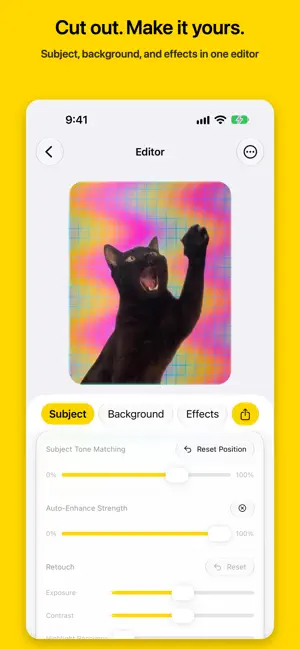
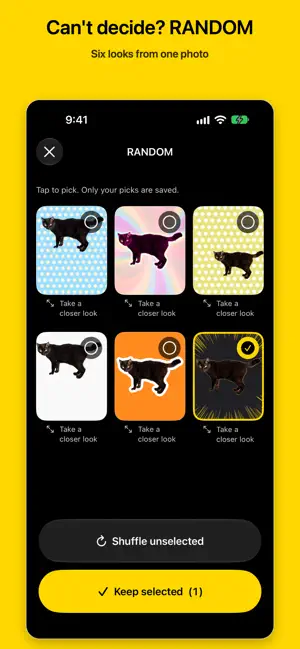
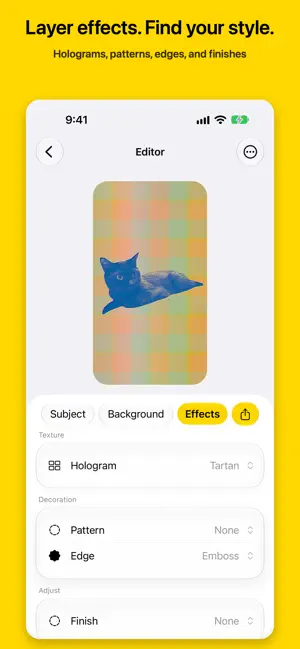
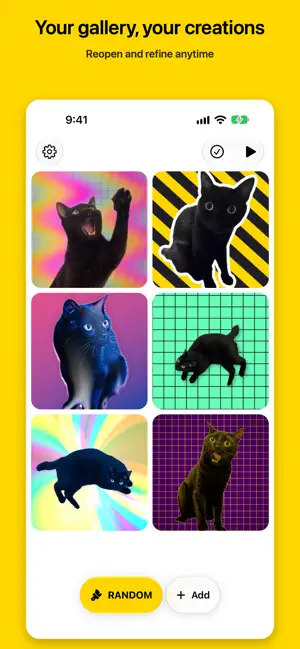
Cut a subject out of a photo and drop it onto a flat background. That is what this app does. A cat, a person, a coffee cup. Pick one photo and the subject is cut out for you, then placed on a square, portrait, or 9:16 canvas. Move and size the subject with your finger, and you have a picture you can post. Videos work too. RANDOM - when you cannot decide For the moments when you do not want to make every choice yourself. Pick a photo and Meemie assembles a background, effects, and a layout at random. Results are random. If you do not like one, roll it again. - Unlimited, with no extra charge - From a photo you take right now, or from your library (up to 5 at once) - Every result is saved automatically - Open any result in the editor to adjust it Finish it by hand The editor has three tabs - Subject, Background, Effects. No mode switching. Subject - Drag to move, pinch with two fingers to scale and rotate - Double-tap to reset to centred, unscaled, and unrotated - Tone matching, which pulls the subject's colour toward the background (0-100%) - Auto-enhance and retouch (exposure, contrast, highlight recovery, shadows, saturation, colour temperature) Background - Aspect ratio: 1:1, 4:5, or 9:16 - 9 background patterns: solid, linear, radial and conic gradients, polka dot, stripe, checker, sunburst, grid - Colours from the palette, or any colour from the picker Effects - 17 holographic finishes across four families - base, glitter, metallic, and pattern - with an intensity slider and a reroll for the pattern - 16 overlay patterns: screentone, comic, focus lines, drip lines, cherry blossom, plum, snow, bubbles and more - 3 edge treatments: white border, drop shadow, emboss - 13 finishing looks: vignette, fade, sepia, monochrome, film grain, light leak, lens flare and more Export - Save to Photos - Send it to a social app, or any other app, through the share sheet - A work with a holographic finish can also be exported as an MP4 where the light moves (H.264, 30fps, seamless loop) - A work made from a video exports as a clip with your background and effects applied Your photos stay on your iPhone Cutting out, effects, and export all happen on your device. No generative AI is involved - your photo stays your photo. It works offline, too. There is no account to create. Nothing leaves your device unless you share it. The app collects no analytics and shows no advertising. It reads your photo library only when you pick something. The only thing that talks to Apple's servers is the in-app purchase - showing its price, buying it, and restoring it. About the purchase The basics are free. RANDOM is unlimited, and subject placement, aspect ratio, background colour, tone matching, auto-enhance, retouch, and export all work without buying anything. Buying "Unlock All Effects" once lets you choose the holographic finishes, overlay patterns, edges, finishing looks, and background patterns yourself. It is a one-time purchase - not a subscription, with no further charges. Use "Restore Purchases" after a reinstall or when you move to a new iPhone. Please note Requires an iPhone running iOS 26.0 or later. iPad is not supported. Subject cutout uses the iPhone's own on-device segmentation, so accuracy varies with the photo and the device.
What’s new
Version 1.2.0 · Updated October 5, 2026
• RANDOM has been redesigned. Pick one photo to get six candidates, choose the ones you like and shuffle the rest as often as you like. Tap "Keep selected" to save only your picks. The subject's size also varies from one candidate to the next. • Added Japanese traditional background patterns: seigaiha, asanoha, shippo, and plum blossom. • Redesigned the holographic finishes and added a new one, "Big Lens". • Redesigned the particle shapes, with more natural variation in size and scatter. Plum blossom has moved to the background patterns. • Added the "Puffy" edge. • Improved cutouts. Small holes inside the subject are filled automatically. If a cutout fails, the editor now opens with the original photo and lets you try again with "Retry Cutout". "Fill Holes" in the editor fixes them by hand, too. • The subject's size and position are now set automatically from the subject's extent: centred if it is not cut off at the photo's edge, and placed against that edge if it is. Double-tap reset and changing the aspect ratio use the same placement. • The fineness of the screentone, colour halftone, comic, and cross-hatch patterns now matches what you see in the editor, even in saved images. When you pick one in the editor, it appears outside the subject. • Redesigned the Film Grain, Lens Flare, Halo, and Neon Rim finishing looks. Halo and Neon Rim glow only around the subject. Note: Existing creations that use holographic finishes, particles, patterns, or finishing looks may look different when edited and saved again.
App privacy
The developer, masanori ueda, reported these privacy practices to Apple.
Data Not Collected
The developer does not collect any data from this app.
Alternatives to Meemie - Cutout Photo Studio
Looking for apps like Meemie - Cutout Photo Studio? Here are 6 similar apps on the App Store. The highest rated is SnapBackdrop - BG Eraser (5.0/5), and 5 of the 6 are free to download.
-
 StripRcam 三連カメラ
-
 GorskyCam
-
 フォトアレンジ
-
 Snippa: Background Eraser
-
 SnapBackdrop - BG Eraser
5.0
SnapBackdrop - BG Eraser
5.0
-
 Display photos on home screen
5.0
Display photos on home screen
5.0
| App | Rating | Price | Last updated | Compare |
|---|---|---|---|---|
| Meemie - Cutout Photo Studio | – | Free | October 5, 2026 | |
| StripRcam 三連カメラ | – | 0.99 USD | Jun 29, 2026 | Compare |
| GorskyCam | – | Free | Jul 4, 2026 | Compare |
| フォトアレンジ | – | Free | Oct 10, 2026 | Compare |
| Snippa: Background Eraser | – | Free | Jun 23, 2026 | Compare |
| SnapBackdrop - BG Eraser | 5.0 / 5 (1) | Free | Mar 27, 2026 | Compare |
| Display photos on home screen | 5.0 / 5 (2) | Free | Sep 19, 2024 | Compare |