

Wakr: Mission Alarm, No Snooze
Ian Talisic Lifestyle iPhoneiPadiPod touch
Wakr: Mission Alarm, No Snooze is a free Lifestyle app for iPhone and iPad by Ian Talisic. Requires iOS 15.5. Updated October 23, 2026.
- Price
- Free
- on the App Store
- Size
- 39 MB
- Age 4+
- Updated
- Oct 23
- 2026 · v1.1.0
Screenshots


About Wakr: Mission Alarm, No Snooze
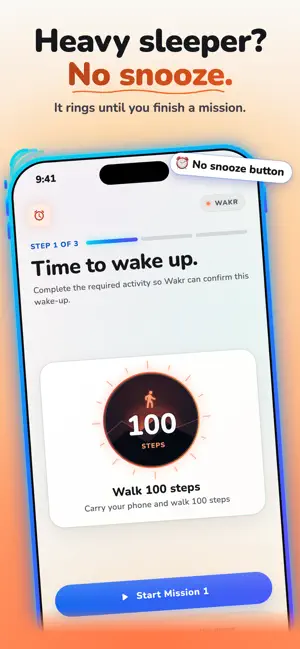
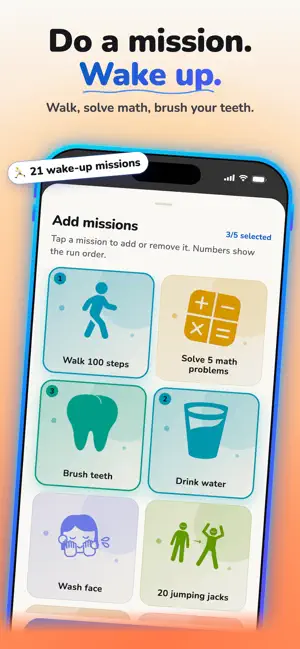
Wakr is the alarm clock for heavy sleepers. There's no snooze button: to stop the alarm, you get out of bed and finish a wake-up mission — walk 100 steps, solve math problems, scan a barcode in your bathroom — checked privately on your phone. HOW IT WORKS 1. Set your wake-up time and pick a mission, or chain up to 5 into a morning routine. 2. When the alarm rings, tap "Start Mission." 3. Your phone checks the mission on the device: the step counter counts your steps, the camera recognizes the movement, the light or the object, and the puzzles check your answers. 4. Finish the mission and the alarm stops. Your streak grows. 18 WAKE-UP MISSIONS • Move: walk 100 steps, 20 jumping jacks, 15 squats, push-ups, shake your phone, leave your bedroom • Freshen up: brush your teeth, wash your face, drink water • Get light: find bright light, spot the sky, spot a plant • Wake your brain: solve math problems, repeat tile patterns, type wake-up phrases, write your top priority • Scan: save any barcode or QR code (your toothpaste, your coffee) and scan it to stop the alarm, or photograph an object and find it again Most missions have Easy, Normal and Hard levels, so the challenge fits how deeply you sleep. TURN YOUR ALARM INTO A MORNING ROUTINE Chain up to five missions in the order you want: drink water, find light, brush teeth, done. Give weekdays and weekends their own alarms. Skip the next alarm, duplicate an alarm, and name each one. STILL AWAKE? WAKR CHECKS. Finishing a mission and crawling back into bed is the oldest trick there is. Five minutes after you finish, Wakr sends a still-awake check. Confirm it with a quick mission. You can turn the check off in Settings. STREAKS Every finished morning grows your streak, and Wakr celebrates the mornings you win. A Home Screen widget shows your next alarm and your streak. AN ALARM THAT RINGS • iOS 26 and later: Wakr uses Apple's system alarms, so it rings on the Lock Screen and through Silent Mode and Focus, even when the app is closed. • iOS 15.5 to 18: keep Wakr open in the background (don't swipe it away) so your alarm can ring. • 15 built-in tones, from "Morning clock" and "Rooster" to "Hard reset," or pick your own song or sound. Vibration included. • Each alarm shows a warning if something, like a turned-off permission, could stop it from ringing. PRIVATE BY DESIGN Mission checks run entirely on your phone. Camera frames are analyzed in memory and never recorded, saved or uploaded. Step and motion data never leave the device. No account, no sign-up, no email. WAKR FREE Unlimited alarms, 1 routine and the mission you choose first, with every alarm tone. No time limit, no ads. WAKR PRO • All 18 wake-up missions • Routines of up to 5 missions, in order • Unlimited routines The yearly plan includes a 7-day free trial for new subscribers; the monthly plan is charged when you subscribe. Payment is charged to your Apple ID at confirmation of purchase. Subscriptions renew automatically unless canceled at least 24 hours before the end of the current period. Manage or cancel anytime in your App Store account settings. Stop negotiating with your alarm. Start your morning with a mission. Privacy Policy: https://wakrapp.com/privacy Terms of Use: https://wakrapp.com/terms
What’s new
Version 1.1.0 · Updated October 23, 2026
Added the following features & enhancements. * Added wake up with friends functionality where you can wake up along with friends. * Allow users to use the app for free and with upgrades. * Improve the user interface to make it look better. * Fixed found bugs.
App privacy
The developer, Ian Talisic, reported these privacy practices to Apple.
Data Not Collected
The developer does not collect any data from this app.
Alternatives to Wakr: Mission Alarm, No Snooze
Looking for apps like Wakr: Mission Alarm, No Snooze? Here are 6 similar apps on the App Store. The highest rated is ChefMate: AI kitchen companion (5.0/5), and 4 of the 6 are free to download.
-
 Alarmageddon: Wake or Else
-
 CCC Digital Stylist
-
 Somi Alarm for Heavy Sleepers
-
 Bangunin: Alarm Misi
-
 ChefMate: AI kitchen companion
5.0
ChefMate: AI kitchen companion
5.0
-
 Grace Girls Connect
| App | Rating | Price | Last updated | Compare |
|---|---|---|---|---|
| Wakr: Mission Alarm, No Snooze | – | Free | October 23, 2026 | |
| Alarmageddon: Wake or Else | – | Free | Oct 2, 2026 | Compare |
| CCC Digital Stylist | – | 4.99 USD | Oct 1, 2026 | Compare |
| Somi Alarm for Heavy Sleepers | – | Free | Oct 23, 2026 | Compare |
| Bangunin: Alarm Misi | – | Free | Oct 12, 2026 | Compare |
| ChefMate: AI kitchen companion | 5.0 / 5 (1) | 0.99 USD | Sep 26, 2026 | Compare |
| Grace Girls Connect | – | Free | Jun 11, 2026 | Compare |