

LocalCloud: Photo Storage P2P
Duong The Utilities iPhoneiPadiPod touchMac
LocalCloud: Photo Storage P2P is a free Utilities app for iPhone and iPad by Duong The. Requires iOS 17.0. Updated August 26, 2026.
- Price
- Free
- on the App Store
- Size
- 22 MB
- Age 4+
- Updated
- Aug 26
- 2026 · v1.2.0
Screenshots


About LocalCloud: Photo Storage P2P
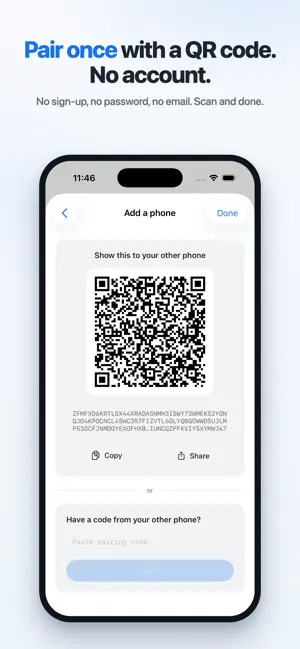
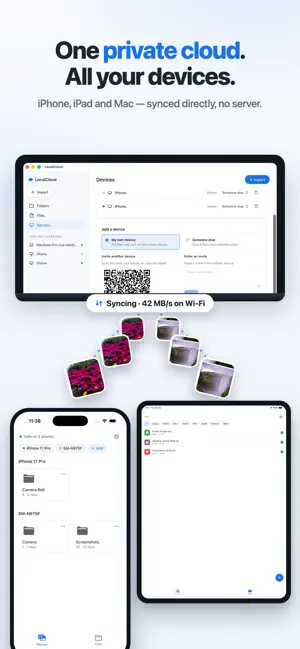
Your phone is full. The cloud wants a monthly fee, forever. And your most private photos live on a server you will never see. Meanwhile, your laptop has hundreds of gigabytes sitting empty. LocalCloud turns the devices you already own into one private cloud. Your phone backs up to your laptop, your laptop to the family PC automatically, encrypted, with no server and no account. Your data never leaves the hardware you own. HOW IT WORKS 1. Install LocalCloud on two or more of your devices 2. Pair them once by scanning a QR code 3. Photos and files stay in sync automatically from then on "IF I LOSE MY PHONE, I LOSE EVERYTHING" Not anymore. The "Safe on N devices" indicator shows exactly how many physical copies each photo has. Lose your phone and everything that reached your laptop is still there. "I DON'T WANT MY PHOTOS ON SOMEONE'S SERVER" There is no server. Your devices talk directly to each other over end-to-end encrypted connections (QUIC with TLS 1.3). There is nothing to breach and no password to leak. "UPLOADING TAKES FOREVER" On your own Wi-Fi, transfers run at local speed — a whole camera roll moves in minutes. When your devices are apart, an encrypted relay keeps them connected without being able to read your data. "SWITCHING PHONES IS A NIGHTMARE" Getting a new phone? Pair the old one with the new one and your whole camera roll walks across — no cable, no cloud upload, no per-photo picking. "WHERE ARE MY FILES, ACTUALLY?" In real folders. On your computer everything mirrors into a normal folder in Finder; on your phone your files appear in the Files app. Drag files in on one device and they appear on the others. MORE THAN PHOTOS Send PDFs, documents and archives from any app with Share to LocalCloud. Files show up on every device with clear type icons and filters. SHARE ONE FOLDER, KEEP THE REST Share an album with family and they receive that folder only. Your library stays yours. HOME BASE MODE Keep an always-on computer as the house archive, so your phones stay in sync even when they never meet. NO LOCK-IN Your files stay in normal folders and normal formats. Stop using LocalCloud any time and you lose nothing. Support: [email protected] Privacy: https://localcloud.work/privacy.html
What’s new
Version 1.2.0 · Updated August 26, 2026
• Reinstalling no longer re-downloads your library. Photos already on your device are recognised instead of fetched again. • Your old photos find their way home. After a reinstall the app recognises your previous install and merges its folders back under this device showing the numbers so you can check before confirming. • "Safe on N devices" now tells the truth. It counts only devices you can still reach. • Noticeably faster and smoother with large libraries. • No more duplicate photos in your library after reinstalling. • Damaged files repair themselves instead of staying broken. • Background backup now uses the full window the system allows.
App privacy
The developer, Duong The, reported these privacy practices to Apple.
Data Not Collected
The developer does not collect any data from this app.
Alternatives to LocalCloud: Photo Storage P2P
Looking for apps like LocalCloud: Photo Storage P2P? Here are 6 similar apps on the App Store. The highest rated is EventShot - Image To Calendar (5.0/5), and all 6 are free to download.
-
 HomeNetIP
-
 Not A Fancy Storage
-
 EventShot - Image To Calendar
5.0
-
 Cloud Data Backup
-
 NetXi: Network Analyzer
-
 Skip Showcase
5.0
| App | Rating | Price | Last updated | Compare |
|---|---|---|---|---|
| LocalCloud: Photo Storage P2P | – | Free | August 26, 2026 | |
| HomeNetIP | – | Free | Oct 29, 2026 | Compare |
| Not A Fancy Storage | – | Free | Jul 7, 2026 | Compare |
| EventShot - Image To Calendar | 5.0 / 5 (3) | Free | Oct 8, 2025 | Compare |
| Cloud Data Backup | – | Free | Oct 23, 2026 | Compare |
| NetXi: Network Analyzer | – | Free | Oct 28, 2026 | Compare |
| Skip Showcase | 5.0 / 5 (2) | Free | Jul 19, 2026 | Compare |