

Opto Wake: No Snooze NFC Alarm
Finbar Allan Utilities iPhoneiPadiPod touch
Opto Wake: No Snooze NFC Alarm is a free Utilities app for iPhone and iPad by Finbar Allan. Rated 3.3/5 from 4 ratings. Requires iOS 26.1.
- Rating
- 3.3
- 4 ratings
- Price
- Free
- on the App Store
- Size
- 1 MB
- Age 4+
- Updated
- Aug 20
- 2026 · v1.0
Screenshots


About Opto Wake: No Snooze NFC Alarm
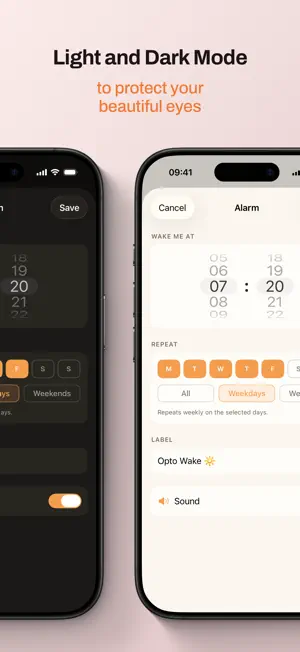
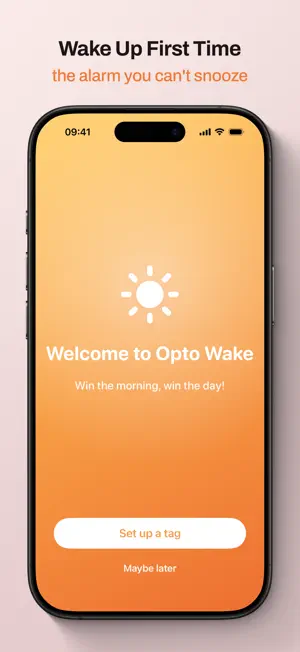
Opto Wake is an alarm clock with no snooze button. To switch it off, you have to get out of bed and tap a real NFC tag — one you stick to the bathroom mirror, the kettle, or anywhere far enough from your bed that you're properly awake by the time you reach it. No sliding a button. No "five more minutes". You get up, or it keeps ringing. WHAT YOU NEED Opto Wake needs a blank NFC tag (NTAG213, 215 or 216 — inexpensive and widely available). You program it inside the app in a few seconds, then stick it wherever you want to be standing when your day starts. Without a tag, you can't dismiss an alarm. HOW IT WORKS • Set a wake-up time, choose the days it repeats, give it a label • When it rings, the only way out is to scan your tag • Miss it and Opto Wake nudges you again — first after a delay you choose, then every minute or two until you're up • Dismissing from the lock screen doesn't beat it: backup reminders are armed in advance, so the wake-up comes back A CALMER WAKE-UP The alarm is a warm, gradual escalation rather than a siren. It starts soft and grows more insistent only if you ignore it, and the screen shifts from a calm sunrise orange to a firmer red once you've had your chance. Alarms can also be set to vibrate only. FOR PEOPLE WHO SLEEP THROUGH ANYTHING If you've ever dismissed an alarm in your sleep and woken up an hour late, this is built for you. There's no muscle-memory swipe to defeat — dismissing takes a physical walk and a deliberate tap. OPTIONAL: PREVENT UNINSTALL Turn this on and apps can't be deleted while an alarm is actively ringing, so you can't dodge the wake-up by removing Opto Wake. It's off by default, uses Screen Time, asks once, and lifts the moment the alarm is dismissed. TRY IT BEFORE YOU TRUST IT Settings includes a Test Alarm that fires in a few seconds, so you can practise the tap before you rely on it tomorrow morning. PRIVATE BY DEFAULT • No account, no sign-up, no email address • No analytics, no crash reporters, no ad networks, no third-party SDKs • Your alarms, tag IDs and settings never leave your iPhone • No ads, no subscriptions, no in-app purchases Light and dark mode throughout. Built in SwiftUI on Apple's AlarmKit. Win the morning, win the day.
App privacy
The developer, Finbar Allan, reported these privacy practices to Apple.
Data Not Collected
The developer does not collect any data from this app.
Alternatives to Opto Wake: No Snooze NFC Alarm
Looking for apps like Opto Wake: No Snooze NFC Alarm? Here are 6 similar apps on the App Store. The highest rated is OkiPaca: Scan Alarm Clock (5.0/5), and all 6 are free to download.
-
 Uprise Alarm
-
 OkiPaca: Scan Alarm Clock
5.0
OkiPaca: Scan Alarm Clock
5.0
-
 GetUp Alarm
5.0
GetUp Alarm
5.0
-
 Rizen: Alarm & Micro Workouts
4.9
Rizen: Alarm & Micro Workouts
4.9
-
 Memorabl: Save Links
5.0
Memorabl: Save Links
5.0
-
 EchoAlarm: Record Voice Alarm
1.0
EchoAlarm: Record Voice Alarm
1.0
| App | Rating | Price | Last updated | Compare |
|---|---|---|---|---|
| Opto Wake: No Snooze NFC Alarm | 3.3 / 5 (4 ratings) | Free | August 20, 2026 | |
| Uprise Alarm | – | Free | Aug 26, 2026 | Compare |
| OkiPaca: Scan Alarm Clock | 5.0 / 5 (1) | Free | Oct 14, 2026 | Compare |
| GetUp Alarm | 5.0 / 5 (1) | Free | Oct 14, 2026 | Compare |
| Rizen: Alarm & Micro Workouts | 4.9 / 5 (10) | Free | Oct 10, 2026 | Compare |
| Memorabl: Save Links | 5.0 / 5 (1) | Free | Feb 10, 2026 | Compare |
| EchoAlarm: Record Voice Alarm | 1.0 / 5 (1) | Free | Jul 6, 2026 | Compare |