

Attendance Check - Roll Call
YONONAKA LLC Education iPhoneiPadiPod touch
Attendance Check - Roll Call is a free Education app for iPhone and iPad by YONONAKA LLC. Requires iOS 18.0. Updated October 21, 2026.
- Price
- Free
- on the App Store
- Size
- 3 MB
- Age 4+
- Updated
- Oct 21
- 2026 · v1.4
Screenshots


About Attendance Check - Roll Call
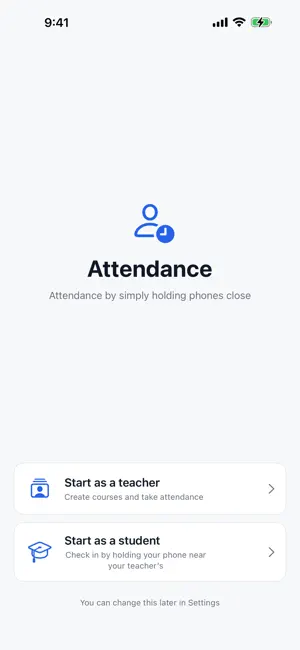
BEFORE YOU BUY: Teachers can run their first 3 check-in sessions without a subscription. From the 4th session, a subscription (yearly or monthly, auto-renewing, with a 1-month free trial for new subscribers) is required. Using the app as a student is free. Record attendance for your classes just by holding phones close. No roll call, no paper attendance sheets, no QR codes to scan. The teacher starts a check-in, and each student simply holds their phone close and taps "Yes". Who attended and when is recorded automatically, and an attendance table with dates across the top builds itself. ■ The teacher only does two things • Register the course name (and groups, if the same course is taught to several classes) • Before class, pick the course and tap Start There is no need to register dates or weekdays. Every day you run a check-in simply becomes a new column in the table. ■ Main features • Check in by getting close: the student holds their phone near yours and taps "Yes" • Automatic late detection: set a grace period per course, and check-ins past it are shown in red • Attendance table by date: students in rows, dates in columns. Present (○), Late (L) and Absent (−) at a glance • Groups: teaching the same course to several classes gives each class its own table • Per-student records: see the exact date and time of every check-in • Student history: students keep a record of the classes they attended on their own device ■ What the student does • Enter name, student ID and email once • Before class, open "Check In" and tap "Yes" on the course that appears ■ Communication and data Check-ins travel directly between devices over Bluetooth and never pass through a server. Records stay on each device. No account is required. ■ Before you start • Bluetooth is used to run and register check-ins • The teacher's device keeps accepting check-ins even while the screen is locked • Students can check in from within the same room as the teacher's device (roughly 5-15 m indoors) • Real check-ins need a device for the teacher and one for each student SUBSCRIPTION (TEACHER MODE) • US$34.99/year or US$9.99/month (prices in other regions follow the App Store) • 1-month free trial for new subscribers. It renews automatically unless canceled at least 24 hours before the period ends • Cancel any time in Settings > your name > Subscriptions • Using the app as a student is free and needs no subscription Terms of Use (EULA): https://www.apple.com/legal/internet-services/itunes/dev/stdeula/ Privacy Policy: https://www.yononaka.co.jp/apps/syuseki/privacy
What’s new
Version 1.4 · Updated October 21, 2026
Teacher mode now shows the subscription plans (with a 1-month free trial) once.
App privacy
The developer, YONONAKA LLC, reported these privacy practices to Apple.
Data Not Collected
The developer does not collect any data from this app.
Alternatives to Attendance Check - Roll Call
Looking for apps like Attendance Check - Roll Call? Here are 6 similar apps on the App Store.
-
 NamePicker Pro
-
 AsistApp
-
 PaseDeLista
-
 Present: Roll Call & Picker
-
 出欠席管理
出欠席管理
-
 Roll Call - Raffle Name Picker
| App | Rating | Price | Last updated | Compare |
|---|---|---|---|---|
| Attendance Check - Roll Call | – | Free | October 21, 2026 | |
| NamePicker Pro | – | Free | Apr 14, 2026 | Compare |
| AsistApp | – | Free | Apr 11, 2025 | Compare |
| PaseDeLista | – | Free | Oct 28, 2024 | Compare |
| Present: Roll Call & Picker | – | Free | Sep 25, 2026 | Compare |
| 出欠席管理 | – | Free | May 14, 2026 | Compare |
| Roll Call - Raffle Name Picker | – | Free | Oct 22, 2026 | Compare |