

Clicker: Smart TV Remote
Trinh Dinh Minh Utilities iPhoneiPadiPod touch
Clicker: Smart TV Remote is a free Utilities app for iPhone and iPad by Trinh Dinh Minh. Requires iOS 17.0. Updated October 8, 2026.
- Price
- Free
- on the App Store
- Size
- 92 MB
- Age 4+
- Updated
- Oct 8
- 2026 · v1.1
Screenshots



About Clicker: Smart TV Remote
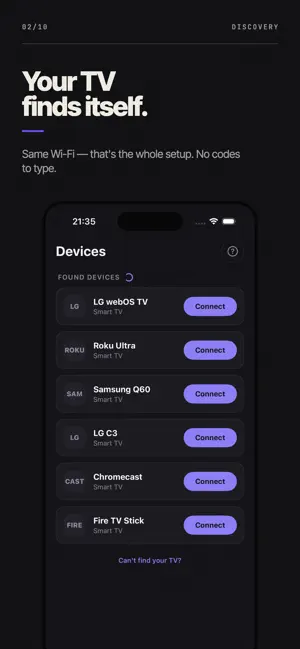
Clicker turns your iPhone into the remote your television came with. Most remote apps promise every TV ever made, then hand you the same six buttons for all of them. Clicker does the opposite. It supports three brands - LG, Samsung and Roku - and builds a proper remote for each one, so the keys on your screen match the keys on the handset you lost. IT FINDS YOUR TV BY ITSELF Open Clicker on the same Wi-Fi as your television and it shows up in the list. There is no infrared blaster to aim, no four-digit code to hunt down, no cable, and no account to create. If your network is unusual you can still type the IP address in by hand. A REMOTE PER BRAND, NOT ONE FOR ALL LG (webOS) - the disc pad plus the Magic pointer. Drag anywhere on the glass and the cursor moves on screen, exactly like the wand that came in the box. Samsung (Tizen) - the full key layout, a real HDMI input picker, and the set's true volume level read back to your phone instead of guessed. Roku - every key on the purple handset, including the ones people actually use: instant replay, options, and the channel shortcuts along the bottom. TYPE INSTEAD OF PECKING Hunting for a show one letter at a time with a d-pad is miserable. Tap the keyboard button and type on your phone; the words land in the television's own search box. Or hold the microphone and just say it. APPS, CASTING AND HDMI Jump straight into anything installed on the television in a single tap. Send photos, video and music from your phone to the big screen. Switch between HDMI inputs without digging through the TV's own menus. THE PARTS YOU KEEP USING Scenes - record a sequence once (TV on, HDMI 2, volume 14) and replay it with one tap on your way to the sofa. Widgets - the d-pad and volume on your Home Screen, power on your Lock Screen, so most days you never open the app at all. Sleep timer - set the television to switch itself off. Themes - recolour the whole app if the default violet is not for you. A CLEAN REMOTE A remote covered in banner ads is not a remote, so the remote screen carries none. The core remote is free to use. Clicker Pro unlocks the pointer, casting, scenes and widgets, with a free trial to try everything first. BEFORE YOU DOWNLOAD Clicker works over your home Wi-Fi, so your phone and the television have to be on the same network. Very old sets that predate network control will not respond. If yours is one of them, you can request a refund through Apple at reportaproblem.apple.com, and please tell us the model. We read every message. SUBSCRIPTION INFORMATION Clicker Pro is available as weekly, monthly and yearly auto-renewing subscriptions. Payment is charged to your Apple ID at confirmation of purchase. The subscription renews automatically unless it is cancelled at least 24 hours before the end of the current period. Your account is charged for renewal within 24 hours prior to the end of the current period. You can manage or cancel your subscription in your App Store account settings after purchase. Any unused portion of a free trial is forfeited when you purchase a subscription. Terms of Use (EULA): https://sites.google.com/view/clickertvremoteapp/termofuse Privacy Policy: https://sites.google.com/view/clickertvremoteapp/privacypolicy Clicker is an independent app. It is not made by, endorsed by or affiliated with LG Electronics, Samsung Electronics or Roku, Inc. All trademarks belong to their respective owners; brand names appear only to state which televisions this app can control.
What’s new
Version 1.1 · Updated October 8, 2026
New remote
App privacy
The developer, Trinh Dinh Minh, reported these privacy practices to Apple.
Data Used to Track You
The following data may be used to track you across apps and websites owned by other companies:
- Identifiers: Device ID
- Diagnostics: Crash Data, Performance Data
Data Not Linked to You
The following data, which may be collected but is not linked to your identity, may be used for the following purposes:
- Usage Data: Advertising Data
- Identifiers: Device ID
- Diagnostics: Crash Data, Performance Data
Used for: Third-Party Advertising, Analytics
Alternatives to Clicker: Smart TV Remote
Looking for apps like Clicker: Smart TV Remote? Here are 6 similar apps on the App Store. The highest rated is Smart TV Remote & IPTV Player (5.0/5), and all 6 are free to download.
-
 Smart TV Remote & IPTV Player
5.0
Smart TV Remote & IPTV Player
5.0
-
 TV Remote For All TV Brands
4.2
TV Remote For All TV Brands
4.2
-
 Remote Control for TV: Mote
4.7
Remote Control for TV: Mote
4.7
-
 Cast TV Cast Your Phone Screen
5.0
Cast TV Cast Your Phone Screen
5.0
-
 TV Remote Manager
4.4
TV Remote Manager
4.4
-
 Prime Zoom - Camera Zoom Photo
4.6
Prime Zoom - Camera Zoom Photo
4.6
| App | Rating | Price | Last updated | Compare |
|---|---|---|---|---|
| Clicker: Smart TV Remote | – | Free | October 8, 2026 | |
| Smart TV Remote & IPTV Player | 5.0 / 5 (7) | Free | Oct 22, 2026 | Compare |
| TV Remote For All TV Brands | 4.2 / 5 (21) | Free | Sep 16, 2026 | Compare |
| Remote Control for TV: Mote | 4.7 / 5 (3) | Free | Oct 22, 2026 | Compare |
| Cast TV Cast Your Phone Screen | 5.0 / 5 (1) | Free | Oct 13, 2026 | Compare |
| TV Remote Manager | 4.4 / 5 (7) | Free | Oct 19, 2026 | Compare |
| Prime Zoom - Camera Zoom Photo | 4.6 / 5 (115) | Free | Oct 22, 2026 | Compare |