

Receipt Camera+
Brief Company Inc. Photo & Video iPhoneiPadiPod touch
Receipt Camera+ is a free Photo & Video app for iPhone and iPad by Brief Company Inc. Requires iOS 16.4. Updated October 23, 2026.
- Price
- Free
- on the App Store
- Size
- 213 MB
- Age 4+
- Updated
- Oct 23
- 2026 · v1.3.1
Screenshots


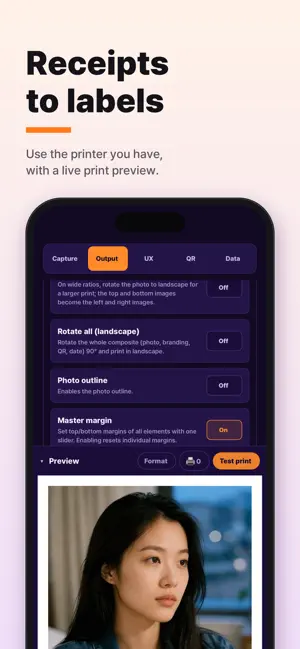
About Receipt Camera+
■ RECEIPT CAMERA — Seven Years in the Making Launched in 2019, refined for seven years. The most polished receipt photo booth, built on the experience and feedback of millions of users worldwide. RECEIPT CAMERA is still evolving at this very moment. ■ Build your own photo booth with devices you already have With the iPad or iPhone and receipt/label printer you already own, your photo booth is ready in just 5 minutes. Broad compatibility with almost every thermal printer on the market — no special external equipment, no extra spending. Build your own photo booth right now. ■ Make every print your brand Add your logo, text, date, and QR code, and fine-tune everything from header and footer images to frames and margins. Use the preloaded themed frames or upload images you made yourself. Create truly one-of-a-kind receipt photos of your own. ■ A true AI photo booth, powered by generative AI Generative AI filters optimized for receipt photos. Give every single shot a different mood — you can even create your own custom AI filters. Start fresh with free credits and top up only as much as you need. ■ Shooting and printing, exactly your way Choose your own shutter button and skin design. Dress everything from the background to the intro screen in your brand. Versatile capture styles like ONE, MORE, GRID, and FRAME, with modes that fit any device, portrait or landscape. ■ Unlock the hidden potential of RECEIPT CAMERA From exposure, white balance, and focus to print density and dithering — automatic photo correction plus pro-grade manual control. Print easily in any orientation with Wide mode, and print selected images without shooting in Image mode. With versatile capture modes and print modes tailored to any paper, get exactly the results you want under any lighting, on any device. ■ Multiple printers, printing at once Connect several thermal printers — even different brands — and print in one go. Just hook up a receipt printer and a label printer, and one app supports them all simultaneously, with no waiting. Broad, flexible compatibility adds something special to any venue. ■ Start today, risk-free Check out every core feature first with an unlimited free trial. Expand with the extended license if you need more, or subscribe to the EXTENDED license and start a low-capital photo booth business right away. Your own receipt photo booth, starting with just one tablet. ■ Where people use it In-store photo booths for cafés, restaurants, and gift shops; weddings, first-birthday parties, and celebrations; pop-up stores, exhibitions, and event booths; self-service photo studio startups. ■ Privacy Photos taken are processed only for printing and for the customer's own QR code download — we do not track for advertising purposes. For details, see our Privacy Policy (https://receiptcamera.net/legal/privacy) and Terms of Use (https://receiptcamera.net/legal/terms). *Questions and feedback are always welcome. Your input becomes our next update. © Brief Company
What’s new
Version 1.3.1 · Updated October 23, 2026
• Operator camera mode: turn it on under Camera control in the console to use the rear camera like the built-in Camera app — 0.5×, 1× and telephoto lens buttons (on devices with those lenses) with automatic lens switching, tap to focus/expose and lock, brightness drag, Pro mode, Styles and Face effects. • In operator camera mode you can also shoot with the volume buttons. • High-res original: deliver full sensor-resolution photos via QR download. • Tap the customer screen to set focus and exposure right there. • On iOS 27, the customer screen fills the entire display. • Upload status now shows the cause, plus stability improvements.
App privacy
The developer, Brief Company Inc., reported these privacy practices to Apple.
Data Linked to You
The following data, which may be collected and linked to your identity, may be used for the following purposes:
- Purchases: Purchase History
- Location: Coarse Location
- User Content: Photos or Videos
- Identifiers: Device ID
- Usage Data: Product Interaction, Other Usage Data
- Diagnostics: Crash Data
Used for: App Functionality
Alternatives to Receipt Camera+
Looking for apps like Receipt Camera+? Here are 6 similar apps on the App Store.
-
 perapic: Receipt Photo Booth
-
 AmBooth: Receipt Photobooth
-
 Cekrekin
-
 TaraSnap Photo Booth Creator
-
 VistaPix
-
 INSTAPIX: Receipt Photo
| App | Rating | Price | Last updated | Compare |
|---|---|---|---|---|
| Receipt Camera+ | – | Free | October 23, 2026 | |
| perapic: Receipt Photo Booth | – | Free | Oct 22, 2026 | Compare |
| AmBooth: Receipt Photobooth | – | Free | Oct 17, 2026 | Compare |
| Cekrekin | – | Free | Oct 15, 2026 | Compare |
| TaraSnap Photo Booth Creator | – | Free | Jul 28, 2026 | Compare |
| VistaPix | – | Free | Mar 11, 2026 | Compare |
| INSTAPIX: Receipt Photo | – | Free | Sep 21, 2026 | Compare |
Compare Receipt Camera+ with the top alternatives: ratings, updates, ASO score and keyword gaps →